Participating Frequently
February 11, 2023
Question

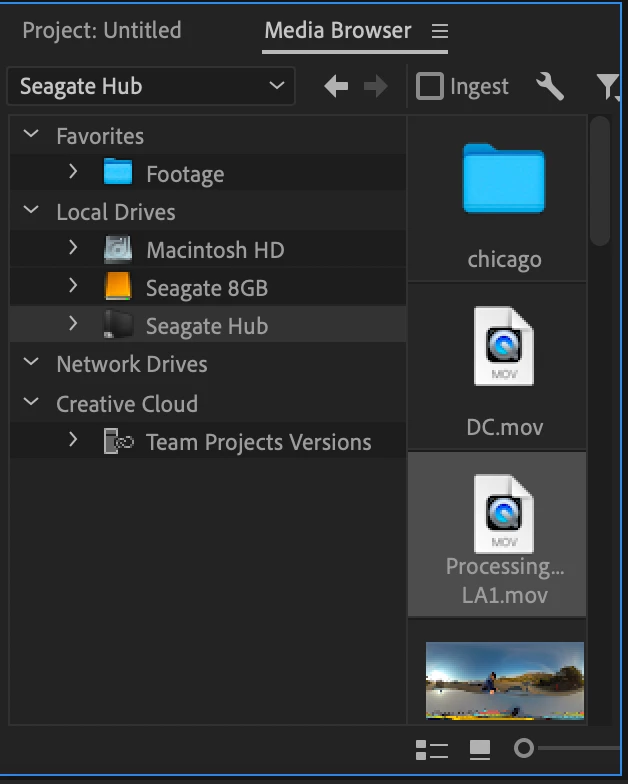
Importing large files stuck on processing

  • February 11, 2023
  • 4 replies
  • 5205 views

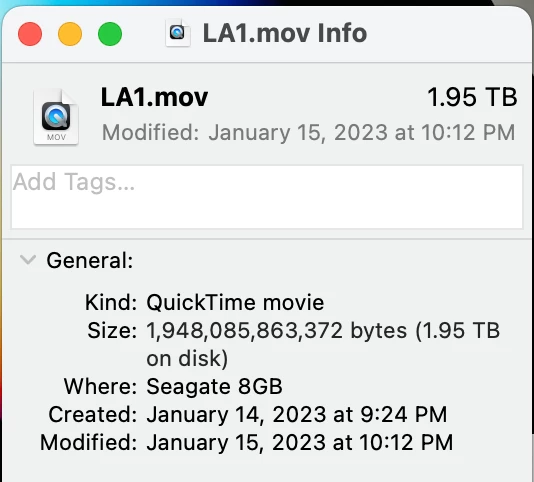
Hello, I'm trying to import large video files to Premiere pro with no luck. Files that are as big as 600gb are fine but when it comes to anything up to 1tb, I'm stuck on processing and does not import when attempting to. Is it possible to import these videos anyway? I would rather avoid rendering these files again! Photos attached. Thanks.
 

This topic has been closed for replies.

4 replies

Participant
April 15, 2023

I've got the same issue here, but with much smaller file sizes.

AE exports, Sony A7IV, A7III and rodecaster pro files. 

All audio and video files are not processing when trying to link the media...

This also happens to projects I've been working on before without any struggles.

This problem started about a week ago, and I can't reopen almost all projects I started...

Tried to place all files on different types of drives, have enough space, deleted media cache, u pdated my MacBook, etc.

The only thing I didn't try was using an older version of Premiere Pro... I'll let you know if that worked out for me.

As you can see in the pictures below... the linking media freezes, then when you hit cancel all files that are 'missing' are showing up, but when trying to link them by hand they are not processing for hours (and probably even longer)...

Participant
April 20, 2023

Tried everything from reinstalling the application to removing all settings in premiere pro...

Stil experiencing the same problem.... The last thing that I can think of is resetting my MacBook to the factory settings...

Let's hope that works..

Participating Frequently
March 25, 2023

Hello all,

still seeing the same issue even after having a new Mac Studio 8TB SSD and having the file on the SSD instead of external drive. Same exact issue - file says processing and when trying to import, import files box appears but never loads. 

Averdahl
Community Expert
Community Expert
February 15, 2023
quote

Hello, I'm trying to import large video files to Premiere pro with no luck. Files that are as big as 600gb are fine but when it comes to anything up to 1tb, I'm stuck on processing and does not import when attempting to. 

By @brad28054206wb4w


I tried to create a large 8K file and it became 2,5TB, Apple ProRes 422HQ. That file imports instanlty and play back as expected. The RAM usage does climb up to 24GB so with less RAM i can see why Premiere Pro struggles and the same goes if the file is on a USB or LAN connection.


Regarding free space, the amount of TB free says nothing, the amount of free space in % says everything.

Participating Frequently
February 18, 2023

Hmm I have a Mac Studio with 8TB SSD and 128gb mem coming next month so hopefully I have transfer a file over to the computer disk if import doesn't work straight from the external drive. I am very excited that you were able to import that large of a file, if I could go back and re process my files I would have done something like H264 but wanted best quality possible so went with ProRes 🙃. I will give it a shot when the mac studio arrives and report back!

Participating Frequently
March 25, 2023

Hello all,

still seeing the same issue even after having a new Mac Studio 8TB SSD and having the file on the SSD instead of external drive. Same exact issue - file says processing and when trying to import, import files box appears but never loads. 

Mike Dziennik
Community Expert
Community Expert
February 13, 2023

Can I ask what the origin of the file is? A single 1.95TB file is massive. What's the resolution, frame-rate, codec & duration?

It's not uncompressed is it?

I'm not aware of any filesize limitation that would cause this necessarily, but I've never tried importing a file that big.

Participating Frequently
February 14, 2023

They're ProRes 422 HQ videos exported from Insta360 at 8k 30fps. The same video files that are under 1tb import fine, but it seems like anything above 1tb is just showing processing... I also have them importing from a hard drive as my comp does not have the space for these files. 

Peru Bob
Community Expert
Community Expert
February 15, 2023
quote

 have them importing from a hard drive as my comp does not have the space for these files. 


By @brad28054206wb4w


You may not have enough free space on your system drive for temp files.

What are the hard drives (how many, what kind, what is on each, what capacity, and how full)?