
sameert75945521
Participant
October 15, 2017
Answered

Importing phone video clips in Premiere Pro

  • October 15, 2017
  • 2 replies
  • 5430 views

Hi, I have 100 video clips (all .MP4) from my Motorola MotoG5 phone  that I want to bring into Adobe Premiere Pro and build a sequence. A few questions for sequence settings:

Do I pick CIF, QCIF, QQCIF under 'Mobile & Devices' for presets?
How many frames/second on the timebase? Default under CIF, QCIF, QQCIF is 15fps
Anything on codec, etc?
I would like to play the movie in HD on vimeo as well as make it available for Instagram using presets for Instagram in Premiere Pro (there aren't any but setting manually for Instagram output)

Any ideas welcome, thanks a lot.
This topic has been closed for replies.
Correct answer R Neil Haugen

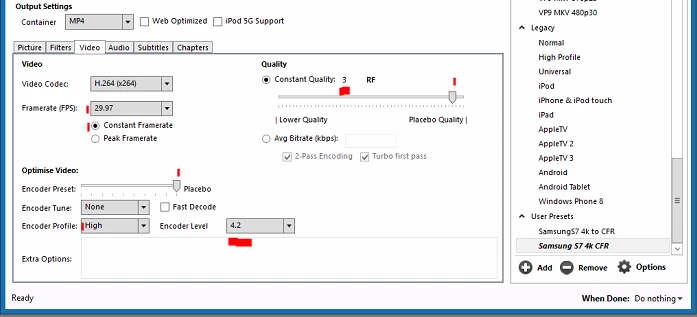
First thing, those are undoubtedly VFR ... variable frame rate ... and PrPro needs CFR for best work. So ... download the free Handbrake program, create a preset that preserves frame-size in the picture tab and is something like this in the Video tab ...

Note the red highlighted areas ... check the CFR button, AND set a numeric frame-rate using the numbers that correspond to the 'target' frame rate you set in the phone. Up the Quality to 5-3, the 'near placebo' area, to keep from heavily compressing your media again, and below ... set the Optimize to Placebo Profile to High, and Level to 4.2.

You can batch process, for a bunch of things, do it over night. Let the computer work while you sleep.

Then ... don't set a sequence from a preset, drag/drop a clip to the New Item icon in the lower right of the Project panel or onto a black timeline panel, and PrPro will select a set of sequence settings to match the media.

Neil

HandBrake download page:  https://handbrake.fr/downloads.php

2 replies

Legend
October 15, 2017

I recommend Step 2b below as the best option.

Unofficial Premiere Pro Troubleshooting Guide

R Neil Haugen
R Neil HaugenCorrect answer
Legend
October 15, 2017

First thing, those are undoubtedly VFR ... variable frame rate ... and PrPro needs CFR for best work. So ... download the free Handbrake program, create a preset that preserves frame-size in the picture tab and is something like this in the Video tab ...

Note the red highlighted areas ... check the CFR button, AND set a numeric frame-rate using the numbers that correspond to the 'target' frame rate you set in the phone. Up the Quality to 5-3, the 'near placebo' area, to keep from heavily compressing your media again, and below ... set the Optimize to Placebo Profile to High, and Level to 4.2.

You can batch process, for a bunch of things, do it over night. Let the computer work while you sleep.

Then ... don't set a sequence from a preset, drag/drop a clip to the New Item icon in the lower right of the Project panel or onto a black timeline panel, and PrPro will select a set of sequence settings to match the media.

Neil

HandBrake download page:  https://handbrake.fr/downloads.php

Everyone's mileage always varies ...