
Participating Frequently
December 7, 2023
Question

In and Out point strange behaviour in Premiere Pro 2024

  • December 7, 2023
  • 2 replies
  • 292 views

Hi community, 


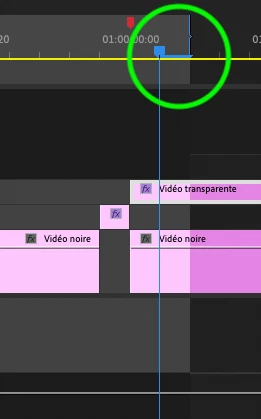
Since I updated to Premiere Pro 2024, In and Out Points have a strange behaviour. 

In point is normal : it marks the exact position of the head. 

But the out point marks one frame later, as shown in my screen shot. 

Any idea to change this ? 

It's very tricky, 


Thanks, 


JB
This topic has been closed for replies.

2 replies

R Neil Haugen
Legend
December 7, 2023

Due to the way the CTI (playhead) looks, it appears it's a spot between frames. But in reality, there is no spot between frames. So the CTI is always showing the next frame, to be consistent.


And that is SO confusing to new editors!


There are keyboard shortcuts to of course go to end of a clip, that sets the CTI after the clip. And to go to the end of the sequence, which again ... sets the CTI after the clip, showing a blank (therefore black) frame.


There is also a lesser known keyboard short to go to the last frame of the current clip. And it's good to get to know that one.

Everyone's mileage always varies ...
Ann Bens
Community Expert
Community Expert
December 7, 2023


Participating Frequently
December 7, 2023

Thanks for your answer, but it seems that the outpoint sets one frame after the playhead. 

I never figured it out but it's apparently well known :))


https://community.adobe.com/t5/premiere-pro-discussions/how-mark-out-point-in-sequence-at-playhead/m-p/12950839#M412270

Ann Bens
Community Expert
Community Expert
December 7, 2023

Your screenshot does not show that.

Playhead is on last frame of selection

If you use arrow down it will be on the first frame of the next whatever.