

Input Lut in Source Clip, Edit and Settings of Lumetri Color - THREE OF THEM!
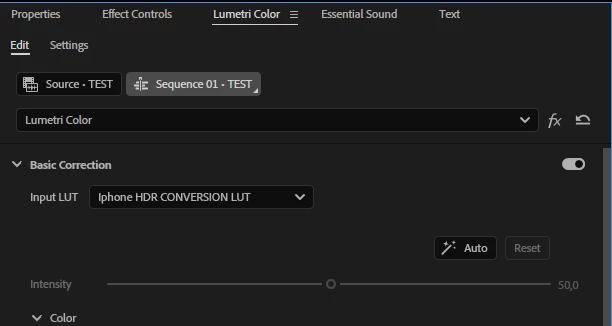
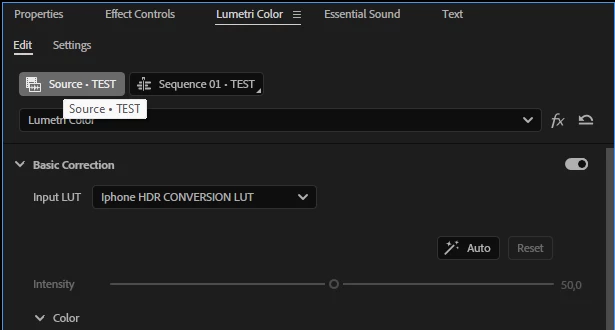
There are three drop down menus for the input lut in Premiere Pro (v.25) in the Lumetri color now:
the edit tab of the clip in the current sequence:
the source clip tab:
... and the Settings tab:
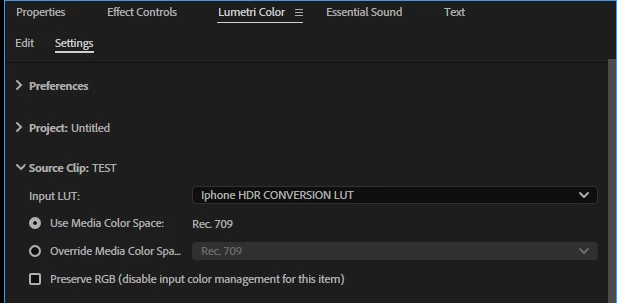
... so you can actually apply an input lut to a single clip three times. I know the difference between the Source and Sequence Lumetri color settings, but they make sence when you speak of the color, not the INPUT LUT.
Isn't the input lut - being the first and the only lut that should go before any color corrections - the essence of the"input"? Why are there now three tabs one can apply an input lut on? What is the correlation between them, which one goes the first if the three are applied at once? Won't they conflict with each other? Where should one apply an input lut, on which tab, if one wants it to be the input, that is the first one and in a single copy? Won't there be a conflict with the color settings if there's on input lut in in of this tabs and the color correction done on the other?


 AdChoices