


Inspiring
Nov 17, 2016 1:45 PM UTC
Answered

Inputting camcorder footage from an old Panasonic camcorder into Premier Pro

Ok I'm on a Mac and have some footage I need to import to my hard drive, I figured I would be able to do this by selecting the input prompt inside Premiere.

The camcorder has 2 export plugs pictured below
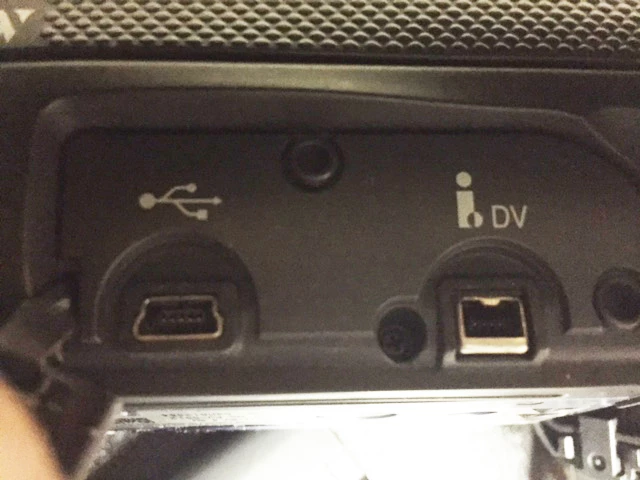
I have a cable that fits the plug on the left which has a usb plug on the other end, but when I play the camcorder I cannot capture the footage. At first I thought it may be the cable but I have two of them and the chances of both being bad are slim.

any help in how to get this footage to my hard drive or thru premiere and into my hard drive?

thx rd

    This topic is closed to new replies. Start a new post to keep the conversation going.
    excited_Genie16B8Correct answer
    Legend
    Nov 17, 2016 3:32 PM UTC

    You need the port on the right, Firewire.  You'll need the corresponding port on the computer as well.

    7 replies

    Conrad_C
    Community Expert
    Community Expert
    Nov 18, 2016 8:05 AM UTC

    If you don't have a cable for the FireWire port on the right of your picture, it's only $5.

    9-pin/ 4-pin BILINGUAL FireWire® 800 - FireWire 400 Cable, 6FT, Black - Monoprice.com

    That cable will connect the camera to any Mac with a FireWire 800 port. If your Mac is new enough that it doesn't have a FireWire port, you might also need Apple's Thunderbolt to FireWire adapter.

    Translate
    Inspiring
    Nov 18, 2016 3:03 PM UTC

    I have a regular firewire cable that connects, the camcorder window says "PC ACCESSING" but what do I do in Premiere to set it up, I'm in the Capture window.

    R

    Translate
    Ann Bens
    Community Expert
    Community Expert
    Nov 18, 2016 3:38 PM UTC
    Vidya Sagar
    Participating Frequently
    Nov 17, 2016 10:12 PM UTC

    Hi Matthewdee,

    As Jim_Simon stated, It requires Firewire connector to capture video in Premiere Pro.

    If connected using firewire & issue persists, please try the steps in this article Can't capture DV, HDV video in Premiere Pro.

    Thanks,

    Vidya Sagar.

    Translate
    excited_Genie16B8Correct answer
    Legend
    Nov 17, 2016 3:32 PM UTC

    You need the port on the right, Firewire.  You'll need the corresponding port on the computer as well.

    Translate