Participant
October 26, 2018
Answered

Insert button not working with new project

  • October 26, 2018
  • 2 replies
  • 2552 views

Hi,

I'm trying to insert a clip from my Source panel into my Timeline. Currently, my Timeline is empty. The "insert" button doesn't work, but I can drag the clip and add it that way. After which, the V1, V2, V3, eye, and lock icons appear in my Timeline panel and the "insert" button begins working as normal.

But if I delete the clip from my timeline so that it is empty, those icons disappear and "insert" stops working. This is trivial since there's a work around, but what exactly is going on here? Is there a way for me to fix this?

I'm using the most recent version of Premier Pro.
    This topic has been closed for replies.
    Correct answer Ann Bens

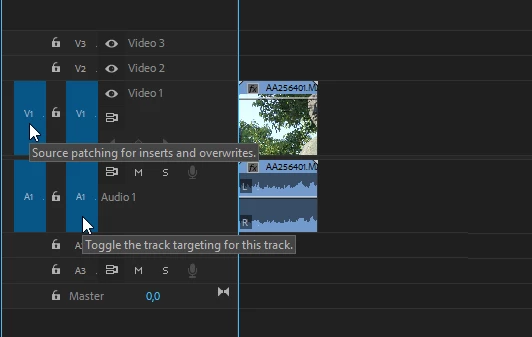
    Most common issue is tracks are not source patched.

    If that is not the case trash preferences:

    FAQ: How to reset (trash) preferences.

    2 replies

    Ann Bens
    Community Expert
    Ann BensCommunity ExpertCorrect answer
    Community Expert
    October 26, 2018

    Most common issue is tracks are not source patched.

    If that is not the case trash preferences:

    FAQ: How to reset (trash) preferences.

    Vidya Sagar
    Participating Frequently
    October 26, 2018

    Hi ryanm37750307,

    Sorry for the trouble. I believe you are trying to insert into an empty timeline panel with no sequence in it. Insert only works if there is a sequence in the timeline.

    Please share a screenshot of the issue.

    Thanks,

    Vidya