
JFaz
Participant
June 22, 2022
Question

Installing In Incorrect Location

  • June 22, 2022
  • 3 replies
  • 4261 views

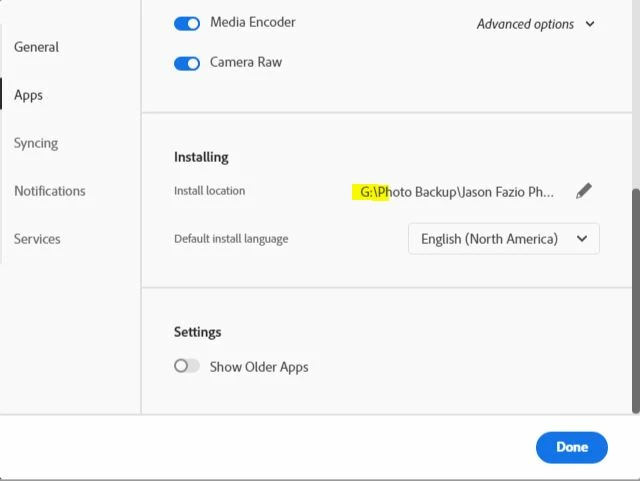
My Premiere Pro will not install where I've told my Adobe programs to do so. Is there a way to uninstall and force the program to move to the correct drive? I've attached screenshots of the error highlighting where the program is trying to install vs where I've told the programs to install.

3 replies

MyerPj
Community Expert
Community Expert
March 10, 2024

After my recent cleaning out, I've just recently got my c: drive down to 130gb. I have about 5gb of stuff I'm going to move to my sata SSD, but I have to change a the links to there, but that's just a couple hours work now, and less hassle going forward. 

After you've uninstalled everything, run the Adobe Cleaner, which I linked above.

Participating Frequently
March 9, 2024

I have exactly the same Problem, except: It installs all my Updates on D instead of C. This is sooooo annyoing.

Like, everytime I make an update, it creates a new folder on D and installs the software there. Than I manualy put the folder over to my C drive. And yeha, it s so dumb, cause my D is an HDD super slow (mainly use it for Backups) and my system does not recognize that I have the software, so I can't open files directly and have to first launch illustr and others than select open file form within.

This problem gets on my damn nerves since months!!

Community Expert
June 23, 2022

Is the reason why you're trying to install on a different drive is that your C drive is full?

-------------------------------------------------------------------------JVK | Editor/Designer/Software Instructor. Pr, Ae, Ch, Ps, Ai, Id
JFaz
JFazAuthor
Participant
June 23, 2022

The C: is close to full, and it is why I get the error as there is not enough room for a Premiere update. As for a real reason, I just have all of my photography-related items on a drive of their own that also gets backed up on its own. 

Peru Bob
Community Expert
Community Expert
June 23, 2022
quote

The C: is close to full,


By @JFaz


You still need room for temp files and system files.

If you don't get a larger C drive, you will likely run into performance issues and won't have room for Windows updates.