Participant
January 20, 2017
Answered

Intégrer une vidéo tournée en 60 ips et visionner en slowmotion à 30 ips

  • January 20, 2017
  • 1 reply
  • 523 views

Bonjour, je suis un nouvel utilisateur d'Adobe Premier Pro CC. Je ne sais pas comment faire pour que mes clips tournées avec ma caméra en 60 ips, que j'importe ensuite dans Adobe, soient automatiquement lu en slow motion (à 30 ips). Lorsque j'importe la clip tournée en 60 ips, elle est automatiquement lue à 30 ips et la durée qui devrait être deux fois plus longue demeure la même ce qui fait qu'il n'y a pas de slowmotion. Qu'est-ce que j'ai fait qui n'est pas correct ?
    This topic has been closed for replies.
    Correct answer Meg The Dog

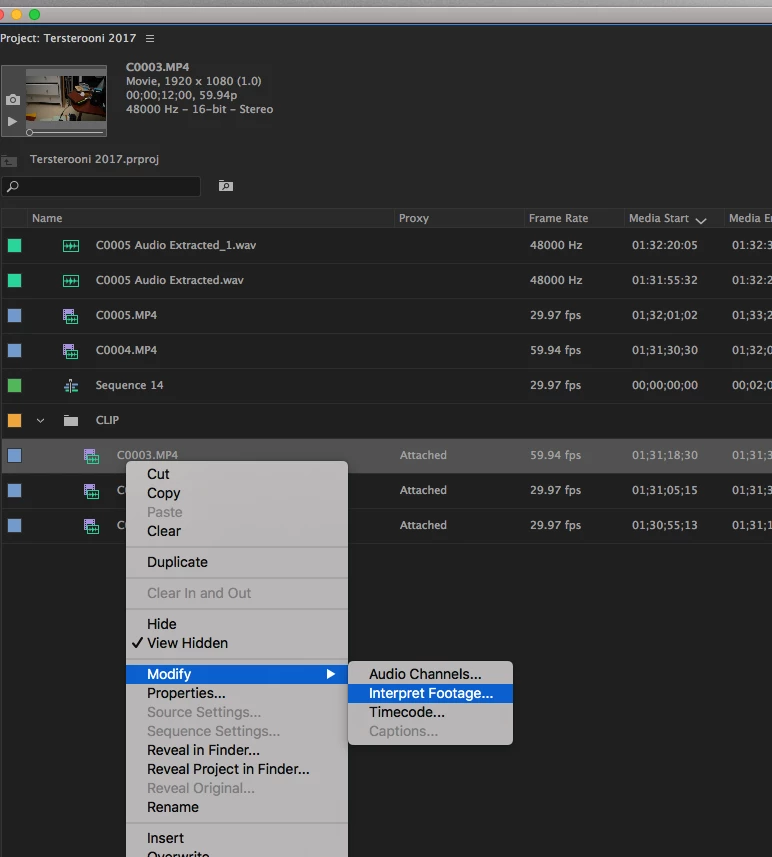
    OK, then click on the clip(s) you want to run in slow motion, and once selected, right click on a selected clip and from the drop down menu choose Modify > Interpret Footage:

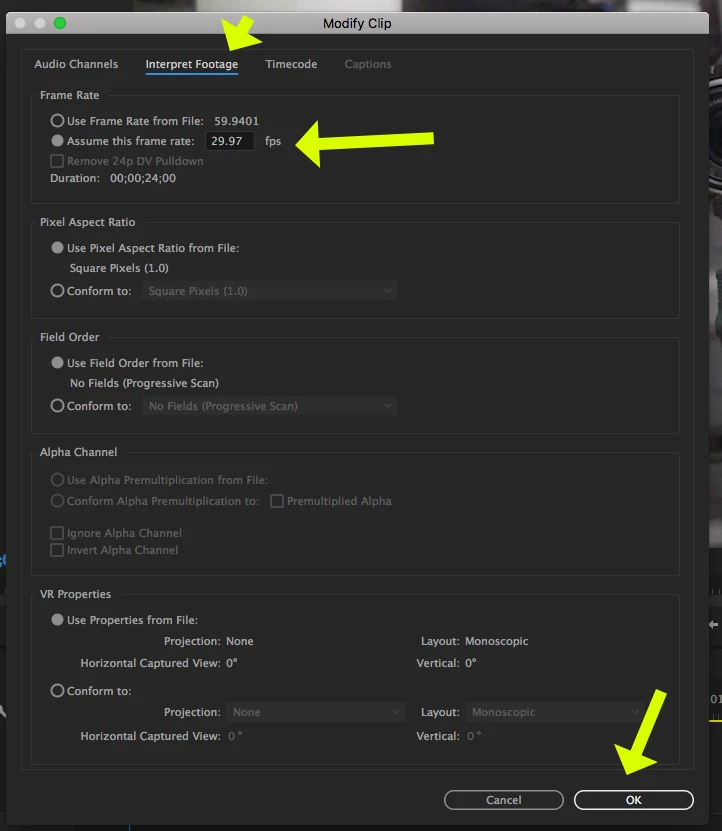
    When the Modify Clip pane opens, On the Interpret footage tab, set the "assume this frame rate" to 29.97 and click OK.

    Now edit the clip to the timeline.

    MtD

    1 reply

    Inspiring
    January 20, 2017

    michell54329824 wrote:

    When I import the clip filmed in 60 fps, it is automatically read at 30 FPS and duration which should be twice longer remains the same which makes not slowmotion.

    The imported clip shows 30fps in the project panel frame rate column?

    MtD

    Participant
    January 20, 2017

    It shows 59,94 fps

    Meg The DogCorrect answer
    Inspiring
    January 20, 2017

    OK, then click on the clip(s) you want to run in slow motion, and once selected, right click on a selected clip and from the drop down menu choose Modify > Interpret Footage:

    When the Modify Clip pane opens, On the Interpret footage tab, set the "assume this frame rate" to 29.97 and click OK.

    Now edit the clip to the timeline.

    MtD