


iPhone/FilmicPro footage: PCM sound issues in Premiere Pro
I'm experiencing some very annoying sound issues on my footage taken on an iPhone using a FilmicPro app (yes, a VFR footage) when I edit it in a Premiere Pro. Unable to solve them.
* The video files recorded with FilmicPro are .mov - PCM sound codec
* I have the latest PP CC 2018 release (12.1.1. Build 10) that supports the VFR, running on an iMac with OS Sierra 10.12.6.
* Yes, I cleared all that Media cache files etc., but no solution. Neither using the Handbrake app.
Here is the list of problems I am unable to fix:
1. Audio is gone
Everything is usually OK once the FilmicPro/PCM file is imported, I can see the waveform and hear the sound. But then - usually when I switch from PP to another app and then go back to PP - the audio is gone. I see the waveform, but I hear no audio, both in the Source or Timeline. In some occasions, the audio is "muted" right I import the files, sometimes I even do not see the waveform. I have to shut down the PP and relaunch it again to fix this, but the problem is back once I skip to another app again. Sometimes even the first restart of PP doesn't help.
This audio issue affects the FilmicPro PCM footage only: if there is AAC FilmicPro, some iPhone native camera footage or non-mobile footage in the project, these files are OK all the time...
2. No VFR option under the Master
Once I import the file to the project and right-click the Options, it says "Variable Frame Rate Detected". OK. But once I go to the Source -> Effects Control –> Master, where the "MPEG source settings" (Preserve Audio/Smooth Video) should be located, there is completely nothing. No option at all.
This issue is common for all VFR footage, not just FilmicPro.
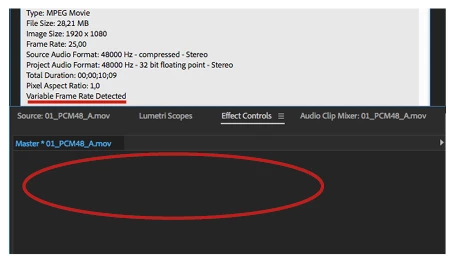
3. A .mov video w/ AIFF audio imported just as an audio file
For .mov FilmicPro video files with PCM or AAC audio, the video is imported OK. But once I want to import the video with AIFF audio track, PP imports just the audio, not the video. But under the Properties, I can find all the video info.
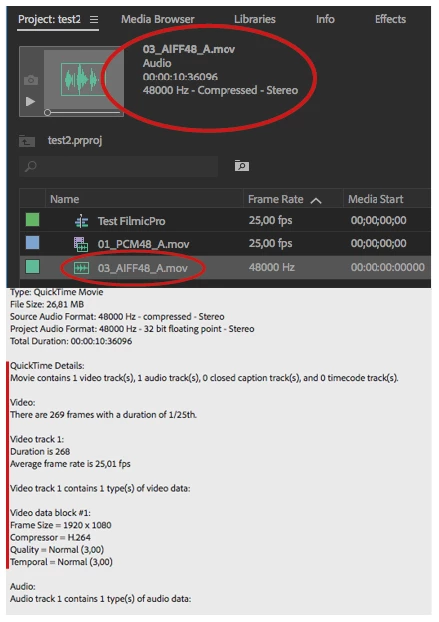
Before the CC 2018 with VFR support was released, there was an audio sync issue with this FilmicPro footage (yes, no VFR support), but I could edit the project in a normal way. Now it is completely impossible, as I am used to shoot with PCM sound for best result.
Any idea how to fix this? Switching to Final Cut will be the last option 
Thanks,
Stepan
 AdChoices