
Inspiring
October 18, 2011
Answered

Is 1080psf export possible from Premiere or AME?

  • October 18, 2011
  • 2 replies
  • 22039 views

I'm exporting individual clips of EX-1 XDcam from a sequence, one clip at a time so I can also apply some level correction to the export. It is 23.967 psf at origin from the camera. I am exporting to ProRes HQ 23.967 1080p as reported by Premiere Pro 5.5.1. The time line is AJA 23.98 1080psf. The problem is that the exports are turning out to be true 1080p, not psf as the original. I'm using the clips in another program that does not create a 1080p timeline, Media 100 Suite 2.1 (latest version, came with the AJA 1080 LHi OEM board I'm using). Bottom line, is there a way to get  Premiere or AME to export a true 1080psf ProRes file? Psf is preferred in many applications. I don't see any mode select for psf, even though I am in a 1080psf timeline.
    This topic has been closed for replies.
    Correct answer DMHP

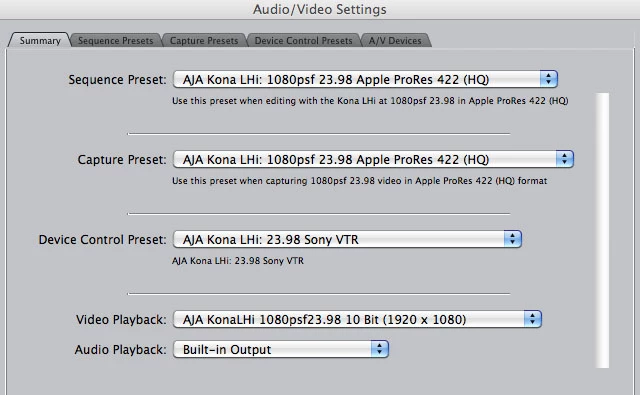
    I do know that ProRes allows PsF as an option. Here is a grab from Final Cut. There are many other ProRes PsF options.


    Figured it out. There is a popup in the export window Codec settings. One of the options is "Interlaced". Check that and it turns exports a PsF progressive clip. That is the way Media 100 sees it, and it shows up on all the monitors in Source and Program windows. Yay!  Thanks everyone.

    2 replies

    Participant
    December 10, 2021

    After hours of searching in Premiere Pro (and the forum topics) I have found the solution for old DV SD footage edited in 1080p: export to AVI in DV Widescreen with upper field and the double interlace lines problem is solved. After that blow up the footage again and you have an HD movie without the lines, as it should be...

    Legend
    October 18, 2011

    I recall using Media 100.  My question to you is why would you prefer this over the vastly superior Premiere Pro?  Why not just edit the media right there in PP, instead of adding an effect and exporting to edit in another NLE?

    DMHPAuthor
    Inspiring
    October 18, 2011

    The project is already started in Media 100 Suite 2.1. It must have been a long time since you've used Media 100. Other than the fact that it won't playback until media is converted to ProRes, I prefer the simple, quick interface to any other. But the biggest reason is stability on the Mac. Media 100 Suite 2.1 is solid as a rock. I have a new Mac Pro with GTX 285 NVidia Card 24 Gb RAM, fast RAID, and I still find unexpected crashes in 5.5.1. That and the fact that 5.5.1 broke Nikon D7000 support, the main reason I wanted to get into Premiere in the first place. There is a lot of D7000 footage in this project, so I am going back and forth between 5.0.4 (which supports it) and 5.5.1 (which doesn't).  But these things are not why I posted. Just wanted to find out why Premiere is taking 1080psf footage from my EX-1 on a 1080psf AJA timeline and exporting it as 1080p. It is giving me problems that I wouldn't have if it stayed in psf. Is there any way to over-ride this behavior and get 23.98 psf out? I see settings in interpret footage. Saw an article in Pro Video Coalition that extolled the fact that it automatically interprets psf as p in 5.5.1. Does this mean I should be doing my exports in 5.0.4 to get more control over interpretation, or is there an interpretation setting I can change in 5.5.1?

    Don't get me wrong, I really enjoy using Premiere, I love the fact that you don't have to convert to get playback of my EX-1 footage, even though my D7000 doesn't work presently. I intend to use it for all of my titling and color correction. Maybe I'll give the next project when I am not under a lot of time pressure to Premiere. Hopefully they fix Nikon support before I have to pay a third time for 6.0. Media 100 will take the 1080p on the timeline, it just won't playback in the source window on my external monitors when the project setting is psf, and all timelines at 23.98 1080 are psf. I really don't want to edit a 30 minute documentary without source window playback.

    Thanks in advance for any help with this.

    Colin Brougham
    Participating Frequently
    October 18, 2011

    No, the EX-1 footage is 23.967 PsF. Using it out of it's native folder structure where it shows up in Premiere as an MP4 at 23.976. Premiere calls it progressive in the Video Field Order metadata, but the only EX-1 camera menu setting for 24 (or 23.98 or actually 23.967) is PsF. No setting for just P, the other setting is 60i. I have checked the live SDI out of the camera with AJA control panel, and it reports 1080sf23.98, their way of saying 1080 23.98 PsF. So I am positive that it is PsF going into Premiere.


    Which flavor of XDCAM EX are you shooting, 1440x1080 or 1920x1080? The 1920x1080 stuff I have is progressive (don't have any of the lower bitrates to check). I don't think you can use the SDI feed as a gauge to what the recorded format does--that's a different ball of wax.

    Even if it is PsF, if you want Pr to interpret it as interlaced, you'll have to specifically do that using Interpret Footage. There's no way to automatically circumvent this. That said, it all comes down to the export codec--if ProRes lets you do this, Pr should expose all those export settings in the Codec Settings dialog. When you select QuickTime as the format, you don't have all the usual field order options that you would with another/different format.