
hopmedic
Participant
April 12, 2020
Answered

Is it possible to link keyframes to the end of clips instead of the beginning?

  • April 12, 2020
  • 1 reply
  • 516 views

Using Premiere Pro 2020, is it possible to have keyframes linked to the end of a clip, instead of the beginning? I am new to PP, working on videos for church streaming, and the purpose of my keyframes is to have the words to the songs enter and exit the screen at the right time. The length of each text graphic (clip?) varies, since some parts of the song last longer than others. When I'm copying from one graphic to create the new one, I frequently have to go in and move the keyframes, which can be very inefficient. There has to be a better way. 


If I could link the exit keyframes to the end of the clip, changing the length of the clip would not cause me to have to move my keyframes.


Thank you for any tips.
This topic has been closed for replies.
Correct answer Meg The Dog

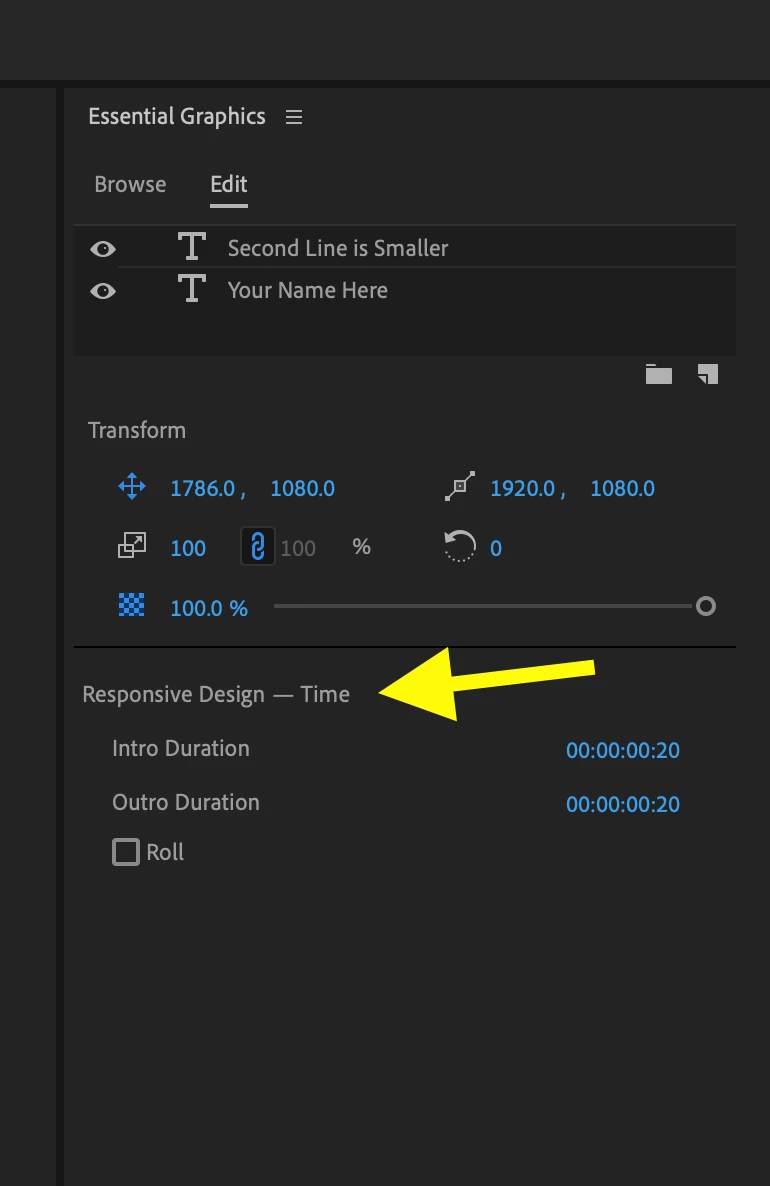
Yes, easily if you are using Essential Graphic to built the text elements. You designate which portions of the graphic animation are kept at constant values by assigning Responsive Design -Time to the Intro and Outro of the clip:

Once you do that if you lengthen or shorten the graphic clip on the timeline, the animation you do in those "protected" areas stays consistent.

More info here:

https://helpx.adobe.com/premiere-pro/using/essential-graphics-panel.html#AddResponsiveDesignfeaturestoyourgraphics 

scroll down to the part about Responsive Design - Time.

MtD

1 reply

Meg The DogCorrect answer
Inspiring
April 12, 2020

Yes, easily if you are using Essential Graphic to built the text elements. You designate which portions of the graphic animation are kept at constant values by assigning Responsive Design -Time to the Intro and Outro of the clip:

Once you do that if you lengthen or shorten the graphic clip on the timeline, the animation you do in those "protected" areas stays consistent.

More info here:

https://helpx.adobe.com/premiere-pro/using/essential-graphics-panel.html#AddResponsiveDesignfeaturestoyourgraphics 

scroll down to the part about Responsive Design - Time.

MtD

hopmedic
hopmedicAuthor
Participant
April 14, 2020

Thank you so much. I'll look into this tonight.