Bed30321077z973
Inspiring
November 21, 2023
Answered

Is it possible to retrieve info from Premiere Pro to outside of it though a text file or sendin data

  • November 21, 2023
  • 2 replies
  • 702 views

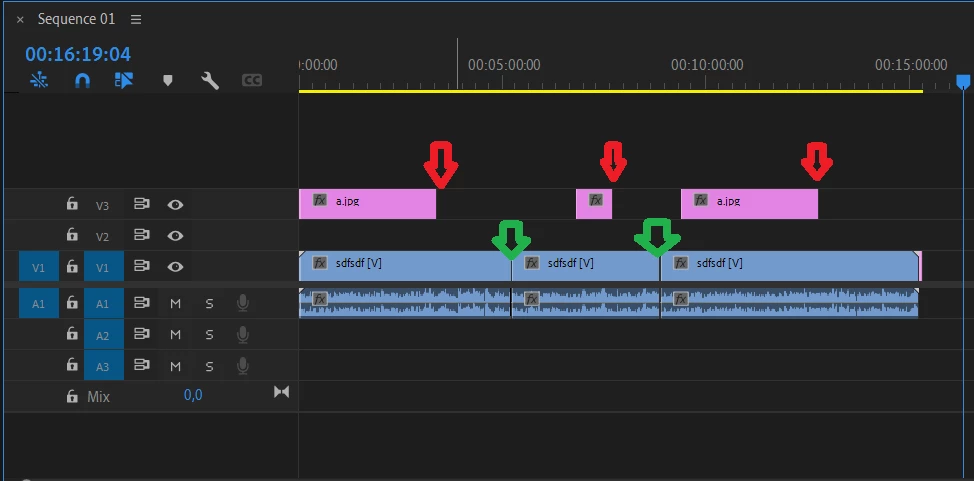
Let's say we have this timeline:


And you want to retrieve info about the "ENDs" of every item,

so in this case, the red yellows = end of every image displayed in the video tracks.

The green yellows = end of every video clip on the video track.

1) I would like to get that info into a TEXT file, exported SOMEHOW (during exporting video or any other process) --> Is that possible?

2) Send that data to visualcode somehow. --> Is that possible? I am supposing it is not.

3) Last solution, sending that information inside the NAME of the exported video.

--> Is it possible PROGRAM the name of the exported video without changing it manually? Meaning I want its name to be like this for example "nameofSeq_Endofclip1_endofclip2_.mp4"

--> Is that possible?


If none of the 3 above is possible, then please show me the path.

This topic has been closed for replies.
Correct answer Bruce Bullis

Oh I see, the in and out are properties from the extend script lines of codes and attributes etc (Now I am starting to remember it), I think I need to tweek a little bit more and i might do it.

However, one impotant thing for me and please answer, do you think it is possible to CHEAT the premiere.jsx and insert a NEW FUNCTION (that I NEED), please? I am essentially needing a function that let you add effects to a clip (vid or aud) and/or transitions beween clips. Would not that be awesome?

If it's theoretically possible, but not in the program, then tell me anyway please. We will see.


> ...do you think it is possible to CHEAT the premiere.jsx and insert a NEW FUNCTION (that I NEED), please?

No, we will not be further expanding or modifying PPro's ExtendScript API. 

2 replies

Bruce Bullis
Community Manager
Community Manager
November 27, 2023

1 : yes, in and out point information is available via API; see PProPanel. You can then save that info into a text file...

2 : ...or see it as a variable value, within VSCode. 

3 : Yes, you can specify the name of output files; see PProPanel

Bed30321077z973
Inspiring
January 21, 2024

Discussuing point number 3:

Hello @Bruce Bullis , OK 2 months later, Now I am trying this CEP tech, (Don't you wish you could learn and do eveything in one instant sometimes? Anyway I am taking my time BUT I think I can do it somehow hopefully).

Anyway, As I am exploring the codes to try to find a way to realize this use case. I went through allt he samples of the categroy "EXPORT" and I think the last one might be related to "exporting a video"?

The function related to this button :


<button id="renderusingdefaultpreset">Render active sequence in AME</button>


?

This buttons uses: this function:


render : function (outputPresetPath) {
		app.enableQE();
		var activeSequence = qe.project.getActiveSequence(); // we use a QE DOM function, to determine the output extension.
		if (activeSequence) {
			var ameInstalled = false;
			var ameStatus = BridgeTalk.getStatus("ame");
			if (ameStatus == "ISNOTINSTALLED") {
				$._PPP_.updateEventPanel("AME is not installed.");
			} else {
				if (ameStatus == 'ISNOTRUNNING') {
					app.encoder.launchEncoder(); // This can take a while; let's get the ball rolling.
				}
				var seqInPointAsTime 	= app.project.activeSequence.getInPointAsTime();
				var seqOutPointAsTime 	= app.project.activeSequence.getOutPointAsTime();
				var useLast 			= false;
				var outputPath = app.encoder.lastExportMediaFolder();

.....
....
...


Is this the one that I need to use to export a video while giving it a name of my choosing?

If you re read this post, you will see that I wanted to be able to name my video as follows:

nameofSeq_Endofclip1_endofclip2_.mp4

(example)


This means I need to somehow get the info about available items in the tracks and somehow insert them into "fullPathToFile"?

The question, is it indeed possible to retrieve that info?


I saw something about markers, that might possibly help somehow maybe?


Discussing point number 1:

You mentioned this :

>" yes, in and out point information is available via API; see PProPanel. You can then save that info into a text file..."

Hum I started looking at the second category (Metadata and Project manipulation)

=>

I see things about metadata maybe?

I am not sure how to go about this. I can spend hours reading every bit of code to try to find it (I will try that), but I would not be opposed to a clue or two if that's okay.

Thanks!

Bruce Bullis
Community Manager
Community Manager
January 21, 2024

Is this the one that I need to use to export a video while giving it a name of my choosing?


That's the function on which you should base your own export function, yes.


>The question, is it indeed possible to retrieve that info?

Yes, it is possible to retrieve the names of trackItems. 

>I saw something about markers, that might possibly help somehow maybe?


I'm not sure; markers have nothing to do with trackItem names, but yes, you could also export marker ranges, if you like. 

>I can spend hours reading every bit of code to try to find it (I will try that)

I'm not sure what you're still trying to find...? In and out points for projectItems and trackItems are both available.

Bed30321077z973
Inspiring
November 22, 2023

up