Participating Frequently
May 18, 2019
Answered

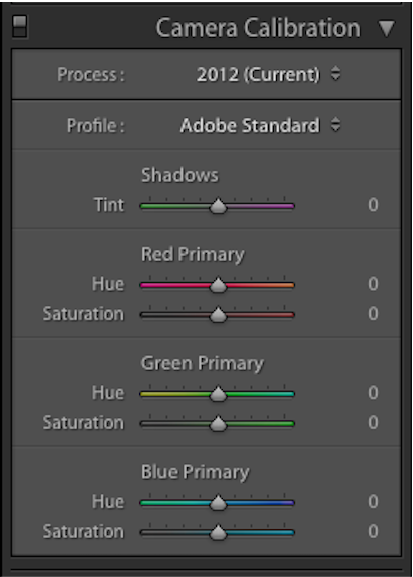
Is there a tool equivalent to Camera Calibration in Ae or Pr?
  • May 18, 2019
  • 5 replies
  • 3563 views

Image result for lightroom camera calibration

i can create many creative things with camera calibration in Lightroom but I can't find a similar tool in Ae or Pr

Thanks

    This topic has been closed for replies.

    5 replies

    Participant
    October 27, 2024

    So I found a work-around. I was trying to figure out how the sliders in the calibrate menu affect each color (because it's not affecting each color seperatly, and also not shifting all the colors equally). This is not exactly how it works but it gives you the same effect and you have the control to give you what you need.


    Step by step on how to do it (with pictures below)


    • Step oneFind the Hue vs Hue (Or Hue vs Saturation for the Saturation Slider equivalent) Curve under Lumetri Color Effect > Curves > Hue Saturation Curves. Then make a point where each bright intersect with the curve.
    • Step twoDecide which Primary Color Slider you want to affect (in the example its red) and make two new points between the red point and the closest one on each side.
    • Step threeThat was the setup, now we can shift the hues. First move your primary hue point up or down to shift its hue (in Camera Raw you would only be able to shift it in this case one and a half rows up or down).
    • Step fourNow you want to continue to shift the other colors a bit as well. Every secondary color should also be shifted in the same direction as your primary color (cyan, magenta, and yellow). From my experience they shouldn't be moves as much as your primary but maybe around half as much, its up to you to experiment an fine tune it though.


    After this you need to add another Lumetri Color effect and do the same for the other hues.


    Lastly I left my edits I made for my project as an example (not a good one per se but something to wrap your head around). It includes a shadow tint, which you could probably do in a number of ways. I did not look into how Camera raw selects which luma ranges are selected to shift the shadow mid and highlight tones, but if you want to tint it you can select that range in HSL Secondary under L, and make sure the full range of H & S are selected. For my example though i selected the darkest tones and faded it out slightly, then you can shift the tint under the color wheel.


    I tried my best to explain this, I don't know a lot about editing but this scratched an itch I had so I'm satisfied, enjoy 🙂


    R Neil Haugen
    Legend
    October 27, 2024

    Your basic starting error is trying to mimic the steps you did in stills work in video color. Lose that ... still and video color do not have much in common other than they make things look different than they started. So you way over-complicated the work.


    And I have had a portrait studio over 40 years, used to run a full color wet lab for our own studio and other picky sots also. Started with Photoshop and flatbed scanner about Cs 4.5. First 'major' studio in our state to go fully digital image capture for full size (24" x 30" and up) prints, started with LIghtroom in public beta 0.8.


    I've been in video capture/post for over a decade now, and going in, I thought the color stuff would be the same or really close, but actually ... they can't be for a whole series of reasons.


    Hue v Hue, yes, use that to set the correct angle of hue (on the circular hue verctor wheel) for each hue. Remember, no camera sees or records color. Period. They record light quantities ... under a physical filter pattern placed over the light-sensitive diodes. Then use a lot of mathematical calculations to totally manufacture the appearance of "color".


    So do use Hue V Hue to get a proper hue vector for your primaries and secondaries. After you've set the black and white points, and the shadow/highlight/contrast to the need of the image.


    Then ... Hue v Sat to either increase or decrease your particular hue sat values.


    That's Basic Video Colorist Training 101. Do that, and you can save the one instance of Lumetri named for that camera, and simply select all shots from that camera in a bin, drag/drop and you've done your prep work for those clips.


    Have one for each camera. No need of multiple instances. 

    Everyone's mileage always varies ...
    Participant
    October 28, 2024

    I'm sorry but I think you're just not understanding exactly what the goal here is.


    The unique way camera correction in camera raw works to slightly shift the hues and also kind of limit the visbile color palette makes a really pleasing image. What happens when you move those sliders I've noticed is that besides the color of the primary hue your moving, the secondary colors kind of blend into the other primary colors creating some kind of in-between. And that gives you more of a limited set of colors instead of a full color spectrum. I tried this, that is kind of what happens when you turn them up to max.


    In this thread it was discussed more how you could get that effect in the same easy way as camera raw. Yes, it was not intended to be a grading tool. Yes, the workflow I used in Lumetri Color is not typical. I get it, but if you want to affect the colors of the image in the same way camera correction does. This gives a similar effect.


    Also I really do need a separate lumetri color for each hue v hue curve, its just the simplest way to break the effect down into 3 different curves like camera raw seperated it into 3 sliders.

    Legend
    May 18, 2019

    That's a really pretty picture. I love still photography and your picture tells a nice story ( I'm guessing but there is some guy in foreground dressed in a way that makes me think he is associated with what I guess might be a temple in the background, maybe Buddhist ?)

    Anyway, good going !

    Legend
    May 18, 2019

    OH, I think I get it.. you're recording game play or something via computer and editing that and making corrections to make that look better .. you're not using a physical camera … right ??

    Legend
    May 18, 2019

    you can't use what ??

    what can't you use ?

    Participating Frequently
    May 18, 2019

    I use camera calibration not just only calibration my camera but also create more strong color and combine outstanding colors

    I'm an Lr and Ps user so i'm pretty new to Pr

    Meg The DogCorrect answer
    Inspiring
    May 18, 2019
    Legend
    May 18, 2019

    what camera are you shooting with ?  What choices are you using when you shoot ?

    You might be perfectly happy just changing your camera settings to suit the workspace of adobe stuff natively.

    Participating Frequently
    May 18, 2019

    i cant use it as i would change every preset for each color and it costs time