
Bed30321077z973
Inspiring
February 8, 2024
Answered

Is there a way to "create/activate" audio tracks on the timeline/sequence automaticaly?

  • February 8, 2024
  • 3 replies
  • 563 views

When you start a project you got only 3 audio tracks and 3 video tracks,
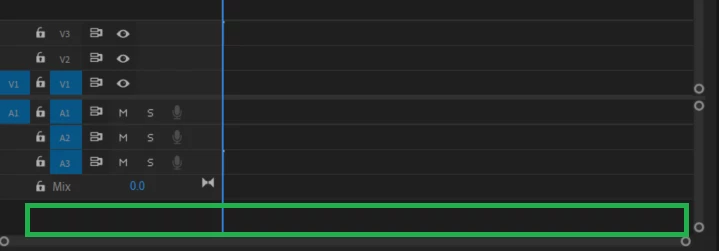
 

To add more you need to drag items into the empty area above or below, then a new track will be created.

I would like to have that process figured out as soon as my project is created.

Is there a way to do it thourgh the UI, through options and preferences etc? (I searched in preferences but did not find), or maybe through API? etc


This topic has been closed for replies.
Correct answer R Neil Haugen

Past Richard's suggestion, you can create a new sequence. Then in the Sequence dialog, change the audio channels ... then save as a preset. It will be atop the preset list when you next open Premiere.

3 replies

R Neil Haugen
R Neil HaugenCorrect answer
Legend
February 8, 2024

Past Richard's suggestion, you can create a new sequence. Then in the Sequence dialog, change the audio channels ... then save as a preset. It will be atop the preset list when you next open Premiere.

Everyone's mileage always varies ...
Bed30321077z973
Inspiring
February 8, 2024

Perfect Indeed I need a set number of tracks for numerous projects! Thanks

Community Expert
February 8, 2024

You can add as  many tracks as you want with this dialogue option.

Community Expert
February 8, 2024

There is an 'add tracks' option under the sequence menu. This let's you add any number of audio, video or audio group tracks.

Bed30321077z973
Inspiring
February 8, 2024

That's interesting, but you can only add one a time (actually 2, since it add a vid and an audio one),

It's still faster than dragging an item and trying to find an area when the item can fit, so thank you!

I am still looking even faster methods if there are (maybe with scripting) (edit: faster = instant)