Cobra
Inspiring
June 22, 2022
Question

Is there any tutorial for the time remapping playhead handles?

  • June 22, 2022
  • 2 replies
  • 461 views

I have searched online but most of the tutorials are super adequate. I do not even know if I even spelled it correctly.


I have questions


1. What is this in the middle? I cannot drag it, grab it or whatever. Does it just show the middle point? Why it looks like a mini waveform?
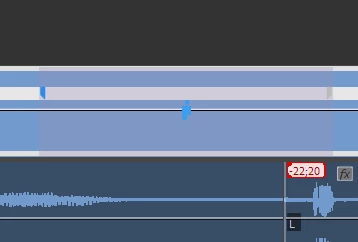


2. How to move the whole speed playhead? If you click and drag it splits in two pieces and you can just move them around
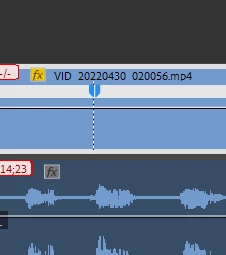
 

3. I cannot place a speed playhead at the beggining of the clip. I want to speed up a part that is at the beginning of the clip


This topic has been closed for replies.

2 replies

Richard van den Boogaard
Community Expert
Community Expert
July 15, 2022

Tutorials like this one will help you understand the feature better: https://www.youtube.com/watch?v=qpph9lvoEVU

Ann Bens
Community Expert
Community Expert
June 22, 2022

https://helpx.adobe.com/premiere-pro/using/duration-speed.html


1. you need to have set a speed change first in order to use the blue curve controle to set the curve of the ramp.


2.  Its not a playhead but rather two keyframes for the curve control.

3. Dont use the keyframes just drag the line up.

Cobra
CobraAuthor
Inspiring
July 15, 2022

How do I delete one keyframe? If I hit delete it deletes the clip

Richard van den Boogaard
Community Expert
Community Expert
July 15, 2022

No, it shortens the clip at whatever speed you have chosen. If you look closely to the previous clip, you'll see that a single frame has remained on the timeline. Drag it out and you'll see the clip status without the speed keyframe you just deleted.