Issue with audio tracks are mapped wrong in Premiere 2020???
Hi all, I noticed the following problem in the latest Premiere 2020 (14.0.0 build 572).
I am on Windows 10 if it helps.
If I create a new sequence from any of the templates, for e.g. select the ARRI 1080p 25 template, and drag the video in, I noticed that the audio mapping is coming the other way around.
The A2 comes in first and the A1 comes in second. Like the screenshot below.
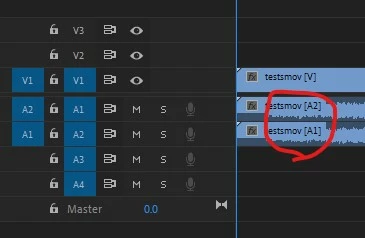
The same happens if you choose any of the templates.
BUT, if I drag it over so it automatically creates the sequence everything is fine. A1 comes first and A2 second. Screenshot below:
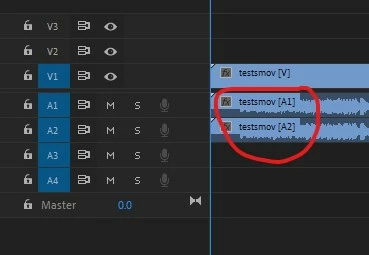
The multichannel files seems to import fine. I do not see any changes to the audio layout.
That means I cannot use any templates as the audio files will come in wrong!
Any ideas on that?
Thanks!
 AdChoices