Participant
August 18, 2023
Answered

Issue with installing mort files on Apple M1

  • August 18, 2023
  • 2 replies
  • 441 views

The problem is , every time i buy or download a new mogrt file from Adobe stock it is somehow damaged. For example at the screenshot you can see a callout that supposed to look lik on the right but looks like this. Some templates are invisible , some i cannot even change the color , so different problems and non of them is working well. Templates are from different creators , tried uninstalling Premiere Pro and CC , clean all files with the cleaner , create a new user and nothing helsp. Spent 5 hours with the support , but the same mogrt files work ok on other PC. Currently using Mackbook Pro on M1 Pro. Does someone have idea how to fix it?
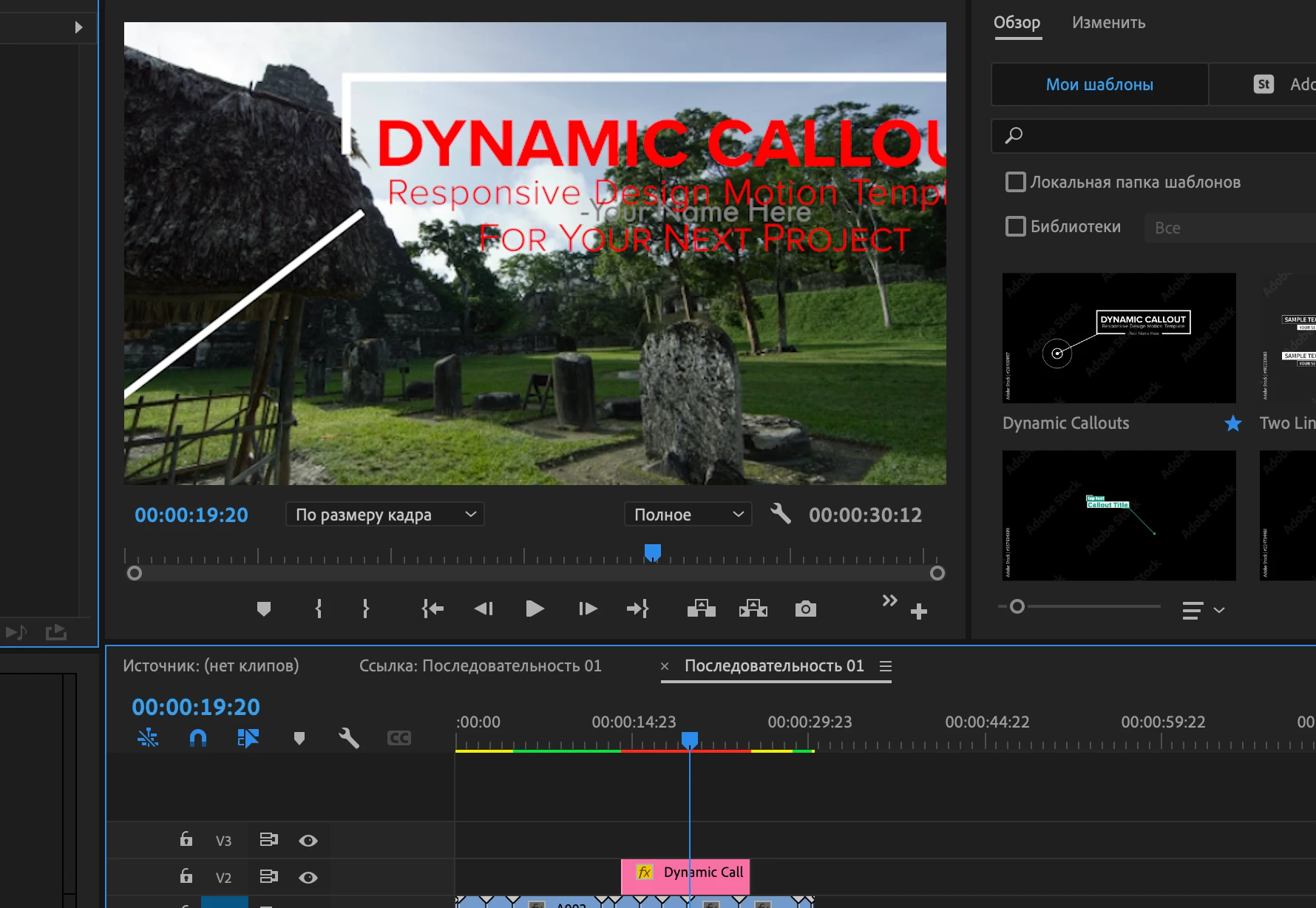
This topic has been closed for replies.
Correct answer DaciaSaenz

Expressions are breaking across languages because they need to be index-based instead of name-based. 

This can be done manually in the app, but there is also a script that can do this. 

There is a tool on aescripts.com that will walk through all of the Expressions in a project and make sure they will be compatible with all languages called the Expression Universalizer. https://aescripts.com/expressionuniversalizer/ 

2 replies

DaciaSaenz
Community Manager
DaciaSaenzCommunity ManagerCorrect answer
Community Manager
August 30, 2023

Expressions are breaking across languages because they need to be index-based instead of name-based. 

This can be done manually in the app, but there is also a script that can do this. 

There is a tool on aescripts.com that will walk through all of the Expressions in a project and make sure they will be compatible with all languages called the Expression Universalizer. https://aescripts.com/expressionuniversalizer/ 

- Dacia Saenz, AE & PR Engineering Teams
DaciaSaenz
Community Manager
Community Manager
August 18, 2023

hi @Биробиджан31756925gv2j , 


It looks like the Expressions in your Mogrts haven't been "Universalized," meaning the creator didn't make the Expressions index-based. When they are not index-based, they won't work when the app is set to different languages. 


There is a tool on aescripts.com that will walk through all of the Expressions in a project and make sure they will be compatible with all languages called the Expression Universalizer. https://aescripts.com/expressionuniversalizer/ 


You can open .mogrts in AE, run the Expression Universalizer, and re-export the mogrt to fix this issue. 

To open a .mogrt in AE use the following steps:

  1. Launch AE
  2. Use File > Open
  3. Select the Mogrt file
  4. Follow the dialog that pops up and asks you what folder you want top extract the project to
  5. and boom you've got the .aep
    Every Mogrt has the related .aep inside


All Adobe Stock Mogrts are supposed to be Universalized though so that is weird to me. If you want to send me one though, I can fix it for you. 


Sorry for your trouble, 

- Dacia Saenz, AE & PR Engineering Teams