javnaval
Participant
June 14, 2018
Answered

issues on my projects
  • June 14, 2018
  • 2 replies
  • 275 views

Hi!!

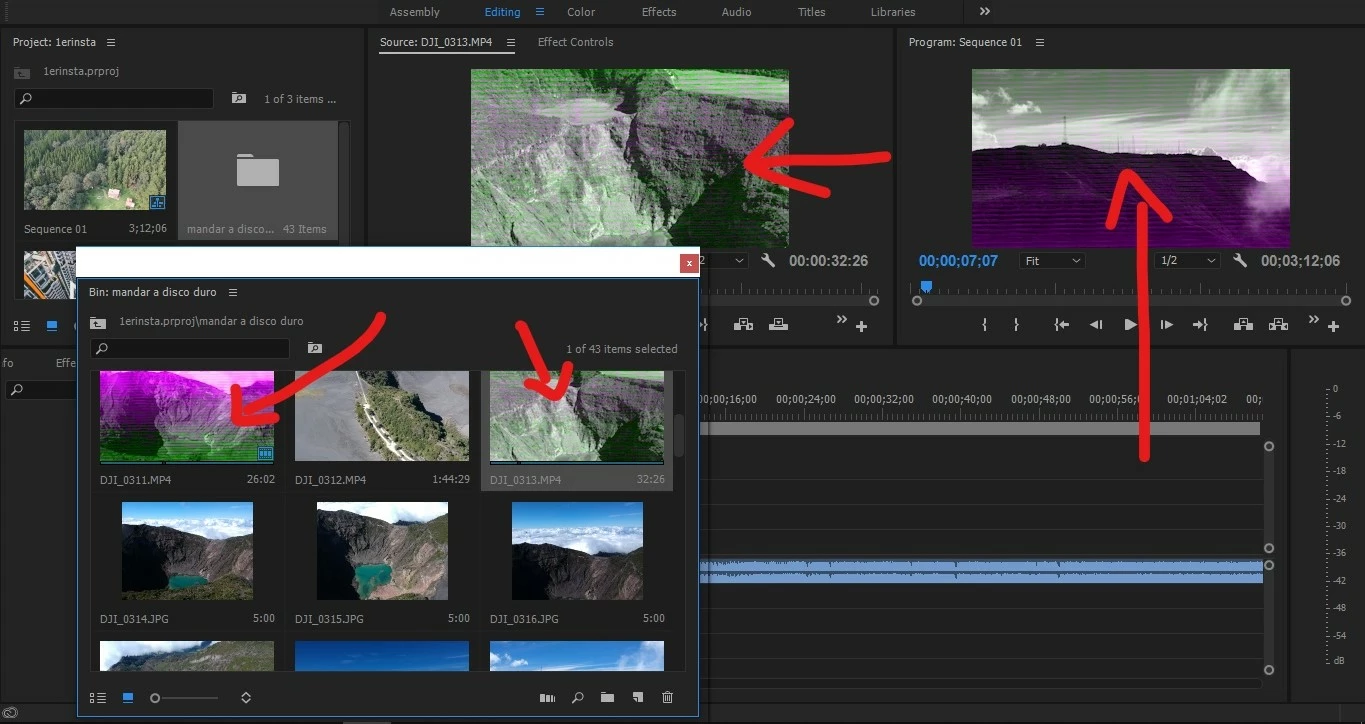
recently I've been with this problem, All my videos look like no full signal TV.

I don't know whats going on? have anyone had this prob before?

This topic has been closed for replies.
Correct answer Kevin J. Monahan Jr.

javnaval,

Sorry for the issue. Kindly update your video drivers: Re: Green and Pink Video in Premiere Pro 12.0.1 (Build 69)

Changing to Software Only for Mercury Engine Playback also solves this issue.

Thanks,
Kevin

2 replies

Kevin J. Monahan Jr.
Kevin J. Monahan Jr.Correct answer
Legend
June 18, 2018

javnaval,

Sorry for the issue. Kindly update your video drivers: Re: Green and Pink Video in Premiere Pro 12.0.1 (Build 69)

Changing to Software Only for Mercury Engine Playback also solves this issue.

Thanks,
Kevin

Kevin Monahan - Sr. Community and Engagement Strategist – Adobe Pro Video and Audio
javnaval
javnavalAuthor
Participant
June 26, 2018

thanks!!! it worked!! thanks a lot!

Peru Bob
Community Expert
Community Expert
June 14, 2018

Try resetting the preferences:

FAQ: How to reset preferences in Premiere Pro?

If that doesn't work, try resetting the Workspaces:

Reset a workspace

Reset the current workspace to return to its original, saved layout of panels.

  1. Do one of the following:
    • Click the Workspace menu icon and select Reset to Saved Layout.
    • Choose Window > Workspace > Reset to Saved Layout.

from here:

https://helpx.adobe.com/premiere-pro/using/workspaces.html

If that doesn’t work,try updating or rolling back your graphics driver directly from the video card manufacturer’s site.

javnaval
javnavalAuthor
Participant
June 18, 2018

thanks, I will try it.