
Participant
April 13, 2021
Answered

Issues to import a video file (MOV) into Premiere Pro : only the audio but not the video

  • April 13, 2021
  • 1 reply
  • 1289 views

Hello, for 3 weeks, when I try to import a video file (MOV) into Premiere Pro and then drag it onto the timeline, there is only the audio but not the video. Can you please help me?


Thank you,


Camille
Correct answer Ann Bens

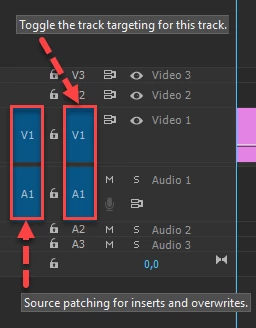
Most common user error is not source patching the track.
Solved by first opening clip in Source Monitor, set in and out point. Then drag/insert into timeline.

1 reply

Ann Bens
Community Expert
Ann BensCommunity ExpertCorrect answer
Community Expert
April 13, 2021

Most common user error is not source patching the track.
Solved by first opening clip in Source Monitor, set in and out point. Then drag/insert into timeline.

Participating Frequently
July 15, 2021

These answers do not solve the problem.  I suspect it is a codec issue.  I tried loading Quicktime player as suggested that has also not worked.


Participant
November 21, 2023

I'm having the same issue. Were you able to find a solution to the problem?