
Participant
June 13, 2017
Question

Jagged edges for new Essential Graphics Titler

  • June 13, 2017
  • 24 replies
  • 18183 views

Hi guys,

I'm running Premiere Pro 11.1.0 (222 Build).

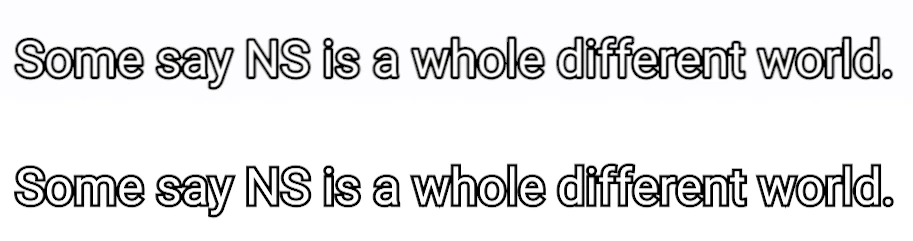
I find that the Essential Graphics Titler is producing titles with more jagged edges as compared to the Legacy Titler. Same issue over a few machines. Is there a fix for this? See the screengrab attached.

(Above text is legacy, below is the new essential graphics.)
This topic has been closed for replies.

24 replies

bryanrpromedia
Participant
December 28, 2017

A quick and dirty fix that I have found is to add a channel blur all zeros to the graphic, anti-aliases all the text nicely in both preview and render with no blurriness.

JBourgoin
Inspiring
July 18, 2018

Thanks bryanrpromedia

That tricks work for me !!!!!!!

That's the only one that work here...

A quick and dirty fix that I have found is to add a channel blur all zeros to the graphic, anti-aliases all the text nicely in both preview and render with no blurriness.

jstrawn
Legend
October 31, 2017

Thanks for the helpful tip. Exporting with Fields could certainly explain some unexpected results for rendered frames. Other export settings could also be at play. Also, keep in mind that if your monitor is not set to show "High Quality" then we intentionally show no anti-aliasing during playback for performance reasons. So there could certainly still be a bug looming, but at this point there is no umbrella cause for any such problems.

For anyone still seeing what looks like 'jagged' graphics' we will need: Simple but CONCISE steps, a graphics-only test project (or else include the media if it is really essential to see your result) and some sort of screenshot or screencast of your result. Thank you all in advance for your support.

Inspiring
October 31, 2017

Hi, I just wanted to clarify that I am referring to the Fields setting in "Sequence Settings," rather than fields for exporting/encoder. Having "Fields" set to anything but "None (progressive)" in sequence settings is causing jaggedness/aliasing in both the program monitor and in rendered final product.

This is still the case when "high quality playback" is turned on in the program monitor.

Alex

Participating Frequently
October 30, 2017

Problem still occurring in newest release of Premiere.  12.0.0 (Build 224)

Participant
September 24, 2017

Here is something that worked for me:

I checked the sequence settings of a timeline where the text from the new text tool had jaggy edges and noticed that the Editing Mode was set to "AVC-Intra 100 1080i". This setting came from the first clip I had dropped on the timeline.

I changed the Editing Mode to "ARRI Cinema" and Fields to "No Fields (Progressive Scan)" and all the text edges instantly looked just as good as the legacy title tool.

And yes, this applies to what I see in the Program window as well as the exported file.

Participant
October 7, 2017

Same issue here, thoug narrowed down to one special behaviour:

Whenever I unlock the scaling factor I get bitmappy like jagged edges. When I turn on scaling lock, everything is fine, as expected from TTF font. I need it regularly to adjust asymmetric width of fonts (compress, stretch,...)

This is the Screenshot of an exported JPG with capture function

And here a Screenshot directly from the program showing the converned button

I have to admit, sometimes get blurry fonts because of interesting Windows font smoothing behaviour on certain programs...

I am on Win 10 1703 on Premiere Pro 2017.1.2

Thank you,

Birgit

September 22, 2017

How's it going Adobe?

Texts do get really jagged lines AFTER export as well (just like it looks in preview) if you use shadow with the new essential tool.

Known Participant
August 31, 2017

I'm getting the same behavior upon EXPORT. All graphics, no matter the font, have jagged edges when zoomed in. Doesn't matter whether I'm exporting ProRes or H.264. Never had this problem when I was using Premiere's title function these many years. Please fix this!

Participating Frequently
August 28, 2017

Following thread, as I am finding the same behavior.

Participant
July 20, 2017

Having the same problem with jagged edges in Essential Graphics here on a PC. In this image, the title was scaled up 150%, which seems to make the problem worse.  I can avoid using the scale function in the Effects window, now that I know it's an issue -- but why should it be an issue?

For comparison, here's a legacy title and a new "essential title." The aliasing is visible on the rounded edge.

Hope to hear some advice!

keith_video
Participating Frequently
June 26, 2017

More tests.

This screen grab is from the Adobe Export Preview Window. Regardless of quality in the preview window the Essential Graphics is Jagged:

Now, this is interesting. This is from the output of the Program Window's "Export Frame" function. Less jaggedness here.

Adobe, what is going on?

keith_video
Participating Frequently
June 23, 2017

Huge fail Adobe. I just used this tool on a project for the first time. All text is jagged. I am using drop shadow so maybe that is part of the issue.