
Participant
September 6, 2024
Answered

Justify is greyed out even though I have selected text
  • September 6, 2024
  • 2 replies
  • 1232 views

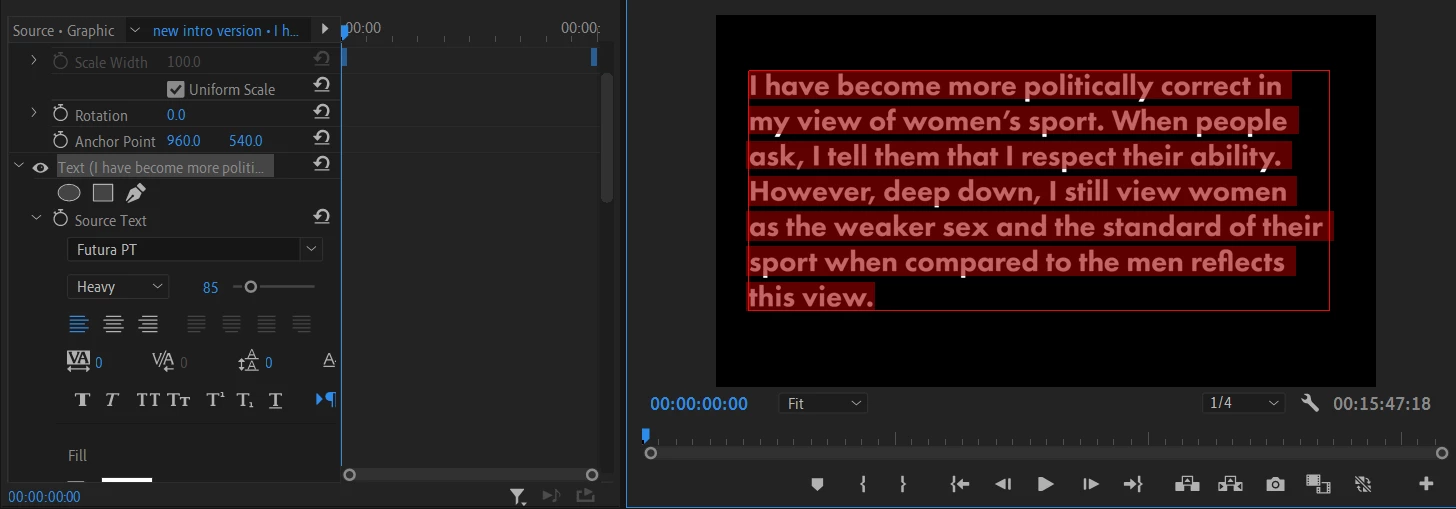
As you can see I have highlighted all the text in this text book and would like to align the lines of text but justify is greyed out in both effect controls and the graphic workspace. Would be really grateful for any advice.

This topic has been closed for replies.
Correct answer PaulMurphy

The Justify Text options are only enabled when you're typing inside a text box, which you create by clicking and dragging with the Text tool (instead of just clicking and typing directly in the Program Monitor).

To add a text box, select the Text tool and click and drag in the Program Monitor to create the box.

2 replies

R Neil Haugen
Legend
September 7, 2024

Paul is so good at catching things like that ... there are a number of differences between "text at point" and "text box". It's useful to learn the distinctive behaviors between these ... and well, so many other "similar" things.

Everyone's mileage always varies ...
PaulMurphyCommunity ExpertCorrect answer
Community Expert
September 7, 2024

The Justify Text options are only enabled when you're typing inside a text box, which you create by clicking and dragging with the Text tool (instead of just clicking and typing directly in the Program Monitor).

To add a text box, select the Text tool and click and drag in the Program Monitor to create the box.