
Lewiscat
Inspiring
February 26, 2024
Answered

'K' key doesn't pause playback - Please help.

  • February 26, 2024
  • 3 replies
  • 650 views

Hello,


My 'K' won't pause playback.  'J', 'Space' and 'L' keys work fine.  I have a custom key stroke involving 'K' but I've tested after deactivating it.  I can't find any useful information about this.  Everything else seems to work fine.  This is odd because it's not a new feature.  Please help/advise.


Premiere Pro 24.2.1 (build 2)

Mac Studio M2 Max.
 

This topic has been closed for replies.
Correct answer MyerPj

Thanks for posting PP and OS version.

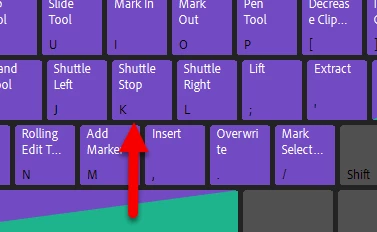
It's supposed to be set to Shuttle Stop. Check your keyboard prefs. Also make sure it's using the file you had in mind, since the PP version is new.


3 replies

MyerPj
Community Expert
Community Expert
March 4, 2024

Also, you'll want to backup that folder in your normal backup routine. It's kind of a moving target, because it changes number with every year, with the new version of PP.


Here's the Windows folder, I backup the whole thing...

C:\Users\Myer\Documents\Adobe\Premiere Pro\


Lewiscat
LewiscatAuthor
Inspiring
March 4, 2024

Thanks for the feedback.  Not sure what folder you refer to saving.  My keyboard prefs?  

MyerPj
Community Expert
Community Expert
March 5, 2024

When you make changes to the keyboard mapping, you can save the file, probably where it says 'custom' or such. Then you can save iterations. I resave them whenever I'm making changes. So, that file in the 'documents' folder is in one of those directories... it's a bit different for a mac, but you should be able to find that folder using the Windows example above, and thus start backing up that folder.

MyerPj
Community Expert
Community Expert
February 26, 2024

Glad you got it! 🙂

MyerPj
Community Expert
MyerPjCommunity ExpertCorrect answer
Community Expert
February 26, 2024

Thanks for posting PP and OS version.

It's supposed to be set to Shuttle Stop. Check your keyboard prefs. Also make sure it's using the file you had in mind, since the PP version is new.


Lewiscat
LewiscatAuthor
Inspiring
February 26, 2024

Thank you so much!  I was using 'k' in another custom setting and must have goofed it up; it was greyed out in the preferences.  Thanks again for your kind help.