Participant
April 24, 2023
Answered

Keeping captions on same track?

  • April 24, 2023
  • 1 reply
  • 941 views

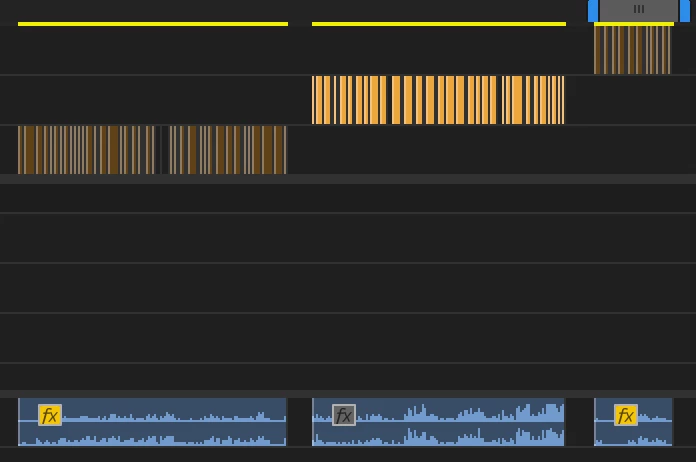
I am just now playing with/learning the captioning feature. I caption ~3 reels a week for a client. I edit all of his reels in the same sequence because they are so short and there are hundreds of them so it's easier than starting a new sequence every time. However, every time I'm adding captions to a new reel/clip in the sequence, it's starting a new subtitle track. Is there a way to keep all the subtitles on the same track? In the photo you can see 3 consecutive reels and it's adding a new subtitle track for each one. I could see this getting messy/annoying as the number of reels with subtitles continues to grow, but I can't find a way to automatically keep them on the same track. Thanks in advance!

This topic has been closed for replies.
Correct answer Stan Jones

Sure, mariellev. I understand. Consider this as you try the re-transcription process: you can move the previously transcribed text to the new track if you have already edited and customized it. That should save you the time if you have to do that. I just tried that with text I had already edited and it only takes that one extra step. Try it, it works great for me. Let me know!

Thanks,
Kevin


maeriellev and Kevin,


lol; I didn't get this finished at 3PM, so here's what I drafted:


I would back up each iteration by doing a Save Copy As for the project and/or Duplicating the sequence and labeling in some meaningful way. When you duplicate the sequence, you keep the "old" transcription/captions.


Generally, I would keep doing what you are doing. Then set the playhead to the beginning of the first caption in the new track. Select the new captions and drag them to the old track. Or Alt+Drag to copy them to the other track.


I assume you are re-transcribing in to out and NOT checking the "merge" button. If you did, it would transcribe everything and re-add the old captions.


What version of PR are you running? The glitches and problems have been improved with every version, but captioning is still being improved with each release, so it is a challenge.


BTW, in the Beta, they are working on transcribing clips so that the clip transcription would follow it to your sequence. As long as the clips don't overlap, it will be a piece of cake for you. You will still have the option to create a static transcription of the whole sequence, but I don't think that is what you want.


The Beta can be installed independently from your production version(s).


See the Beta FAQs:
https://helpx.adobe.com/x-productkb/global/creative-cloud-beta.html


I do not suggest moving to do production work in the Beta version. There are often unexpected bugs. But you can give it a try, and export srt if it works, as long as you don't change your sequence clips in the Beta.


Edit: Forgot to add; you can right-click in the track header and delete tracks you don't need.


Stan

 

1 reply

Kevin J. Monahan Jr.
Community Manager
Community Manager
April 24, 2023

Hi mariellev,

Yes, I see the issue. Try the "Re-Transcribe Sequence" function in the kabob (three dots) menu in the Text > Transcript panel. After re-transcribing the sequence, you can delete the previous transcription. That seems to work OK for my purposes. Let me know if that works OK for you too. I hope so!


Thanks,

Kevin

Kevin Monahan - Sr. Community and Engagement Strategist – Adobe Pro Video and Audio
Participant
April 24, 2023

Thanks for your response--I believe I have tried this but I will try again. The thing is, I don't want it to delete the previous captions/subtitles on the track, just add the new ones if that makes sense. The captioning has been super glitchy and inconsistent so far, causing bugs and crashes multiple times per session.

Kevin J. Monahan Jr.
Community Manager
Community Manager
April 24, 2023

Sure, mariellev. I understand. Consider this as you try the re-transcription process: you can move the previously transcribed text to the new track if you have already edited and customized it. That should save you the time if you have to do that. I just tried that with text I had already edited and it only takes that one extra step. Try it, it works great for me. Let me know!

Thanks,
Kevin

Kevin Monahan - Sr. Community and Engagement Strategist – Adobe Pro Video and Audio