
Keyboard Shortcuts - Plus and Minus (Moves & Playhead Position)
I was searching the the documentation guide (which led me down another path), looking for an explanation and clarification on numeric keypad operations - specifically the “+” and “-“ keys on the numeric keypad (quite apart from the standard keyboard).
Operation:
If I hit the plus or minus keys (numeric keypad), the timecode area of the timeline panel is activated, and I can enter a number. If a clip (or clips) are selected, they will move the amount I enter. If no clips are selected, the playhead will move the amount I enter.
(Examples: I hit numeric keyboard "+" and enter 100, clips or playhead move 1 second later)
Problem:
This shortcut for the numeric "+" and "-" keys seems not to be defined in the “keyboard shortcuts” dialog … therefor it can’t be redefined.
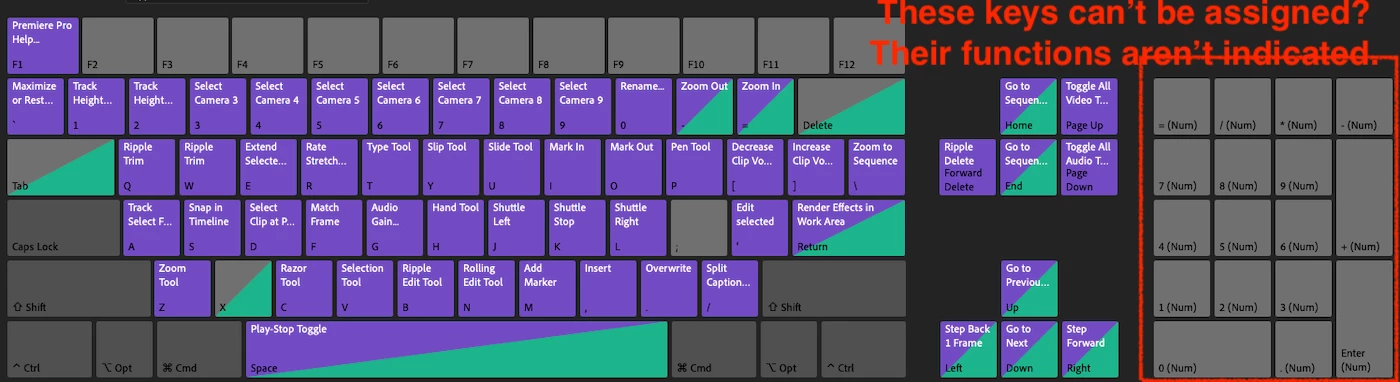
Essentially, I am trying to set up an analogous shortcut for the “+” and “-“ action on a system without a numeric keyboard, but can't get past square one (finding these functions in the keyboard shortcuts dialog).
Is this a design choice? A bug?
Have I missed something? Any assistance or direction appreciated.
R.


 AdChoices