Participant
December 28, 2020
Answered

Keyframes not working in Premiere Pro

  • December 28, 2020
  • 1 reply
  • 821 views

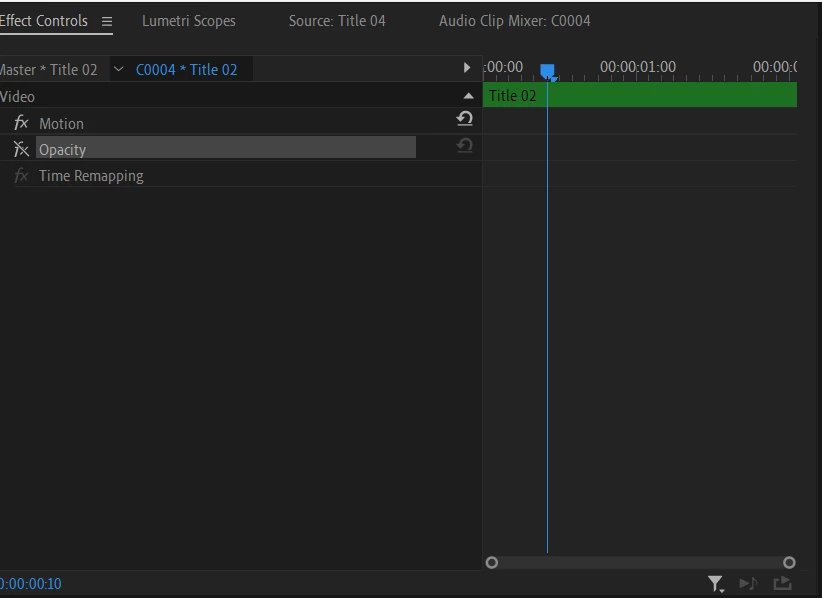
So normally my keyframes have been fine. But about a week ago they suddenly stopped working. I can't even click on them and I'm not sure why. I've reset the preferences many times, reset  to saved layout, installed all updates and still nothing is working. Anyone know a fix for this?
This topic has been closed for replies.
Correct answer R Neil Haugen

Notice the line through the fx there for Opacity? At some you clicked on it, which disabled that effect. You need to click on that fx icon with the line through it to activate it again.


Neil

1 reply

R Neil Haugen
R Neil HaugenCorrect answer
Legend
December 28, 2020

Notice the line through the fx there for Opacity? At some you clicked on it, which disabled that effect. You need to click on that fx icon with the line through it to activate it again.


Neil

Everyone's mileage always varies ...
Participant
December 28, 2020

Thank you!