Inspiring
November 1, 2017
Answered

keyframing mograph templates in premiere

  • November 1, 2017
  • 2 replies
  • 1947 views

Is there a way to keyframe the options within premiere from an after effects created motion graphics template?

    Correct answer jstrawn

    Probably not in the way you are thinking. Aegraphics get added as Track items in the timeline, so you can animate Motion for them just like you would a regular media clip. But it's mot a recommended workflow in most cases because everything will be clipped by the frame boundaries when moved/scaled/rotated... see the attached screenshot to see what I mean.
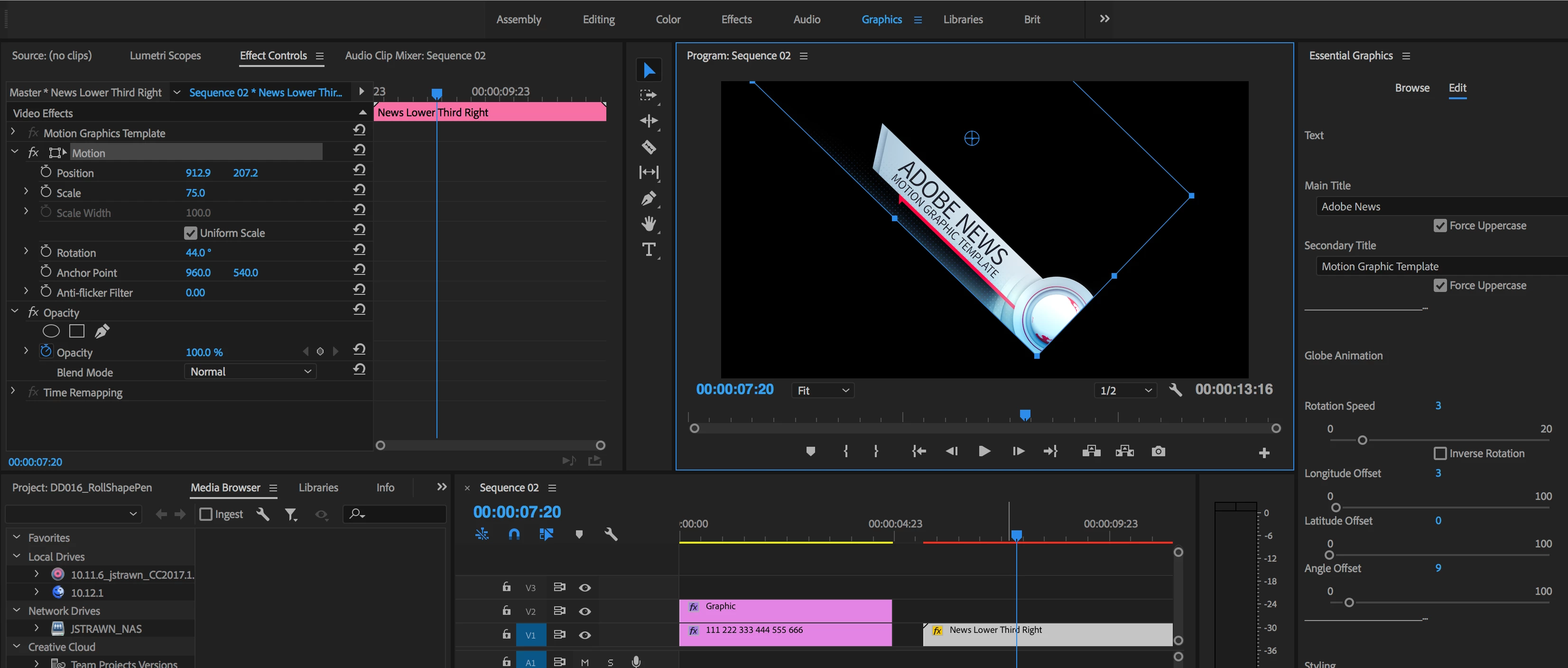
    Otherwise the Ae mogrt would need to be authored in a way what allows some animation controls in Pr. Like for example, in that same 'News Lower Third' mogrt I used for my screenshot, you can see controls to change the Globe Animation.

    2 replies

    aTomician
    Inspiring
    August 28, 2018

    therealodwyer & wshinn1​ - did a feature request get filed for this?  Or any workarounds?  I'm coming up against the same brick wall now, so good to know where you went with this.

    Regards, aTomician
    jstrawn
    jstrawnCorrect answer
    Legend
    November 1, 2017

    Probably not in the way you are thinking. Aegraphics get added as Track items in the timeline, so you can animate Motion for them just like you would a regular media clip. But it's mot a recommended workflow in most cases because everything will be clipped by the frame boundaries when moved/scaled/rotated... see the attached screenshot to see what I mean.

    Otherwise the Ae mogrt would need to be authored in a way what allows some animation controls in Pr. Like for example, in that same 'News Lower Third' mogrt I used for my screenshot, you can see controls to change the Globe Animation.

    DOD Media
    Participant
    January 24, 2018

    Hi there, so am I right in thinking that there's no possible way to keyframe the animation controls of the Ae Mogrt from the Essential Graphics panel in Premiere? This seems a real shame. I've designed a fairly complex Ae template for natural plugin-free flares which works great by themselves if you know how to use Ae, but for users who don't, a super basic Ae Mogrt with three sliders to control Opacity, X pos and Y pos of the main node in the Ae template from within Pr seems like the ideal way of solving that issue. But without being able to keyframe those sliders to change within their designated value range, so the flares can be keyframed to move along with the footage, it's no good. Would it be difficult to add a temporal factor to the Essential Motion Graphics panel?

    I'm happy to post the recommendation as a request if that can help?

    Thanks,
    David

    jstrawn
    Legend
    January 24, 2018

    therealodwyer  wrote

    Hi there, so am I right in thinking that there's no possible way to keyframe the animation controls of the Ae Mogrt from the Essential Graphics panel in Premiere? This seems a real shame. I've designed a fairly complex Ae template for natural plugin-free flares which works great by themselves if you know how to use Ae, but for users who don't, a super basic Ae Mogrt with three sliders to control Opacity, X pos and Y pos of the main node in the Ae template from within Pr seems like the ideal way of solving that issue. But without being able to keyframe those sliders to change within their designated value range, so the flares can be keyframed to move along with the footage, it's no good. Would it be difficult to add a temporal factor to the Essential Motion Graphics panel?

    I'm happy to post the recommendation as a request if that can help?

    Thanks,
    David

    You are correct (at least as of Pr 12.0.1 x 069). It's not impossible, and I can't say how difficult it would really be, but aegraphics (the Graphics you get from Ae mogrts) are not designed to work that way. At least not yet. It sounds like the first thing you need is more Supported Properties in Ae's EGP so that you can give the user more of the animation controls that you want them to be able to change in Pr's EGP. After that, you might still need some way to affect the animation even more directly in Pr. Those are both good requests and filing them is never a bad thing because, if nothing else, it helps us identify and prioritize the biggest user needs. The only other thing I can say about it right now is that these things all take time and there are a lot of different user needs to think about.