Participant
September 28, 2017
Answered

Labels Icon View

  • September 28, 2017
  • 5 replies
  • 5034 views

Once I label a folder(Bin) how can I make those label visible in the icon view?

Correct answer daniels53766830

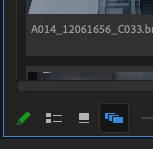
There are three different views: 
1. List view  – no thumbnails, but lable color)
2. Icon view – scrubbable thumbnails no lable colour
3. That's the one we were all looking for: Free Form View – shows scrubbable thumbnails and lable color
5 replies

daniels53766830Correct answer
Inspiring
July 3, 2024

There are three different views: 
1. List view  – no thumbnails, but lable color)
2. Icon view – scrubbable thumbnails no lable colour
3. That's the one we were all looking for: Free Form View – shows scrubbable thumbnails and lable color

dgmorgan93
Participant
September 19, 2025

freeform view doesnt let you sort though. 

Participant
September 6, 2022

Can't believe that after 5 years and we can still see labels in the icon view 

Participant
October 27, 2023

It's crazy that we were able to see labels in icon view.

In Premiere 22 labels are in icon view indeed, but in newer Premiere versions they disabled them.

I can't understand why, it didn't cause any problem, nor was distracting! Why getting rid of a feature when it's alreay there?

cmgap
Community Expert
Community Expert
September 29, 2017

Changing bin views

Bins have two views. You choose between them by clicking the List View or Icon View button at the bottom left of the Project panel.

  • List view: Displays your clips and bins as a list, with a significant amount of metadata displayed. You can scroll through the metadata, and use it to sort clips by clicking on column headers.
  • Icon view: Displays your clips and bins as thumbnails you can rearrange and play back.

The Project panel has a Zoom control, which changes the size of the clip icons or thumbnails.

Source: Working with bins > Organizing Media in Adobe Premiere Pro CC

Participant
September 29, 2017

This I know. When working on the "Icon View" the color labels used to mark in the list view don't show up. Is there a way to color code the bins in "Icon View" ?

cmgap
Community Expert
Community Expert
September 29, 2017

Hi Alejandro - I was able to change the bin color in icon view by right-clicking on the folder and selecting label. The fly-out menu lists the colors available.

Ussnorway7605025
Legend
September 29, 2017

tag has premiere pro so I moved this to that forum

Participant
September 29, 2017

thank you

cmgap
Community Expert
Community Expert
September 29, 2017

Your welcome Alejandro. I'll look into color coding the bins in icon view... if it can't be done now that might be a good feature request.

Peru Bob
Community Expert
Community Expert
September 28, 2017

You posted in the nontechnical Lounge Forum.

Please tell us what Adobe software you are using so that this can be moved to the proper forum for help.