
Participant
October 16, 2023
Answered

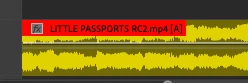
Labels: The entire clip isn't changing color, just the title

  • October 16, 2023
  • 1 reply
  • 309 views

I've been coloring my clips different colors from the time I started using Premiere. Today, I must've hit a keyboard short cut or something, but now, by label colors are a mess. I used to color an entire clip one color. Now, only the title of that clips is colored and it appears that the rest of the clip is the default color. How do I change this back???


This entire clip was red, before whatever happened, happened. Now it's yellow, with a red title.
This topic has been closed for replies.
Correct answer Peru Bob

You're welcome. 

1 reply

Peru Bob
Community Expert
Community Expert
October 17, 2023

Try resetting the preferences:
https://community.adobe.com/t5/premiere-pro/faq-how-to-reset-trash-preferences-in-premiere-pro/td-p/8236158?page=1

If that doesn't work, try resetting the Workspaces:
Reset a workspace
Reset the current workspace to return to its original, saved layout of panels.
1. Do one of the following:
• Click the Workspace menu icon and select Reset to Saved Layout.
• Choose Window > Workspace > Reset to Saved Layout.
from here:
https://helpx.adobe.com/premiere-pro/using/workspaces.html

If that doesn't work, try creating a new project and import the old one into it.

Participant
October 17, 2023

Resetting the prefferences did the trick! 


Thank you!

Peru Bob
Community Expert
Peru BobCommunity ExpertCorrect answer
Community Expert
October 17, 2023

You're welcome.