


valeriansantosa
Participant
Mar 14, 2024 2:29 PM UTC
Question

Legacy Title is missing in Premiere Pro 2023 - Only a thin strip was left.
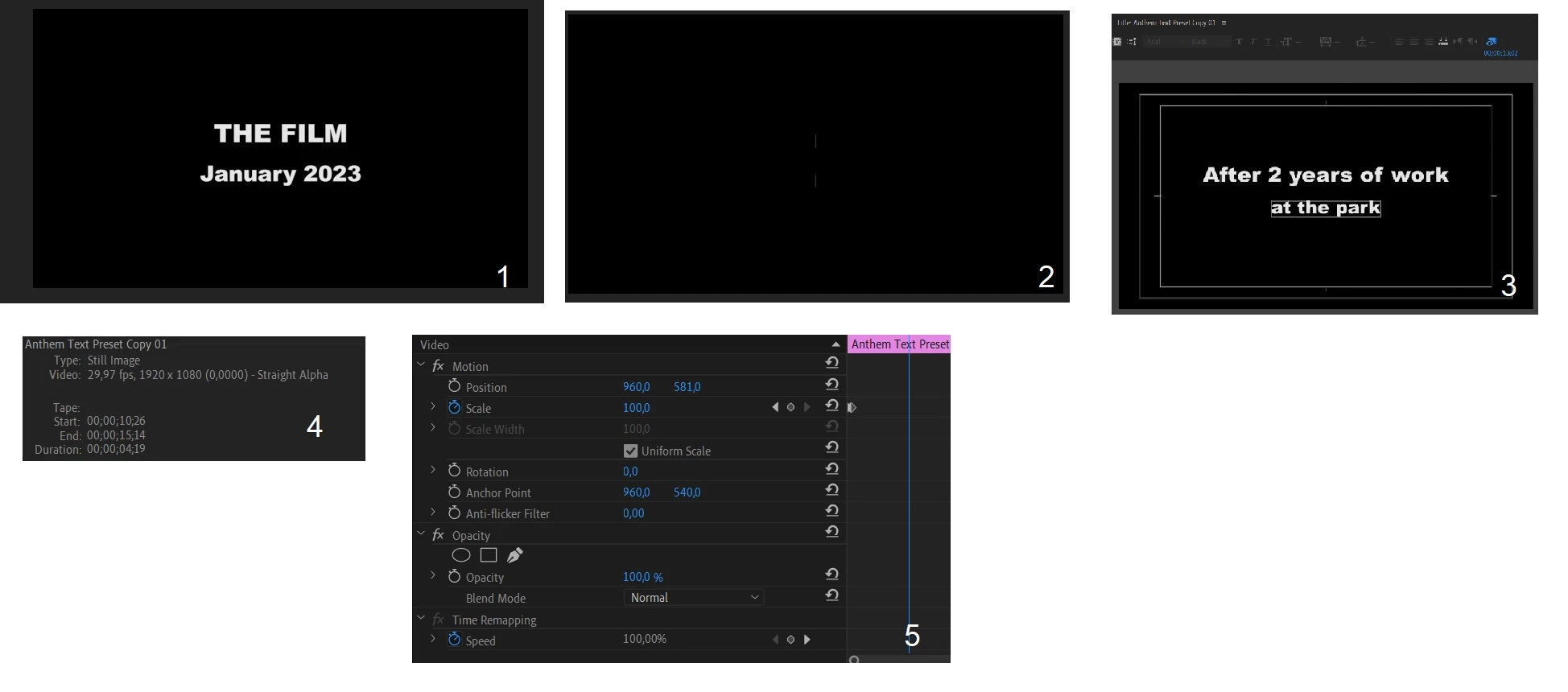
Hi Everyone, I wanted to edit some old projects and I lost all the titles in the preview, all is left was a thin strip (2) that moves according to the motion settings (5)  In the past I usually copy the first title (1) and replace the text. Then when I opened this file, I had to convert it to the latest premiere since in the past I used CC17. But when I clicked it twice, the editing window will pop up and the whole text can be seen (3). Number 4 is the screenshot of the "info" window.

The exported video looks similar to the preview (2). I've tried to tweak the crop and motion directly from the pop-up window but it doesn't work.

4 replies

AnnikaKoenig
Legend
Apr 4, 2024 10:18 PM UTC

Hi @valeriansantosa ! I'm a Quality Engineer who was involved with the Legacy Titler removal. Happy to take a look. I'll send you a DM here in the community page so we can connect


Translate
Participant
Jan 19, 2025 5:12 PM UTC

thanks ,i think legacy title are best for crawling text

Translate
Kartika Rawat
Community Manager
Community Manager
Apr 3, 2024 9:02 PM UTC

Hi there!

Thanks for writing in. You can try essential graphics to add titles to the project: https://adobe.ly/49lBUqg

Let us know if this helps.


KR

Translate
valeriansantosa
Participant
Apr 4, 2024 6:06 PM UTC

Hello, thanks for the tip. I can still edit the text in essential graphics but it just won't show in the preview and the rendered video.

Translate