Participating Frequently
December 24, 2018
Resuelto

"Legacy title" panel size changes every time I reopen

  • December 24, 2018
  • 20 respuestas
  • 30502 visualizaciones

Hello Adobe community,

I am doing a new project where I have to use a lot of on screen text. I am using "Legacy Title" to create those text.

The problem that I am having is that the size of the panels change every time I reopen the titles.

Below are the images:

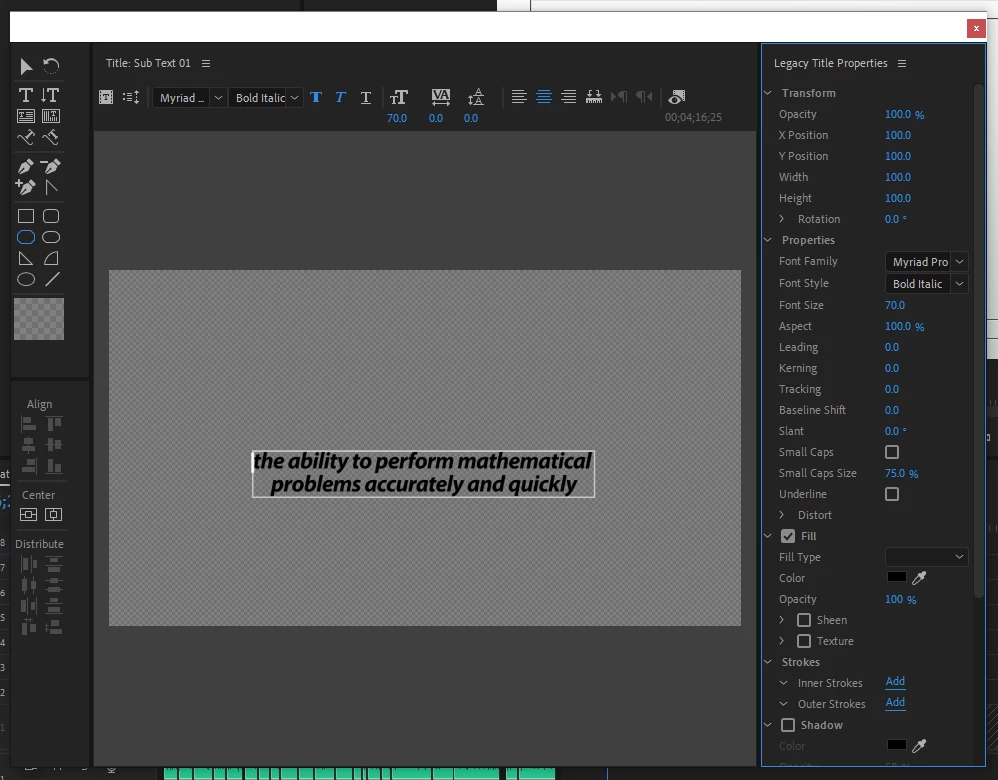
1) First time I open it. This is normal. All three panels are divided properly.
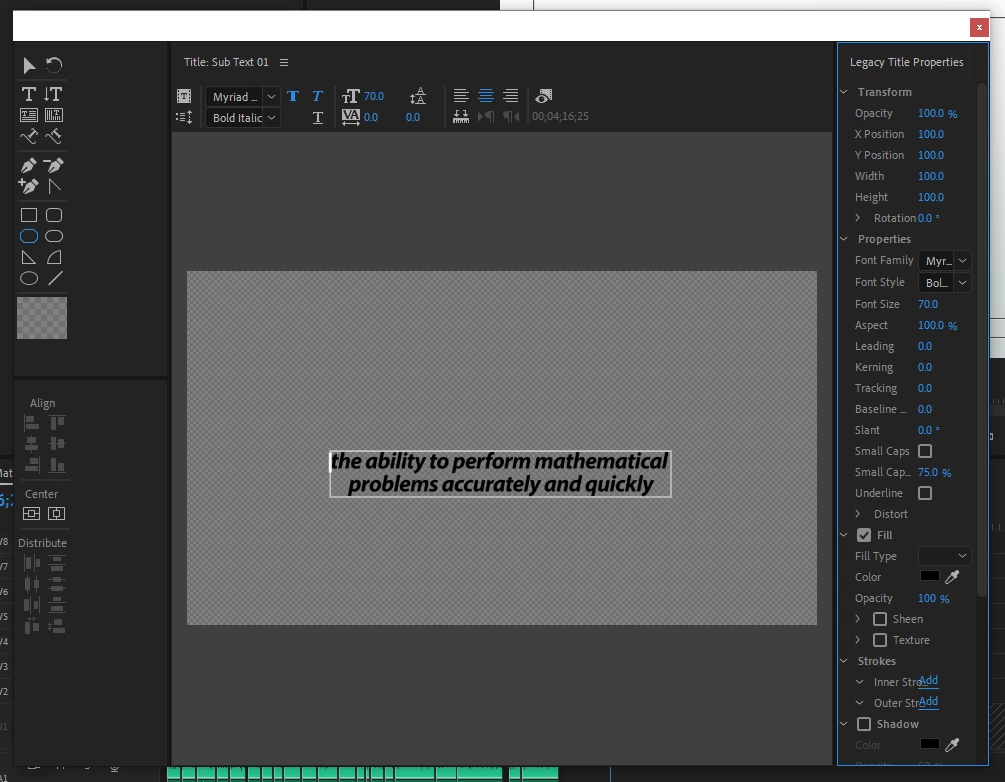
2) Second time I open: Look at the left and right panels. Right panel gets extended and the left one gets squished.
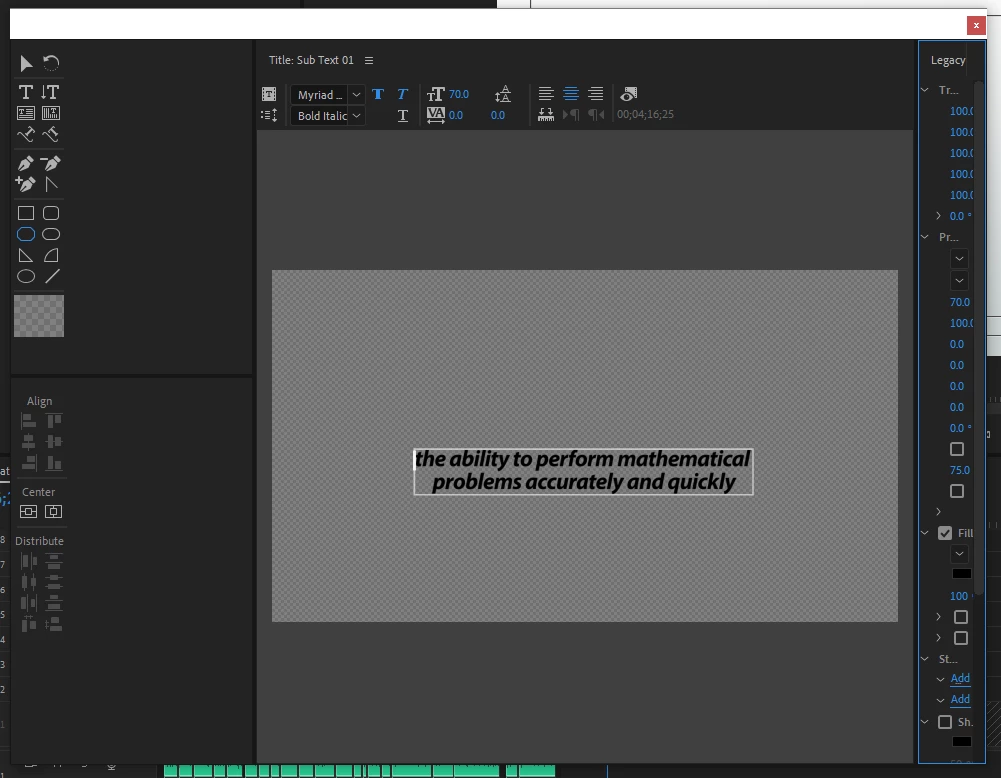
3) Third time I open the title. Again look at the left and right panels.
This gets really annoying when dealing with lots of on screen text!

Any help will be appreciated.

K

Este tema ha sido cerrado para respuestas.
Mejor respuesta de David Kuspa

Hi, we fixed the issue where the legacy titler panels weren't showing up at all in the default workspaces. Unfortunately, this fix came at the end of the 13.0.2 cycle and we ran out of time to fix a side effect, where the panels aren't maintaining their original layout. Given that the original problem prevented access to the legacy titler panels, we wanted to provide that fix ASAP. We hope to get the layout resizing bug (now a separate issue) fixed soon. If you reset the workspace, that should reset the legacy titler panel layout.

David Kuspa | Adobe | Sr. Experience Designer, Lead | Pro Video & Audio

20 respuestas

R Neil Haugen
Legend
May 6, 2021

Users of the Legacy Titler should check out that discussion on updating Legacy Titles to "source graphics" on the Public Beta forum. They give two long list there ... the first, of things that will 'migrate' to the Source graphic. The second, a long list of things that won't.


The process for migrating titles forward is not something that will work completly for many, many graphics. Note that most shapes, rolls, crawls, slant text, rotation and tracking will not be "migrated" to the Source Graphic.


So you will have to rebuild significant parts of many of the graphics. Start with the newly created Source graphic, then remake the rest of your old title.


Like many users, I've been after them to add the Titler's shapes to the EGP since it was created ... but that's not been done. I wish it were otherwise. This would probably be vastly easier if we had those shapes available.


Neil

Everyone's mileage always varies ...
Known Participant
May 7, 2021

Too long too late.


Move to Ae now.

You won't miss LT or EGP.

Participant
October 8, 2020

hello, 

i am a similar issues with legacy title, but insteadof the side panels being the problem, the problem is the slate is verticle instead of horizontal, and i need it horizontal. how do you go about fixing it. 

ricka59407662
Known Participant
October 8, 2020
I am using the next to the last beta issue of Premiere. I have to adjust
... slightly ... the panels each time, but it is so much better than the
regular Premiere. I constantly read that the titler is going away, so it is
strange to me that it would be so much better in the Beta, but it is. So I
do not update as I do not want to lose the titler.

Rick

--


*Lean-into-GOD*
Inspiring
October 8, 2020

Adobe has to know how important the features of the Old Legacy Titler are to so many people. The people that have probably been using it for over 8 years. You think they would fix it but I think they care more about new users.

Known Participant
June 11, 2020

Still not resolved. Why is it resizing in a way that doesn't make any sense ? Shrinking all the tools and parameters ? What are you doing about that, Adobe ? Fix this for crying out loud, it's been ages now. It's a real clog to the workflow.

Ann Bens
Community Expert
Community Expert
June 11, 2020

Might want to get used to th EGP as the legacy title will be removed from the program some day.

Known Participant
June 11, 2020

Hi. I am not sure about the EGP. The "Legacy Title" is a great tool, and the way it is prenseted in a separated panel can benefit some workflow. Still it's not a reason to keep it broken in the new versions... I would rather like them to leave it there and fix it....

Randune23
Inspiring
April 11, 2020

It's 2020 and you still haven't fixed this issue.  Also, when you open up Legacy Title it slows to a screeching halt...why is that?  I have a super fast Dell Precision workstation w/ two CPUs and TONS of RAM.  So why the slowdown?  It's like typing in sllllllllllllooooooooooowwwwwwwww mmmmmmmmmmoooooooottttttttiiiiiiiiooooooooonnnnnnnnnnn!!!

Participant
April 10, 2020

not fixed yet. 

Ann Bens
Community Expert
Community Expert
April 10, 2020

The legacy titler still has issues with its layout.

R Neil Haugen
Legend
April 3, 2020

Good comments.


One thing that happens every year at NAB ... (and yea, gonna miss that this year ... ) ... is talking with the engineers and development staff that Adobe and the other companies bring. Bear in mind, all the engineers I've talked with are pretty decent editors in their own right ... so this is stuff they really get into.


But ... oh my ... are they ever engineers! Gotta love 'em, but ... just wow. Some of the issues that from a users' perspective aren't fluid ... stem from the engineer's designing beautiful code. Making the UI look ... or function ... like the user would prefer, would mean adding clunky things to the code as far as they see it ... and ... well ... you can see their eyes as their mind recoils in horror.


"You can do that now ... just do this, then this, followed by clicking here to set this to X and then go back here and see, it works fine."


That's what, five extra steps? None of them obvious?


"It just works fine as long as you do it correctly."


Every freaking time I need to do those five extra steps that I have to remember?


Blank ... yet intense ... stare.


I've had some long detailed discussions with a few over EGP/mogrt issues. Jarle Leirpoll ("who wrote the Book") has been discussing things with them also. And a lot of improvements have come about over time. There's a few things still needing to fix, such as ... giving us a quick way to make shapes. Such as ... you need a bar under a lower-thirds text line, and it needs to be so many pixels tall with ends chopped at 45* ... and you need to be able to stretch it to fit under text without either getting thicker or having the ends change angles.


Seems like that should be a darn simple thing, but ... it sure ain't to create in Premiere. And just taking a bar and scaling it horizontally typically will end up changing the angles of the ends. NOT usable.


One of the engineers finally came up with a way to do this by making a graphic 'fill' with a linear gradient, and setting a couple extra opacity stops ... and changing the angle of the bar on the controls ... and futzing ... see, it can do it!


Right. They do have staffers though who listen in and go back to talk with the engineers. So ... I'm hoping we'll get some of that sorted because parts of this are ridiculous from a user point of view. And ... we pays their bills, right?


Neil

Everyone's mileage always varies ...
R Neil Haugen
Legend
April 3, 2020

Different strokes for different folks ... I've always felt the old Legacy Titler was clunky. And the code for it is purely antideluvian ... so yea, it's headed for the dust bin. Though of course there are many who are very comfortable with it.


This last cycle, with adding all of the Titler's keyboard shortcuts to the EGP has been a huge help for production with the EGP/mogrts setup. There are still a few things that need re-making in it, such as ... learning how to handle anchor points and pinning can be counter-intuitive at times. Shapes aren't as flexible and versatile as we need. But ... with another cycle, those will probably also improve.


In general, I can get anything done I need quickly and mostly easily.


Neil

Everyone's mileage always varies ...
R Neil Haugen
Legend
February 18, 2020

It would be nice if this stuff ... the cameras, computers, media, and software didn't always seem to be in a permanent state of flux. Keeping up with all the shifting and changing of things is both taxing at times and annoying.


But ... ain't no way of stopping it. Ah well ... 😉


Neil

Everyone's mileage always varies ...
Inspiring
April 3, 2020

It would also be nice if we could keep tools that simply work and aren't so clunky as the essential graphics panel. 🙂

R Neil Haugen
Legend
February 17, 2020

Hunter,


Good comments ... yea, you're correct, Premiere was designed around broadcast standards. Which actually is the basis still for nearly all media, as well ... the amount of actual HDR produced professionally is fairly small. That will be growing and a lot of people want in, but ... jeepers ... the cost of producing profesionally referenced HDR is stunning.


In another forae, I'm in discussions with a number of 'power' users of Premiere and Ae and other apps. One said the problems with limits in mogrts currently in Premiere make him choose to create all his graphics in Ae, and simply comp them into his Pr projects.


I've done enough Ae comps in Pr, especially on medium/lesser machines, to not ... prefer ... using Ae comps. My stuff is also web-bound and for some local clients. So doesn't justify a mega-machine/RAID array to work upon. Although ... the rig I'm ordering now is about double the cost of any computer I've yet used. Sigh.


So ... as Jarle's books preaches and teaches, when I do go to Ae to create a graphic it's for something like the animations for text that are very robust and easy there. But ... I export that as a mogrt with all options for modding that in Pr that are available moved to the EGP panel priort to exporting the mogrt.


That's the workflow that I most suggest ... if you need things not available in Pr, go to Ae, make a mogrt and include all the options you can, then export to a library for use in Premiere.


And the cool thing about this workflow ... if you're working in a shop or network facility. When the 'standard' for the company's logo/text/colors changes, you simply re-do the mogrt in Ae, export that new one and remove the old one from the library or ... simply export the new one with that standar mogrt's name, overwriting that in the Library.


Then the mogrt available for everyone as of that moment is with the new company standard for their graphics.


Neil

Everyone's mileage always varies ...
Known Participant
February 17, 2020

Thanks! That sounds like my new workflow.

Time to stop emulating Chyron by proxy. Probably way past time...

--
Hunter Cressall
Senior Production Associate, Pack Health

R Neil Haugen
Legend
February 17, 2020

Hunter,


There are some things about graphics in Premiere that I criticise regularly, some things I push for. Such as currently on another forum I'm pushing for simpler tools for creating shapes in Premiere ... an ability to say use the Program monitor's pen tool to select a vertice of a shape, and have an Angle setting appear, so you can lock that vertice to X angle. There are ways to accomplish this, but they take a number of steps and certainly aren't intuitive. Here's a request I've just filed:


https://adobe-video.uservoice.com/forums/911233-premiere-pro/suggestions/39731842-allow-users-to-set-locked-angles-for-shapes-with-s


So ... yea, some things need improvement. And their UserVoice system is the place to jump on or add things, and ... as Adobe lives by metrics, they collate all reports/comments and pass those up to the upper managers who decide budgets. Give 'em some metrics. PLEASE.


I haven't used the "Legacy Titler" over the last three years for anything but testing other user's troubles with it. I work with Premiere and for the things that are better done with graphics in Ae (by design of the apps) ... I work with Ae/Pr workflows.


I would suggest that learning the current tools replaces anything you could do in the Titler. And a lot more. There's an eBook by Jarle Leirpoll that, while Adobe was doing a final check-through, they bought out for use on their websites, and it's available for free to all. This gives a decently complete and clean look at building mogrts in Ae and porting them for deployment in Pr. [Note: I am credited as spell-checker and also served as basic grammarian/tester for the book.]


Leirpoll ebook, Making Mogrts


Their current system is actually built with the concept that Ae is where the more complex graphics are built, and Pr has a 'basic' toolset for simpler things.


Neil


Everyone's mileage always varies ...
Known Participant
February 17, 2020

Neil,

Thanks for the overview. I sense you are correct but with a caveat. In
my experience, Pr most closely resembles an online NLE for broadcast.
I use it for the web, broadcast and film. For me, its toolset aligns
most closely with broadcast. For that reason, the Ae/Pr graphics
workflow is, at this point, disjointed. A broadcast workflow
necessitates being able to see your overlays floating over an edit in
real time. Something as simple as lower thirds can be agonizing when
hot-swapping between Ae and Pr. Not always. Not even often but it can
be depending on the complexities of layer interaction and your client
(and you know what I mean). The reason both Legacy and EGP are useful
is their immediate feedback. I honestly don't care which one works but
one MUST be 100%. I do a lot of work in Ae and almost none of that
work is titling. Workflow is dictated primarily by time and right now
Adobe is in an awkward stage where user time seems to be their lowest
priority.

I will be sure to send respectful thoughts over to User Voice.

Thanks for the insight and open mind.

--
Hunter Cressall
Senior Production Associate, Pack Health
[personal info deleted by mod]

Kevin-Monahan
Community Manager
Community Manager
February 16, 2021

Hey Hunter,

Sorry for the frustration with Legacy Titler. I do recommend forcing yourself to switch to the Essential Graphics panel workflow. You can get things looping from in to out so you can make adjustments to your graphics while monitoring video for most titling duties. When there is something required from After Effects, then I'll go there, but I usually don't need it for basic titling duties. One basic rule of thumb is to keep the Essential Graphics panel and the Effect Controls panel open at the same time. That can help have access to some of the animation features, like keyframes and the ability to show or hide them.


Good luck with your efforts.

Kevin

Kevin Monahan - Sr. Community & Engagement Strategist – Pro Video and Audio