
Participating Frequently
December 24, 2018
Answered

"Legacy title" panel size changes every time I reopen

  • December 24, 2018
  • 20 replies
  • 30625 views

Hello Adobe community,

I am doing a new project where I have to use a lot of on screen text. I am using "Legacy Title" to create those text.

The problem that I am having is that the size of the panels change every time I reopen the titles.

Below are the images:

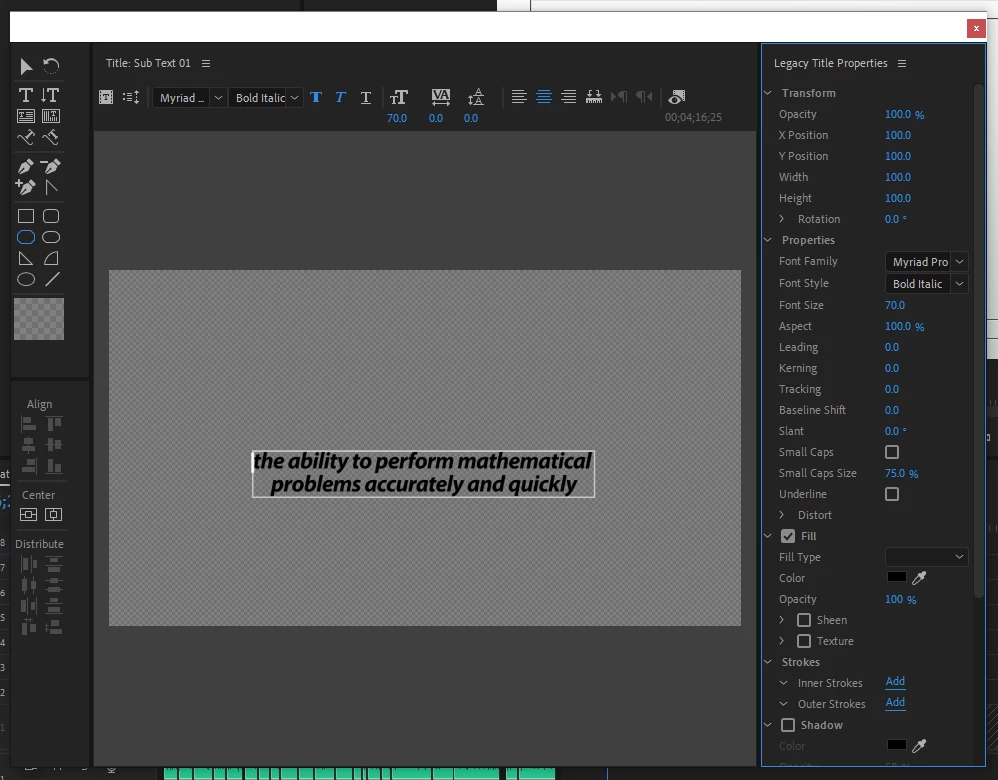
1) First time I open it. This is normal. All three panels are divided properly.
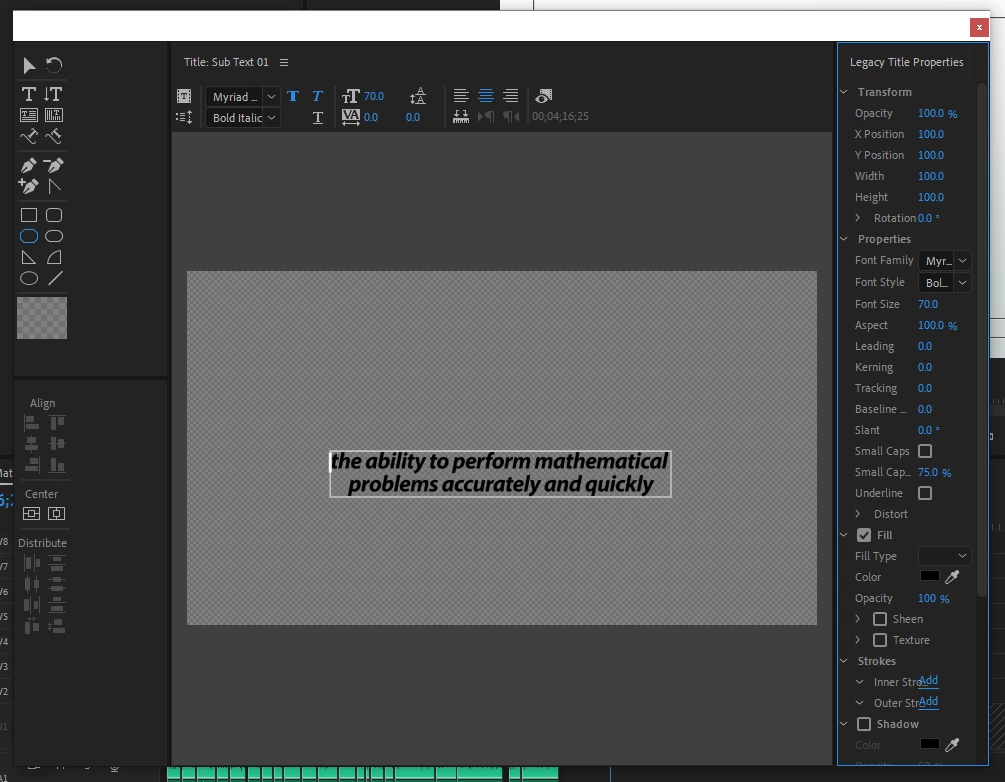
2) Second time I open: Look at the left and right panels. Right panel gets extended and the left one gets squished.
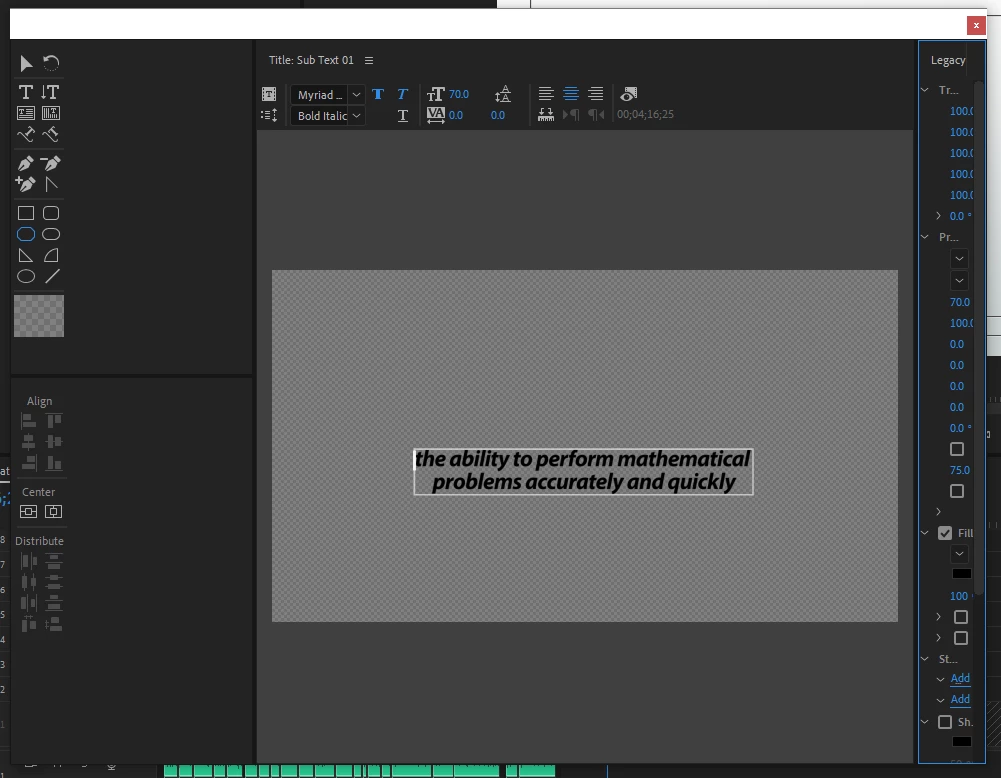
3) Third time I open the title. Again look at the left and right panels.
This gets really annoying when dealing with lots of on screen text!

Any help will be appreciated.

K

This topic has been closed for replies.
Correct answer David Kuspa

Hi, we fixed the issue where the legacy titler panels weren't showing up at all in the default workspaces. Unfortunately, this fix came at the end of the 13.0.2 cycle and we ran out of time to fix a side effect, where the panels aren't maintaining their original layout. Given that the original problem prevented access to the legacy titler panels, we wanted to provide that fix ASAP. We hope to get the layout resizing bug (now a separate issue) fixed soon. If you reset the workspace, that should reset the legacy titler panel layout.

David Kuspa | Adobe | Sr. Experience Designer, Lead | Pro Video & Audio

20 replies

Participating Frequently
January 2, 2020

Hi, I've been having this problem for the past year too. When will this be fixed? Anyone come up with a solution? 

Chupon
Participant
December 6, 2019

It's been about a year since this issue was acknowledged by Adobe. It remains broken, and still severely interrupts my workflow.


What on Earth are you guys doing? This isn't a wildly complex feature. It's a layout resetting. How could this possibly still be broken a year later? It's a pretty significant issue and a frequent waste of time.

Ann Bens
Community Expert
Community Expert
December 6, 2019

Dont think Adobe want to spend time on a feature that is eventually going to be deleted.

ricka59407662
Known Participant
December 6, 2019

Sigh. Been with Adobe for years, but this sure wastes a lot of my time having to redo workspace every time. Saving as sub-sequence does nothing. Is there an alternative that would be Premiere compatible? Probably not or someone would have shared. 

Ann Bens
Community Expert
Community Expert
November 5, 2019

Workspace still a mess.

Also in 2020 Arrange has been grayed out which will prevent you from changing the stack order.

Ann Bens
Community Expert
Community Expert
October 2, 2019

Might want to get used to the new Graphics Panel. The Legacy titler will never get updated.

ricka59407662
Known Participant
November 5, 2019

Sigh, just updated Premiere and still unable to fix legacy title workspace. I have to make a sub-sequence for every title I want to save with effects; margins, crop etc. Is there an alternative?

Participant
October 2, 2019

Bump. Exact situation (the same panels warping the same way) still happening here with me.

Department4
Known Participant
June 20, 2019

This fix ("Reseting Window Layout") worked for me at first, but now it's right back to the problem before. Each time I reopen the Legacy Title tool, certain panels are squeezed off to the side, unusable. This is super frustrating. And amazingly I still prefer the Legacy Title tool to the horrific Essential Graphics panel...

Participant
September 15, 2019
Any timeline for that bug to be fixed? It is super annoying 😞
Participant
November 4, 2019

...Still Loading...

BMcCarty
Known Participant
April 11, 2019

Still having this problem. The title window scoots to the right every time I close the panel, until the properties window eventually becomes a tiny little sliver. Really annoying...

BMcCarty
Known Participant
April 11, 2019

I just installed the 13.1 update, and the legacy title tool is still messed up.

SpookyDude_BW
Participant
May 12, 2019

Same here. This is REALLY annoying Adobe. It's been like it for a while now... isn't it time to stop sipping your coffee and sort this out?

KeithHopkin
Inspiring
March 26, 2019

Can we all agree that a "legacy" tool that's been around since the beginning of Premiere  shouldn't be breaking????

Stan Jones
Community Expert
Community Expert
March 26, 2019

KeithHopkin  wrote

Can we all agree that a "legacy" tool that's been around since the beginning of Premiere  shouldn't be breaking????

That got me chuckling! So true, and yet, we might be wrong!

The tool is legacy, but the way it "lives" in the workspace is constantly changing. And its nature (a collection of panels in a window) made it an oddity. Yes, there are floating panels, but the legacy title seems to float in its own universe.

Yes, I hope they get it fixed!

KeithHopkin
Inspiring
March 26, 2019

Yeah, I can see how the complications can arise and how recent years of integrating new UI will cause issues but, well, I could go on for hours about this

mandicreally
Inspiring
December 25, 2018

Yea, this has been happening to me too.  Before that the tool bars from the Legacy Title page disappeared and I had to re-add them every time I opened a new Legacy Title, it was infuriating.  Seems to be a thing since 2019 launched.

David Kuspa
David KuspaCorrect answer
Inspiring
January 2, 2019

Hi, we fixed the issue where the legacy titler panels weren't showing up at all in the default workspaces. Unfortunately, this fix came at the end of the 13.0.2 cycle and we ran out of time to fix a side effect, where the panels aren't maintaining their original layout. Given that the original problem prevented access to the legacy titler panels, we wanted to provide that fix ASAP. We hope to get the layout resizing bug (now a separate issue) fixed soon. If you reset the workspace, that should reset the legacy titler panel layout.

David Kuspa | Adobe | Sr. Experience Designer, Lead | Pro Video & Audio

Known Participant
February 17, 2020

The ancient Titler is not a "core" section of Premiere, and all work forward will be put into the replacement. And over time,  at some point, the Titler will disappear.


Life moves forward. Tools change. Including software. Whether we like it or not the best current effort is to posit for changes in Essential Graphics to handle anything you do in the Titler that the EGP doesn't allow.


Which is getting to be fewer things over time.


Neil


I have to disagree: PP CC is presumably a professional tool for web
and broadcast. Either the EGP or the LT (either one) must work 100% or
PP is essentially broken. I suppose a workflow could be to create
graphics in AE and export them to PP but I might just as well be using
a Chyron at that point. So long as EGP isn't quite a replacement for
LT, then LT should function at 100% or PP is degraded as a product.
I'm not a workflow snob - I've transitioned from Avid to Final Cut to
Premiere with few complaints. What I can't abide is flagging support
and Adobe is starting to feel a lot like Avid with promised support
but lackluster delivery.

My humble opinion is that they simply have too many brands in the
fire. I'd love them to hack off a few branches and focus on their core
video and audio assets for a couple of years. But admittedly that's
just me.

--
Hunter Cressall
Senior Production Associate, Pack Health

Ann Bens
Community Expert
Community Expert
December 24, 2018

Reset workspace?

kerinshAuthor
Participating Frequently
December 25, 2018

I tried resetting, but the issue is still there. I was kind of wondering if this occurs on your system as well? If not I will have to re-install.

Thank you for the response!

Ann Bens
Community Expert
Community Expert
December 25, 2018

Yes I have seen this also.

Titler is still buggy even after fix in 13.0.2