Participant
November 26, 2022
Answered

Lines between keyframes not shown in ECP timeline

  • November 26, 2022
  • 2 replies
  • 999 views

Hi All,

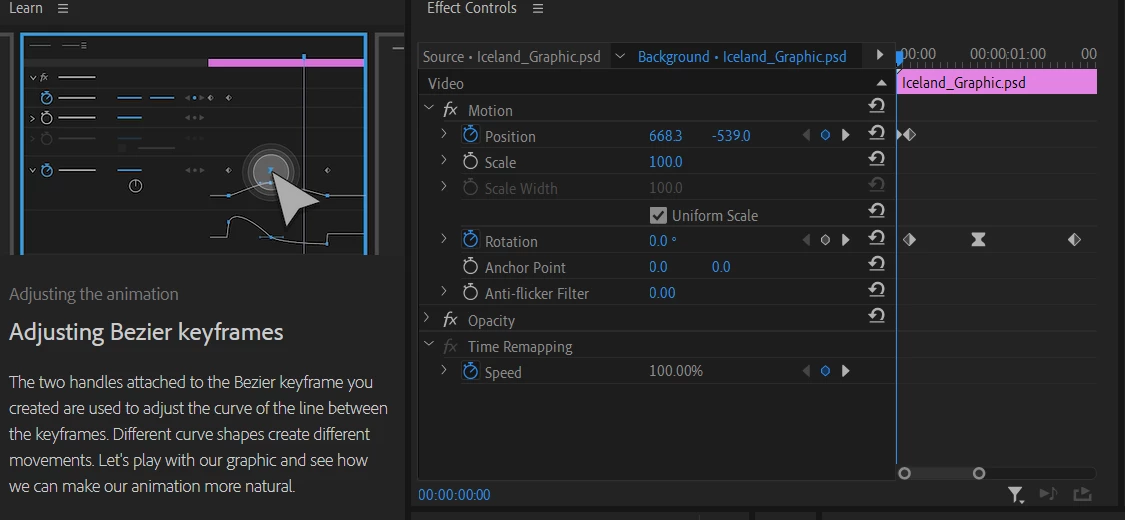
I'm currently running through the learning videos in premier pro (animations one). I'm at the point where I need to adjust the handles on the bezier keyframe to manipulate the curve of the line. However, I cannot see the line or the handles, only the keyframe markers. Can someone please advise?
This topic has been closed for replies.
Correct answer Samiul27313757dapd

It didn't work in this case, but I've managed to solve it by expanding the rotation setting instead.

Thanks for the help, appreciate it. 

2 replies

Community Expert
November 26, 2022

You need to twirl open the speed graph:

Samiul27313757dapdAuthorCorrect answer
Participant
November 27, 2022

It didn't work in this case, but I've managed to solve it by expanding the rotation setting instead.

Thanks for the help, appreciate it. 

R Neil Haugen
Legend
November 26, 2022

Have you clicked on a keyframe? The splines should then appear.


Neil

Everyone's mileage always varies ...
Participant
November 26, 2022

I've clicked on all the key frames, the lines haven't appeared still.