Participant
January 7, 2025
Answered

Link audio to original video file in timeline

  • January 7, 2025
  • 1 reply
  • 210 views

When inserting a video file with its audio on the timeline, they are no longer automatically linked as before. If you move the video, its audio will not move with it. In previous versions, they were linked, but in the latest version, the matter has become very difficult and tiring.

Correct answer PaulMurphy

To link audio back to the original video file in the timeline, ensure the Linked Selection button is enabled. You can find this button in the timeline panel, located just below the timecode display and to the right of the Snap button.
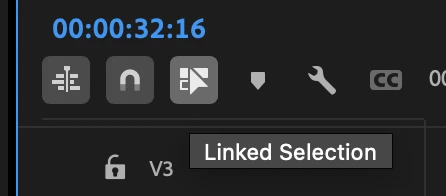
When Linked Selection is turned on, selecting a video clip in the timeline will automatically select its linked audio, and vice versa. If the button is off, the video and audio clips can be selected independently.


1 reply

PaulMurphyCommunity ExpertCorrect answer
Community Expert
January 7, 2025

To link audio back to the original video file in the timeline, ensure the Linked Selection button is enabled. You can find this button in the timeline panel, located just below the timecode display and to the right of the Snap button.

When Linked Selection is turned on, selecting a video clip in the timeline will automatically select its linked audio, and vice versa. If the button is off, the video and audio clips can be selected independently.
