Participating Frequently
May 4, 2018
Question

Link/Group multiple clips?

  • May 4, 2018
  • 2 replies
  • 778 views

Currently my timeline looks like this:
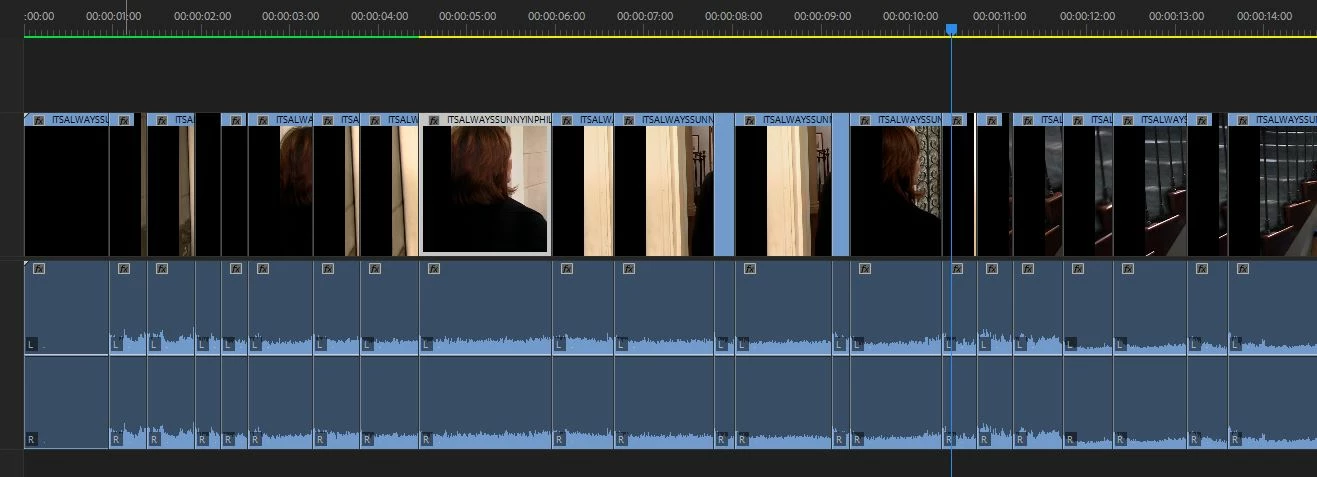
Where I have a lot of separated clips with their own matching audio file.

As you can see, when I click the video portion, the audio portion of the clip does not get selected as well. All these groups are unlinked.

Is there any way to link each video clip to the audio clip below it?

Using the built in Link or Group function I would have to select them column by column and I have over 1000 columns so that would take forever

    This topic has been closed for replies.

    2 replies

    Philéas
    Participating Frequently
    October 16, 2023

    Batch-Linking multiple clips to their corresponding audio would be a great feature.


    I use a lot the workflow where I import clips from a sequence opened in the source monitor. But the huge issue is that when I flatten thoses clips in the final timeline, there all unlinked, which means that I need do relink them one by one, as in this example.

    Community Expert
    October 16, 2023

    Make sure this icon is selected, it might be your problem:

    Philéas
    Participating Frequently
    October 16, 2023

    Yeah, I checked that linked selection was active.


    The issue is that when I use the Multicam option to flatten clips, the link between the video/audio clip goes away, so I need to relink every clip manually.

    Graeme Bull
    Community Expert
    Community Expert
    May 4, 2018

    If you need to link each one individually, no, there isn't an automatic way to do that. If you just want everything linked up (you probably know this), you could just make a new sequence off of that one.. but I don't think that's what you want. Sounds like a lot of work coming your way!