


Participant
June 17, 2025
Answered

Little + symbol appears after deleting track / track is not deleted

  • June 17, 2025
  • 1 reply
  • 123 views

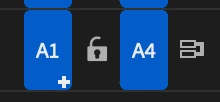
There is a little + symbol apearing after I'm deleting a track. Then when I click on it the deleted track is back again. So I basicly can not delete any track and my work gets a mess. How can I get rid of this nonsens?
Correct answer PaulMurphy

The plus (+) icon appears when your source clip has more video or audio tracks than your sequence. This usually happens when a clip in the Source Monitor or Project panel requires more tracks to be fully inserted.

Clicking the icon will add the necessary tracks so all parts of the source clip can be added correctly. If you prefer not to add extra tracks, simply avoid clicking the icon.

1 reply

PaulMurphyCommunity ExpertCorrect answer
Community Expert
June 18, 2025

The plus (+) icon appears when your source clip has more video or audio tracks than your sequence. This usually happens when a clip in the Source Monitor or Project panel requires more tracks to be fully inserted.

Clicking the icon will add the necessary tracks so all parts of the source clip can be added correctly. If you prefer not to add extra tracks, simply avoid clicking the icon.