Participating Frequently
September 11, 2017
Answered

Loudness Radar in Premiere Pro CC 2017 for CALM compliance

  • September 11, 2017
  • 2 replies
  • 9288 views

I have a TV spot that's been flagged as being too loud for CALM compliance. In looking at other posts re: this issue, most are from older versions of PP so not sure they apply to my situation.

I'm trying to pull up the the Loudness Radar and have not been successful. I can see it in the Audio Track Mixer, but can't pull up the radar graphic to verify visually the effect. Even so, when I set the Loudness Radar to -19 (the requirement) in the Master Track, I can't hear any difference when I turn the effect on and off.

Could anybody out there help me with this? I'm not an audio guy so I'm out of my comfort zone here.

Thanks!
This topic has been closed for replies.
Correct answer David Arbor

Again, the Loudness Radar doesn't do anything to your audio. It's a measurement tool to let you know where your program stands, and in your case it's too loud. Your overall measurement is -21.2 LKFS, which is more than the ±2 dB you're allotted. With the ATSC A/85 preset, -24 is where things start to go yellow and your whole program should be floating around -24, yours is too loud. You need to lower your levels so they fall in the -24 range.

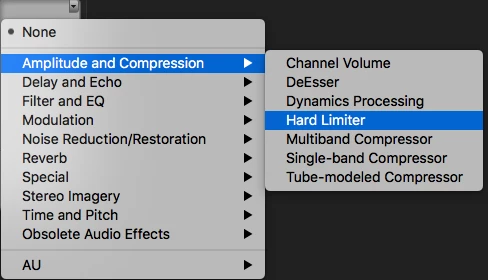
A limiter should be applied after to catch any errant levels that might be too loud. See the attached screenshot for where that is. This does not mix your audio, it is a final step. Once applied, switch the radio button to "True Peak" and the Maximum Amplitude to -2 dB. This will only limit levels above -2 dB unless you have your Input Boost set to something other than 0 dB. Input boost will raise your entire signal up, but you will still get limited at -2 dB, so if you find that your audio is louder after applying the Hard Limiter, check that setting.

Neither of these tools are substitutes for a proper mix.

2 replies

Inspiring
September 11, 2017

The Loudness Radar should be applied to your Master Track via the Audio Track Mixer. You can click one of the empty slots, go to Special>Loudness Radar

Double-click it to open and set your preset the correct standard.

The radar doesn't do anything to your levels except monitor them. You need to mix your levels properly, and then for good and safe measure, throw a Hard Limiter on the Master Track (above your Radar) to make sure nothing does over the requested levels. Your spec sheet should tell you everything you need to know, but the CALM act specifies the below:

  • In accordance with ATSC A/85 RP, loudness levels should be -24 LKFS. Minor measurement variations of up to approximately ±2 dB about this value are anticipated, due to measurement uncertainty, and are acceptable.
  • The true-peak level should be kept below –2 dB TP (True Peak: the maximum absolute level of the signal waveform in the continuous time domain, measured per ITU-R BS. 1770 Annex 3) in order to provide headroom to avoid potential clipping due to downstream processing.

So you should be using the ATSC A/85 preset in the meter, and then add the Hard Limiter to your Master Track and click the "True Peak" radio button and change your settings based on the second bullet point.

These are the steps that should be followed after you mix your levels properly for broadcast. Your mix could be too low and the limiter won't fix it, or it could be way too loud and the limiter will clamp your levels but you might get clipped audio. Make sure to mix so you're just barely hitting the yellow area when the Radar is playing back. Also note, that you have ±2 dB to work with around your -24 LKFS levels (which can be seen in the Radar). All the information is there, but it's definitely different to look at if you're not used to working with the Loudness Radar.

Community Expert
September 11, 2017

The loudness radar does not change any levels, it just tells you what they are. It is a real time meter so you have to add the radar to the master track in the track mixer as an effect, open the radar and then play the entire spot. The radar will then show you the loudness level, you then have to adjust the master fader to make the loudness what you want.

Participating Frequently
September 11, 2017

Thanks for the thorough answer, Richard. Just to make sure I understand, if I go with the settings you suggest (and required by the spec sheet I have), do I then just render my video and those settings will be applied? (See attached screen caps.)

I wasn't totally sure about how to set the Hard Limiter, but it looked like that was covered in the settings (last one in the middle image).

David ArborCorrect answer
Inspiring
September 11, 2017

Again, the Loudness Radar doesn't do anything to your audio. It's a measurement tool to let you know where your program stands, and in your case it's too loud. Your overall measurement is -21.2 LKFS, which is more than the ±2 dB you're allotted. With the ATSC A/85 preset, -24 is where things start to go yellow and your whole program should be floating around -24, yours is too loud. You need to lower your levels so they fall in the -24 range.

A limiter should be applied after to catch any errant levels that might be too loud. See the attached screenshot for where that is. This does not mix your audio, it is a final step. Once applied, switch the radio button to "True Peak" and the Maximum Amplitude to -2 dB. This will only limit levels above -2 dB unless you have your Input Boost set to something other than 0 dB. Input boost will raise your entire signal up, but you will still get limited at -2 dB, so if you find that your audio is louder after applying the Hard Limiter, check that setting.

Neither of these tools are substitutes for a proper mix.