



Low CPU & GPU Utilization (random dips and spikes) during export
I am exporting through Adobe Media Encoder 2025 (but not just exclusive to that application it is like that in premiere pro 2025 as well) using Hardware Encoding and CUDA GPU acceleration. My NVIDIA Studio driver and the apps are updated to the latest firmware.
The export works, but performance is inconsistent. There are random periods where export progress slows down heavily, while total CPU use may be below 20 to 50% and GPU use can drop below 10%, but then would randomly go up to 100% and stay like that for a small amount of time.
I am aware that total GPU usage may not reflect NVENC activity, so I am also checking the Video Encode engine in Task Manager. However, I am trying to determine whether this is normal behavior from Premiere's render pipeline or whether there is a known Media Encoder or Premiere issue.
My timeline does not show unrendered sections, and the effects I use are GPU accelerated (no red bars anywhere). My system specs are:
CPU: Ryzen 9 5950X
GPU: RTX 5080
RAM: 32 GB DDR4 4000 MHz
OS: Windows 10 Pro
Storage: A 2tb Hard Drive (but the drive usage is not maxed out or close to maxing out)
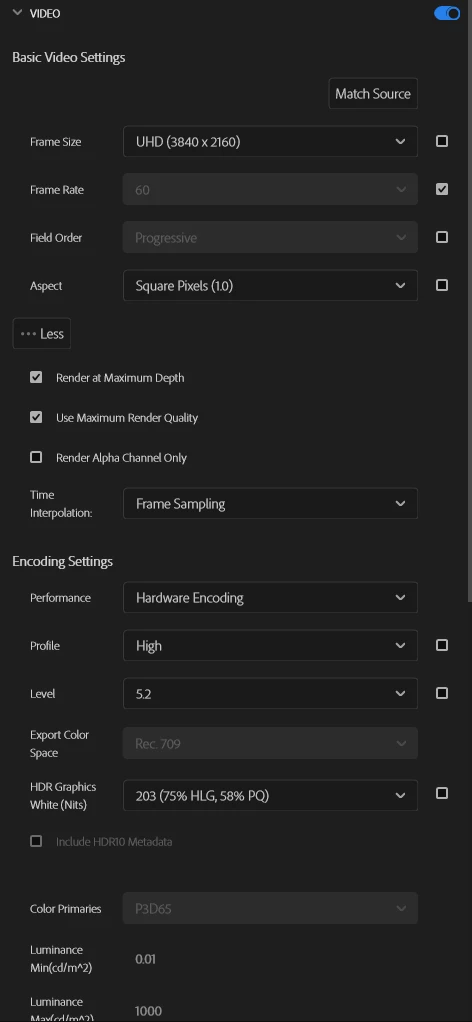
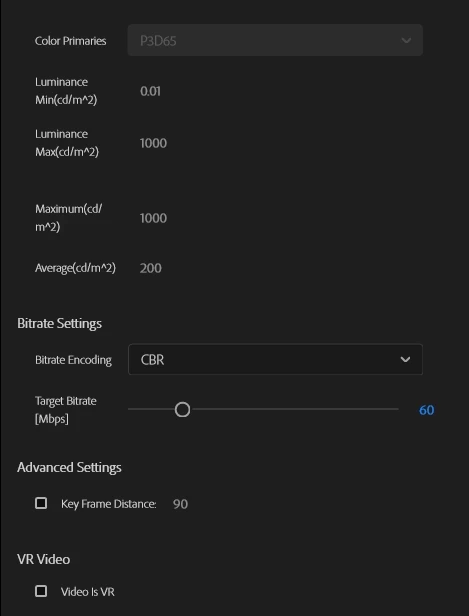
Export: H.264/HEVC with Hardware Encoding enabled
Has anyone seen exports where both CPU and GPU appear underused while export speed slows down? Is there a known cause related to Media Encoder, Premiere cache, Dynamic Link, third-party effects, source codecs, or hardware decoding?
The only 3rd party plugins that I use are Sapphire plugins (such as s_shake etc.) and those are GPU accelerated. It mainly consists of a gameplay layer (1440p from OBS, and it is NOT a VFR file as I checked with Mediainfo) and then a webcam layer as I make gaming videos. The webcam recording is 4k 30fps at 10 bit 4:22 (also not VFR) from my camera but being 10 bit footage could be why the speed is slow. I was just curious to see if there was a possibility that it is a Premiere and Media Encoder issue (like not being able to keep up with my hardware).
If you need anything else just lemme know and thank you for taking the time to read through this!
My export settings are:
 AdChoices