Known Participant
December 6, 2017
Answered

Lumetri Color export killing memory

  • December 6, 2017
  • 1 reply
  • 990 views

I've been doing some color grading lately and so am using Lumetri Color.  Only other filter is an unsharp mask that is doing just a slight sharpening.  My footage is 3 hours long and on the V2 timeline have numerous non-overlapping adjustment layers for color adjusting different parts of the video.  I've tried on three computers and two versions of Premiere Pro 2017 and 2018 and it keeps running out of memory.  Usually saying that but also saying out of drive space which isn't possible (i.e.13TB available).  Here is a fun fact half way thru my rendering
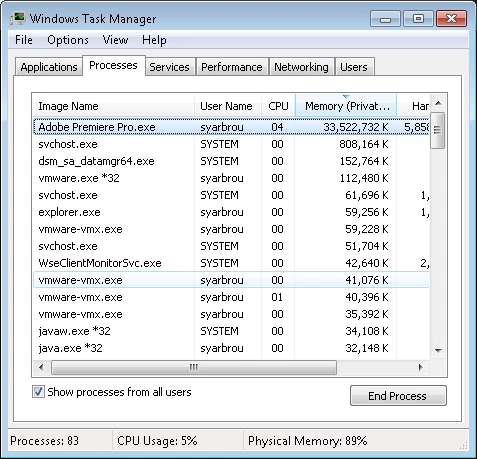
Because of the issues on one computer, moved it to one that has 64GB free.  No joy.  Again this is an issue with 2017 and 2018 and the only real thing that could be causing this.  Especially since the base footage was originally rendered by Premiere using Lagarith lossless codec.  This issue sounds like it's been going on for years.  See issues with this since 2015.  Thoughts?  Never gonna be fixed?  Alternatives to Lumetri that would not have this issue?

For reference, happens in Windows 7 and Windows 10.


Thanks.

JR   

    This topic has been closed for replies.
    Correct answer R Neil Haugen

    Thanks for the reply.   Not sure how the drive factors in since it seems to be more memory orientated the actual problem, but my Windows 10 computer has a 750GB SSD with 300GB free (video averages 135GB rendered), and my Windows 7 box has about 18TB (yes TB) free.  That Windows 7 box I can get it to render, but it sucks up all of my 64GB of RAM and runs for days even though it starts out saying 9 hours.  The 64GB system with Windows 7 is using SATA 15k RPM drives and they are sleeping during the render process basically.

    Should be noted that I have seen the memory utilization drop down from time to time during the rendering, however from an OS perspective Premiere never releases the memory.  It holds onto it under the "committed" area of task manager.

    Thanks.

    JR


    Just checking on the drive situation because during renders PrPro takes about 4-5 times the disc space of the final file while working on the export. Some folks think that having X space should be plenty, but with a longer video it can take a lot of available drive space to complete.

    You seem to be above that ... and that behavior is really nasty. I'm having an issue with SpeedGrade 2015.1 (yep, I still have that one and use it with 2018 projects) but only during exports direct from Sg ... and I've never had Sg memory issues before. During an export it keeps climbing though slowly. A short clip can complete before 'wipeout' ... but a 6 minute clip, it will max memory before finishing and boot the export out.

    Your issue seems similar ... but I'm not having any issue with 2017 or 2018 PrPro on Lumetri in exports.

    Have you filed a bug report? They don't respond, but all filings go on the collated list distributed to all managerial types.

    Neil

    Adobe Bug Report /Feature Request form ...

    https://www.adobe.com/go/wish

    1 reply

    kulpreet singh
    Inspiring
    December 8, 2017

    Hi jriker1,

    Is this an updated project or a new project in CC 2018 version? Happening with a specific project or all of your projects?

    Any 3rd party plugin/effect installed?

    Thanks,

    Kulpreet Singh

    jriker1Author
    Known Participant
    December 8, 2017

    New project in 2018 converted project when try in 2017.  Only NeatVideo installed but that works fine and not used in this timeline.

    JR

    Legend
    December 8, 2017

    You've got a lot of variables there.  Let's try and limit those a bit.

    Choose a Windows 10 machine running Premiere Pro 2018.  Only test on that one machine.  List out the specs of that computer.