matthewr927
Known Participant
May 16, 2020
Answered

Lumetri Color Sliders

  • May 16, 2020
  • 2 replies
  • 1484 views

This may be a really dumb question, but is there any way to use keyboard arrow keys to make fine adjustments to lumetri sliders such as exposure, contrast, etc?

Correct answer Meg The Dog

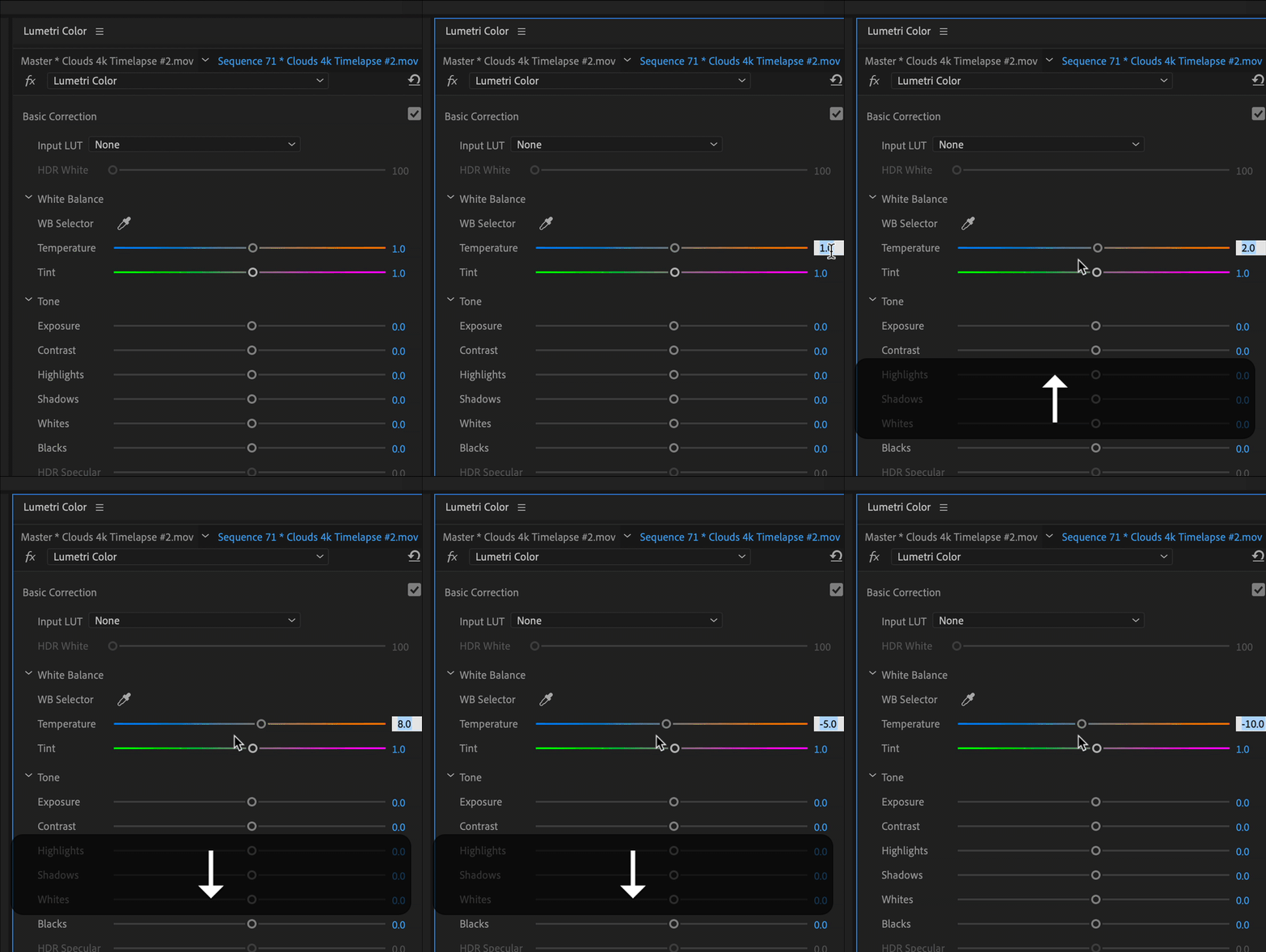
Click to select the numeric value you want to change and then use the up and down arrows.

MtD

2 replies

matthewr927
Known Participant
May 16, 2020

Wow. Thank you 

Ann Bens
Community Expert
Community Expert
May 16, 2020

As a follow up:

Small increments 0,1: hold down ctrl

Larger ones 10.0: hold down shift.

J Schaap
Participating Frequently
November 24, 2021

I have literally been searching for this answer for years! Thank you so much Ann! With this information I was able to set up my Contour ShuttlePro V2 so that I can control the adjustment of the sliders with the job wheel. I was also able to set up the control and shift key for fine and larger adjustments. Awesome!!

Meg The DogCorrect answer
Inspiring
May 16, 2020

Click to select the numeric value you want to change and then use the up and down arrows.

MtD