Donlee2
Known Participant
May 16, 2017
Question

Lumetri Scopes: sharpen over 100 and below 0

  • May 16, 2017
  • 1 reply
  • 6487 views

Hello,

I am learning how to read Lumetri Scopes by just watching others' work via internet.

And I came to face this problem.
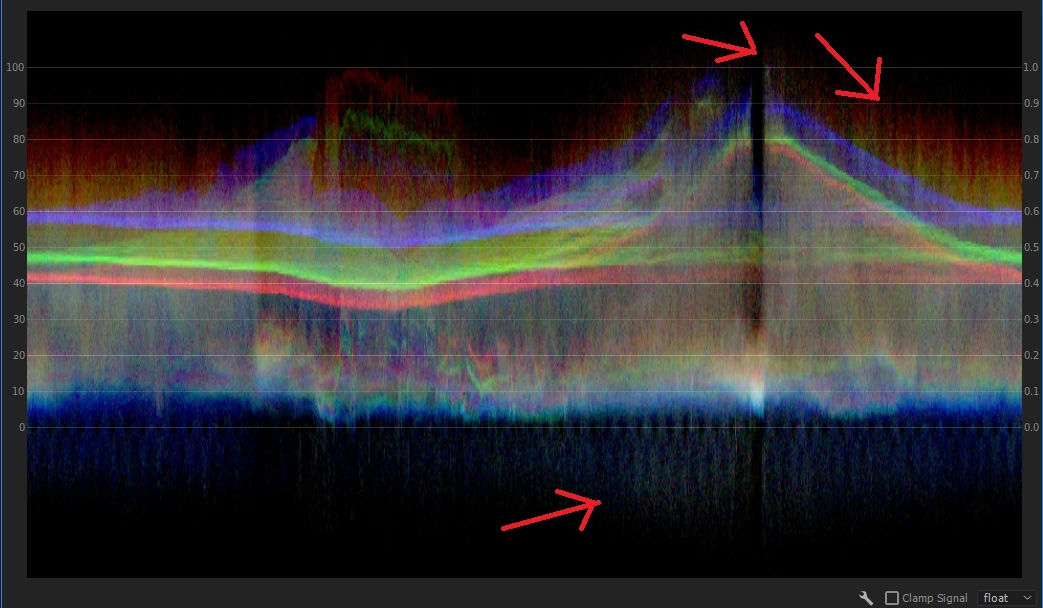
this is the lumetri scopes of my video, and unlike other, I've spotted this spike like chart going over 100 and below 0.

Well... I have just figured out that giving sharpen causes this outcome. Is it okay to just ignore this wavelength?

or should I just never use sharpen tool? or, I just wondered if there is a way to give sharpen option and limit  this chart with in 100 to 0.

Thank you for hearing,

This topic has been closed for replies.

1 reply

R Neil Haugen
Legend
May 16, 2017

What amount do you have set in Sharpen? I can only get something approaching this when I set it to 50 or above ... which is seems rather over-sharpened on any of my media.

Sharpening works by increasing local contrast, essentially. Hence, if you've got it set way high, you get a sort of contrast "flare" I suppose you could call it.

Neil

Everyone's mileage always varies ...
Donlee2
Donlee2Author
Known Participant
May 16, 2017

Hi Neil,

Well, that was sharpen 20. the video is meant to be played on VR device. Since VR device blurs out video, (that is how I felt about it), I kinda gave sharpen option to all videos. On top of it, the video was taken in flat, so I got more confused in contrast and color, etc.

Thank you for your reply 

R Neil Haugen
Legend
May 16, 2017

I'd suggest doing a contrast correction to take care of "flatness", and use sharpen as sparingly as possible.

The two main 'forms' of contrast are Luma (brightness) and Chroma (color). Sometimes pulling down the Saturation can allow for a bit higher Contrast setting without seeming too contrasty, which does help with the "feel" of sharp. And if the video then seems a bit low-color, add some Vibrance back (low-saturated colors) into the clip with the Vibrance setting in the Creative tab.

Unless you've got a pretty high "K" of material, 4k or above, video typically has a bit of softness to the moving parts of an image. If you're new to the medium, it can be confusing ... all of us when new tend to try and make our videos CRISP ... and then realize, that other work often isn't as crunched looking as ours is ... I know I had this issue at first. So I'm wondering if the expectation might be a bit high.

How about showing us a screen-grab of the program monitor, so we can see what the project looks like? Might get some suggestions about contrast, saturation, sharpness, all that.

Neil

Everyone's mileage always varies ...