


Jacques.Rabain
Participating Frequently
May 29, 2025
Question

LUT Import

  • May 29, 2025
  • 3 replies
  • 198 views

Hello,

I am using Premiere Pro version 25.2.3 (french version) 

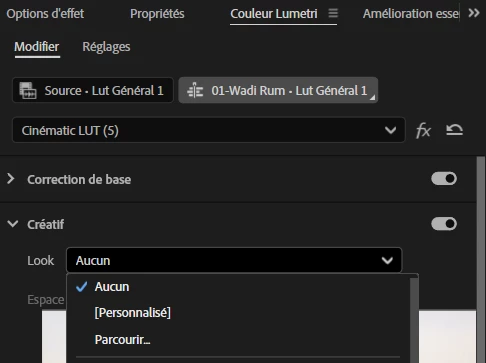
In Lumetri creative Tab I cannot import a LUT via look / parcourir. I get one LUT from the list and cannot access a folder in my computer. See below a screenshot to show where "Parcourir" is

It was working fine in the previous version.
Regards

JR

3 replies

Jacques.Rabain
Participating Frequently
May 29, 2025

It seems to work now. I don't know Why.

Regards

Community Manager
May 29, 2025

Glad to hear that it's working properly. Feel free to reach out if you experience any issues in the future. We're here to help.


Thanks,

Sumeet

Jacques.Rabain
Participating Frequently
May 29, 2025

Thank you for your quick answer,

When I click "Parcourir" i am not directed to my computer but Premiere choose one of the Lut in the list.

Regards

jr

R Neil Haugen
Legend
May 29, 2025

Do you mean "import" as in add a LUT from that dialog, or select a LUT from that dialog?


And as I think you are adding LUTs to your computer, where do you store them on your computer? The complete folder tree would be good to know.


Lastly, there are some LUTs that have formats that Premiere can't read ... which I assume you know. But just to make sure. And that you know you can load the same LUT in a 24.x version of Premiere.

Everyone's mileage always varies ...