Participant
February 17, 2019
Answered

LUTs not applied in export...

  • February 17, 2019
  • 1 reply
  • 6665 views

I'm using AP CC 2019 13.0.2 build 38 in a MacOS Mojave 10.14.3. Installed LUTs from Filmic Pro, cube version, in more then one way: First I opened the package contents of the app, went to where the luts are installed and copied them for both the technical and the creative folders. Did the same in Media Encoder because I found someone on youtube that said I should...restarted both apps. I can select the lut in basic corrections or creative panel, they show on the clip but not in the exported video. Tried to queue and do it from media encoder with no success. What I noticed is that when I hit CMD+M to export, there is a checkbox for Lumetri/Look applied, that I checked. But if I browse the list, the only options are those who come natively with AP (and those apply in export...) Even some other LUTs I downloaded from another source do not show there, just in the Creative panel...

Oh, and I also unchecked that option in the media encoder preferences...

How do I fix this???

Instructions I used: FiLMiC Pro LUT Pack Premiere Pro Install Tutorial (Mac) - YouTube

This topic has been closed for replies.
Correct answer R Neil Haugen

Two things: first, you followed horrid Web advice to put your LUTs where you did, and second, you haven't explained how your're determining that that color is being applied wrong ... which will lead to an answer for that also.

DO NOT EVER put your own/acquired LUTs into the Package files or Program folder for Premiere Pro, AfterEffects, and MediaEncoder. Period ... that folder tree is referenced ONLY by the particular app, and ... in order of appearance in the list, NOT by name of the LUT/Look applied. Change how many things are in there, Pr will suddenly used different LUTs/Looks for every project you've already worked.

There are two specific places provided for you to place LUTs/Looks to be used across all three apps, use those! Here's the location chart ...
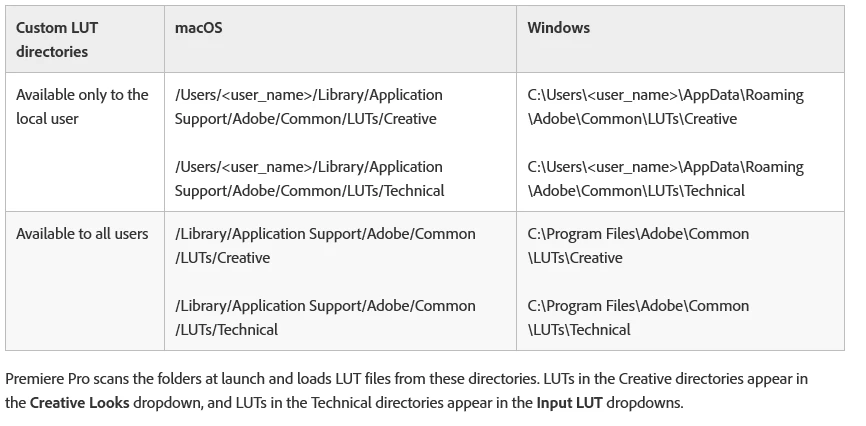
NOTE: when you initially navigate to say .../Library/Application Support/Adobe/Common/LUTs ... there will not be any folders there. YOU create the folders, then add your LUTs/Looks as you wish. Technical folder LUTs/Looks will show up in the Basic tab, Creative folder LUTs/Looks in the Creative tab list.

In both cases, in computer-speak alpha-numeric order. So ... add an A or a 1 to the front of your LUTs/Looks, they show up first.

Next ... are you viewing the exports say in QuickTime on a Mac with a P3 monitor? Well ... you're looking at video sRGB/Rec.709 content on an OS and monitor set for a very, very different color space. Oh ... and you did your corrections with Pr trying to show a proper video sRGB/Rec.709 image in the Program monitor which as your computer is NOT set up for pro video production ... wasn't as accurate as it could be.

So ... if the above is the case, go into your OS settings for monitor, other users have posted that there is an option for sRGB and Rec.709 there ... set your system to that. Also, there is a preferences in the Playback tab for "enable color display management" that helps on some Macs.

Next ... color management is something the user has to provide, as systems do NOT ... and vary widely. Such things as ...

  • Safari and Chrome browsers are color-stuuuuupid. They don't pay any attention to the color flags/tags of images/media they show.
  • Firefox is the only color-aware browser.
  • QuickTime player is if anything more color-stuuuuuupid than Safari and Chrome.
  • Potplayer and VLC are both free downloads and attempt to handle color within the media tags/flags and system settings.

And understand that even in the "tightly controlled" broadcast system, for all the massive QC effort put into everything that is allowed on the system for b-cast and the system controls ... every freaking TV/screen out there does something radically different to the image than was "intended". As one colorist puts it, "You can't fix gramma's green TV."

Even for web use, people will watch your material over devices with radically different screen/color settings, brightness settings, and viewing environments. On every screen, and even as they walk inside or outside, the perception of the image will change dramatically, and again ... none of them will be like you 'intended'.

No pro colorist prepping for major network broadcast has any more control of the image on the viewer's screen than you. So what do they do? Set up a carefully controlled working gear/environment to get controlled results. Prep to the standard asked for in the Deliverables ... deliver ... and move on with Life. It's all you can do.

Neil

1 reply

Participant
February 17, 2019

Update: I decided to uninst and install AP, and reinstalled the luts. Now video export graded, but with the wrong colors, like “weakened “...

R Neil Haugen
R Neil HaugenCorrect answer
Legend
February 17, 2019

Two things: first, you followed horrid Web advice to put your LUTs where you did, and second, you haven't explained how your're determining that that color is being applied wrong ... which will lead to an answer for that also.

DO NOT EVER put your own/acquired LUTs into the Package files or Program folder for Premiere Pro, AfterEffects, and MediaEncoder. Period ... that folder tree is referenced ONLY by the particular app, and ... in order of appearance in the list, NOT by name of the LUT/Look applied. Change how many things are in there, Pr will suddenly used different LUTs/Looks for every project you've already worked.

There are two specific places provided for you to place LUTs/Looks to be used across all three apps, use those! Here's the location chart ...

NOTE: when you initially navigate to say .../Library/Application Support/Adobe/Common/LUTs ... there will not be any folders there. YOU create the folders, then add your LUTs/Looks as you wish. Technical folder LUTs/Looks will show up in the Basic tab, Creative folder LUTs/Looks in the Creative tab list.

In both cases, in computer-speak alpha-numeric order. So ... add an A or a 1 to the front of your LUTs/Looks, they show up first.

Next ... are you viewing the exports say in QuickTime on a Mac with a P3 monitor? Well ... you're looking at video sRGB/Rec.709 content on an OS and monitor set for a very, very different color space. Oh ... and you did your corrections with Pr trying to show a proper video sRGB/Rec.709 image in the Program monitor which as your computer is NOT set up for pro video production ... wasn't as accurate as it could be.

So ... if the above is the case, go into your OS settings for monitor, other users have posted that there is an option for sRGB and Rec.709 there ... set your system to that. Also, there is a preferences in the Playback tab for "enable color display management" that helps on some Macs.

Next ... color management is something the user has to provide, as systems do NOT ... and vary widely. Such things as ...

  • Safari and Chrome browsers are color-stuuuuupid. They don't pay any attention to the color flags/tags of images/media they show.
  • Firefox is the only color-aware browser.
  • QuickTime player is if anything more color-stuuuuuupid than Safari and Chrome.
  • Potplayer and VLC are both free downloads and attempt to handle color within the media tags/flags and system settings.

And understand that even in the "tightly controlled" broadcast system, for all the massive QC effort put into everything that is allowed on the system for b-cast and the system controls ... every freaking TV/screen out there does something radically different to the image than was "intended". As one colorist puts it, "You can't fix gramma's green TV."

Even for web use, people will watch your material over devices with radically different screen/color settings, brightness settings, and viewing environments. On every screen, and even as they walk inside or outside, the perception of the image will change dramatically, and again ... none of them will be like you 'intended'.

No pro colorist prepping for major network broadcast has any more control of the image on the viewer's screen than you. So what do they do? Set up a carefully controlled working gear/environment to get controlled results. Prep to the standard asked for in the Deliverables ... deliver ... and move on with Life. It's all you can do.

Neil

Everyone's mileage always varies ...
Participant
February 18, 2019

Thanks Neil. I’ll study the problem with tour advice in mind. Guess I’ll get there!