Inspiring
February 10, 2020
Answered

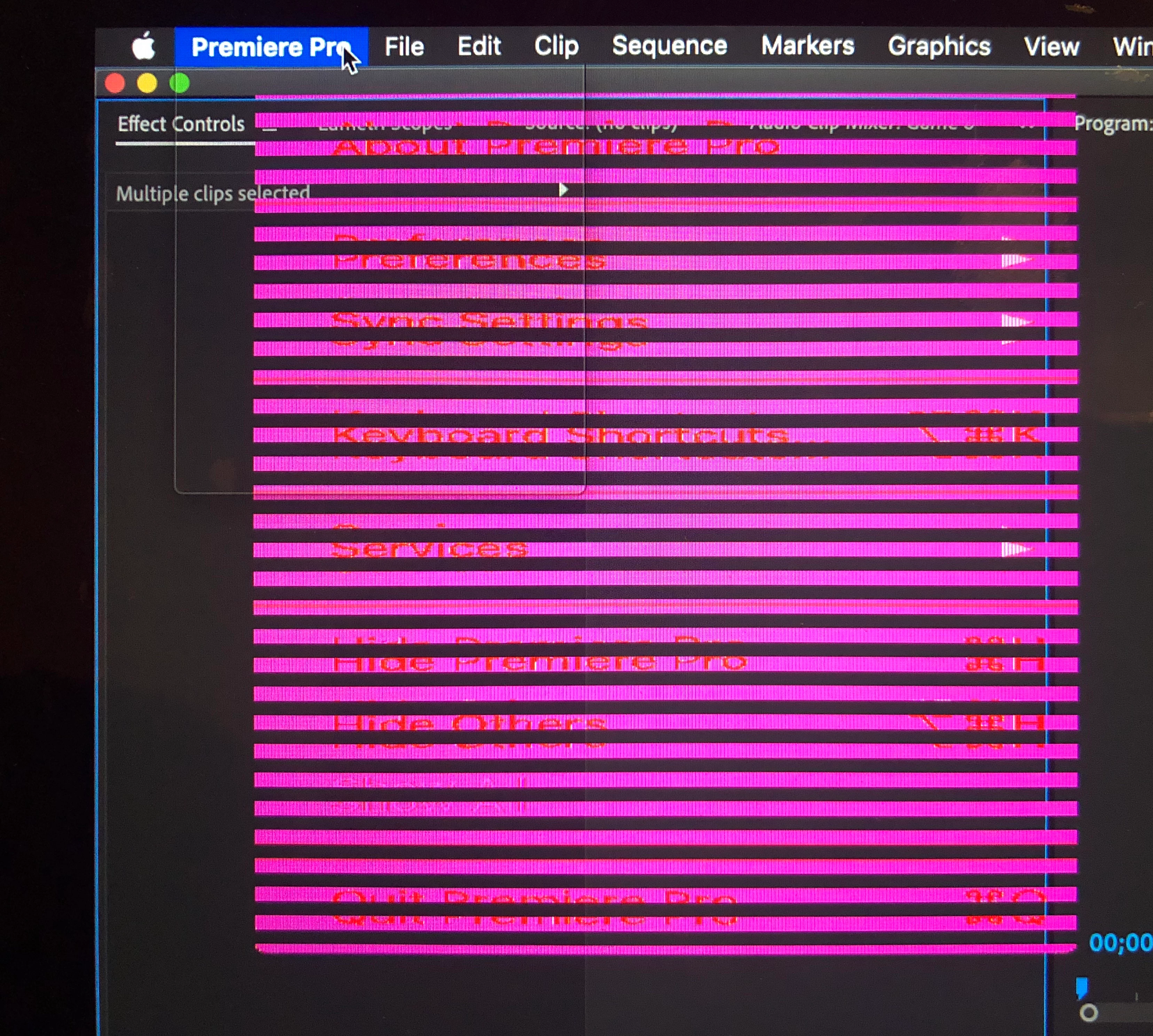
macOS app menus weird and unusable when using Premiere Pro

  • February 10, 2020
  • 9 replies
  • 1570 views

Hi. Does anybody know what's going on here? It affects all menus on all my apps but only after I try doing anything in Premiere Pro. It only started happening yesterday but now it's literally every time. The only way I can recover is by turning off the power - I can't even do 'force quit' as it prevents me from using any app menus at all. Thanks!
 

This topic has been closed for replies.
Correct answer Tranquil_Wonderland6C13

Hi all

Sorry, I had to leave this for a bit, but for the record I've since updated to version 14.0.4 and used it for the first time in a few weeks, and the problem has not recurred. I only seem to have had it with version 14.0.1. 

Thanks very much for all your help.

9 replies

gaëld5165271
Participant
April 10, 2020

Thank you, you saved me!

Legend
March 21, 2020

thanks for the follow-up.  

Inspiring
February 12, 2020

Hi there!

I had the exact same problem. Katika, from Adobe, suggested me to first check if the video renderer was MERCURY PLAYBACK SOFTWARE ONLY. It was set to Metal. The glitches stopped as soon as I set it as software only.
Use the arrows keys to navigate through the glitching menus. It's hard to see, but the options are all there.
Check this link:
https://community.adobe.com/t5/premiere-pro/faq-how-to-change-the-video-renderer-in-premiere-pro/td-...

Then, I cleared cache (it took a looooooong time, so I guess premiere was not cleaning it regularly, like it should).
Finally, I reset the preferences and the plug-in cache, following these instructions:
https://community.adobe.com/t5/premiere-pro/faq-how-to-reset-trash-preferences-in-premiere-pro/td-p/... 


It's working fine, now!
I think this might be caused by your GPU. I have the same and they're outdated, with no available updates for a year, now.

Good luck!

Tranquil_Wonderland6C13AuthorCorrect answer
Inspiring
March 21, 2020

Hi all

Sorry, I had to leave this for a bit, but for the record I've since updated to version 14.0.4 and used it for the first time in a few weeks, and the problem has not recurred. I only seem to have had it with version 14.0.1. 

Thanks very much for all your help.

PECourtejoie
Community Expert
Community Expert
February 12, 2020

There is another thread on the topic: https://community.adobe.com/t5/premiere-pro/menu-bar-issues-in-mac-os-catalina/td-p/10919083?page=1 I'll invite the poster to post here, and report the link he should have created in the uservoice.

Inspiring
February 11, 2020

Go to System Preferences  > Accessibility  > Display.  Make sure increase contrast and reduce transparency are switched off. Of they are already off, try toggling them.


MtD


Legend
February 11, 2020

I'd guess that its a problem with your graphics card or it's driver.  Can you tell us your system specs and in particular the graphics card.   Since you're on a mac, you might try doing a safe boot (holding the shift key down when you start up)  and see if the behavior is the same or going in to system preferences and go to users/ groups and create a new user with admistrative privleges and log out and then log in with the new user...

Inspiring
February 12, 2020

Hi. It's a late-2013 model MacBook Pro. Graphics: NVIDIA GeForce GT 750M 2 GB, Intel Iris Pro 1536 MB.

It seems to be ok in safe boot. I haven't tried a new user yet.

Kartika Rawat
Community Manager
Community Manager
February 11, 2020

Hi there,

Thank you for reaching out. I see that you're getting some glitches while working on Premiere Pro.

Which exact version of Premiere Pro are you using? Could you confirm what happens if you set the Video Renderer to Mercury Playback Engine Software Only?
https://community.adobe.com/t5/premiere-pro/faq-how-to-change-the-video-renderer-in-premiere-pro/td-...

Looking forward to your response.

Regards,

Kartika

Inspiring
February 12, 2020

Hi Kartika

I've been using version 14.0.1 build 71.

I started a new project and changed the settings as you suggested, and it was fine (admittedly without actually having tried any editing). But then when I re-opened an old project it was all pink lines again. I assume as a project setting this would need to be applied individually to each project, and I can't change the project settings from within a project because as soon as it's opened the menus are unusable.

Thanks

Alexis

Jeff Bugbee
Community Expert
Community Expert
February 10, 2020

Two more things to try: Go to your System Preferences - Energy Saver. Do you have an option for Graphics Switching? If so, uncheck it and try Premiere.

Next thing to try, System Preferences - Accessibility. Click on the Display tab. Uncheck Reduce Transparency.

Inspiring
February 11, 2020

Thanks very much, I'll give these a go. For now I've rolled back to the previous version, which doesn't seem to have the same problem.

Jeff Bugbee
Community Expert
Community Expert
February 11, 2020

You can install the latest version of Premiere concurrently with the older version if you want to test this further.

Jeff Bugbee
Community Expert
Community Expert
February 10, 2020

Wow that's something I've not seen before. Have you tried relaunching Premiere and clearing preferences by holding Alt/Option?