
fabfilm
Inspiring
May 27, 2019
Answered

Major Performance Issues & Dropped Frames - What's going on?

  • May 27, 2019
  • 5 replies
  • 1956 views

Dear Community,

for the past few projects I have been experiencing a constant decline in video editing performance on my computer. It doesn't matter the codec: XAVC, ProRes 422, ...

It used to be able to handle any type of editing quite nicely, without me noticing any performance issues that hindred my creative process. Things have changed.

This is my computer, I consider it quite powerful, I run Windows 10:

i7-6900K 3.20 GHz

32GB RAM

GTX 1080 TI

Optimized Drives: M.2 for Cache Files, fast RAID 0 for Editing, ...

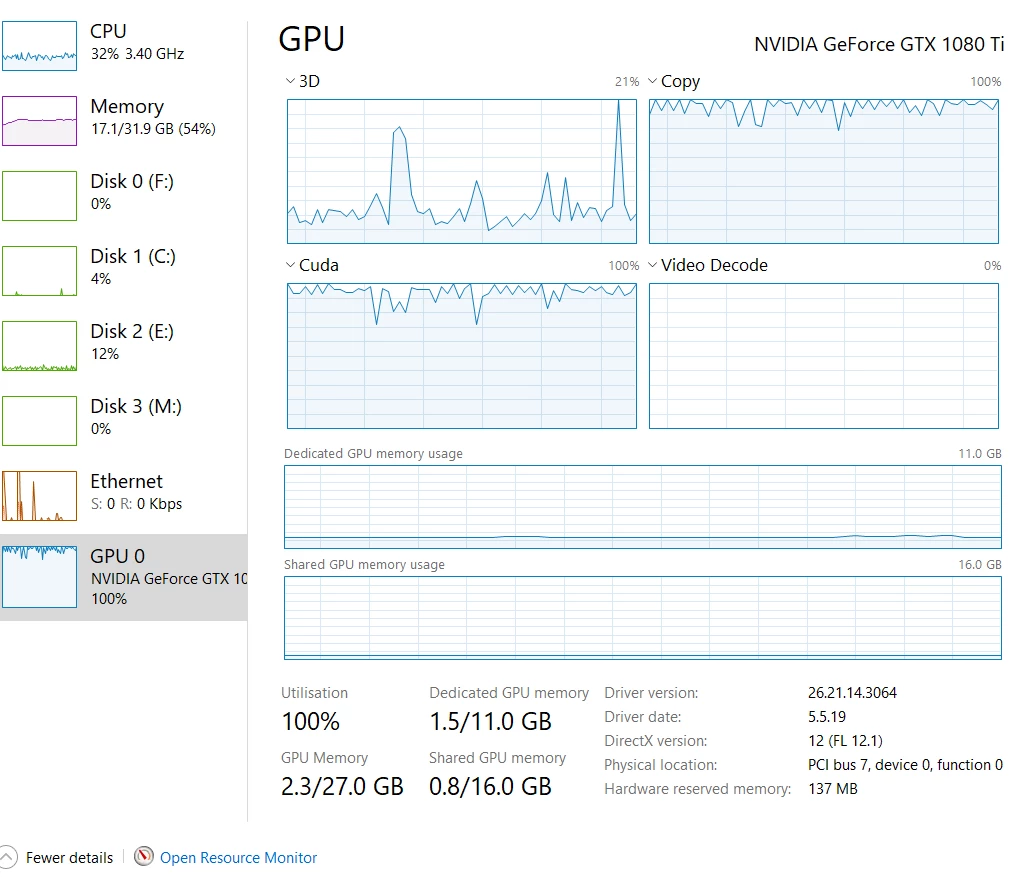
Now, today I can't play back ProRes 4k files in a dedicated sequence with MAJOR lag and dropped frames. Unplayable, uneditable. Even 50% quality doesn't do much of a difference. The same goes for the XAVC format. The previews are fine. Once I'm in the sequence everything goes darn slow.The GPU is maxed-out at 100%, CPU maybe at 20% - 30% (check out the screenshot).

I'm really struggling as I have tried literally everything:

  • GPU Driver update (also tried old drivers)
  • CUDA updates (also tried older 9.2 Version)
  • Updated literally every driver on my system
  • checked hard drive speeds, copied footage to M.2 drive to check performance (still same issues)
  • reinstalled Premiere CC
  • deleted Cache files
  • Updated Windows
  • tried all sorts of sequence settings
  • checked the same projects files on my 2012 Macbook Pro which has no issues playing back the footage on 2 screens from a shitty drive

What am I missing?
This topic has been closed for replies.
Correct answer fabfilm

UPDATE

There definetly still is a major bug with mercury transmit. After a reboot the problem returned. Everything's back to "normal" and I can't grade, edit...

I have just physically changed the cables on my graphics card by switching the monitor connections. Now Premiere got the signal right and I can transmit the video to my Grading Monitor.

---------

I have solved the issue on my computer (did a long test run with Adobe Support).

What did work was to install the latest nVidia Game Ready Driver 430.86 (whql) - just released 2019.5.27. I had previously tried many other drivers (Studio Ready, Content Ready, older drivers) but this seemed to fix it.

Playback is now smooth and the graphics card usage dropped down to 30% (from a previous 100%).

If you still have issues make sure you reset your PrPro settings and remove any Plug Ins (and re-install them).

5 replies

fabfilm
fabfilmAuthorCorrect answer
Inspiring
June 3, 2019

UPDATE

There definetly still is a major bug with mercury transmit. After a reboot the problem returned. Everything's back to "normal" and I can't grade, edit...

I have just physically changed the cables on my graphics card by switching the monitor connections. Now Premiere got the signal right and I can transmit the video to my Grading Monitor.

---------

I have solved the issue on my computer (did a long test run with Adobe Support).

What did work was to install the latest nVidia Game Ready Driver 430.86 (whql) - just released 2019.5.27. I had previously tried many other drivers (Studio Ready, Content Ready, older drivers) but this seemed to fix it.

Playback is now smooth and the graphics card usage dropped down to 30% (from a previous 100%).

If you still have issues make sure you reset your PrPro settings and remove any Plug Ins (and re-install them).

chrisa51509270
Participant
May 31, 2019

I was about to make a new thread and wanted to chime in here as well. I am having similar performance degradation issues on my system. Worked on a project Sunday. Closed it up, noticed in CC I had an update for Premiere ran the update and now my machine and software are performing HORRIBLY. I have a time line with 4k Red and 4K H264 from a GH5 and EVA1... the Red clips are fine. But anything with H.264 is not able to play back. You hit play, and the minute it hits an H.264 clip, playback stops and the audio keeps going. Even set preview to the lowest resolution. Did everything, deleted cache files, reset preferences, full rip and re-install, nothing. Sunday, the project was fine. Usually the system chokes on the Red stuff and not the H.264 compression, so it is odd it changed 180 degrees!

My computer is pretty new - i7 2.2ghz 6 Cores, 32 GB RAM Dell Precision. The footage is on a Blackbox 7200 RPM drive on USB-C so it should be pretty fast to handle.

Another thing, an export from this project on Sunday took about 7 minutes,... last night... 45 minutes! I think something is really different in the new updates for Premiere.

fabfilm
fabfilmAuthor
Inspiring
June 3, 2019

In your case I would really try to just set up a new project and copy the sequence clips over.

fabfilm
fabfilmAuthor
Inspiring
May 31, 2019

I need to make clear that my issue only exists as soon as I enable mercury transmit.

Ann Bens
Community Expert
Community Expert
May 27, 2019

CUDA updates (also tried older 9.2 Version)

You do not install cuda drivers just the card driver.

Legend
May 27, 2019

Your PC might not have enough system RAM for the CPU that you have. You have an 8-core 16-thread CPU but only 32 GB of RAM, which is barely enough RAM per physical CPU core (4 GB/core) for strictly 1080p work. Any workflow that involves 4k video will require even more system RAM than that. I would recommend that you upgrade that system's RAM to 64 GB.

By the way, your renders and exports from Premiere is using all the RAM that the program itself allows them to utilize. If you allocate any more RAM for Premiere Pro than the default allocation, your entire PC may crash to the point of requiring a restart of the entire system.