Adnan7
Known Participant
February 16, 2021
Question

Make a layer longer without effecting everything else

  • February 16, 2021
  • 2 replies
  • 286 views

Hello

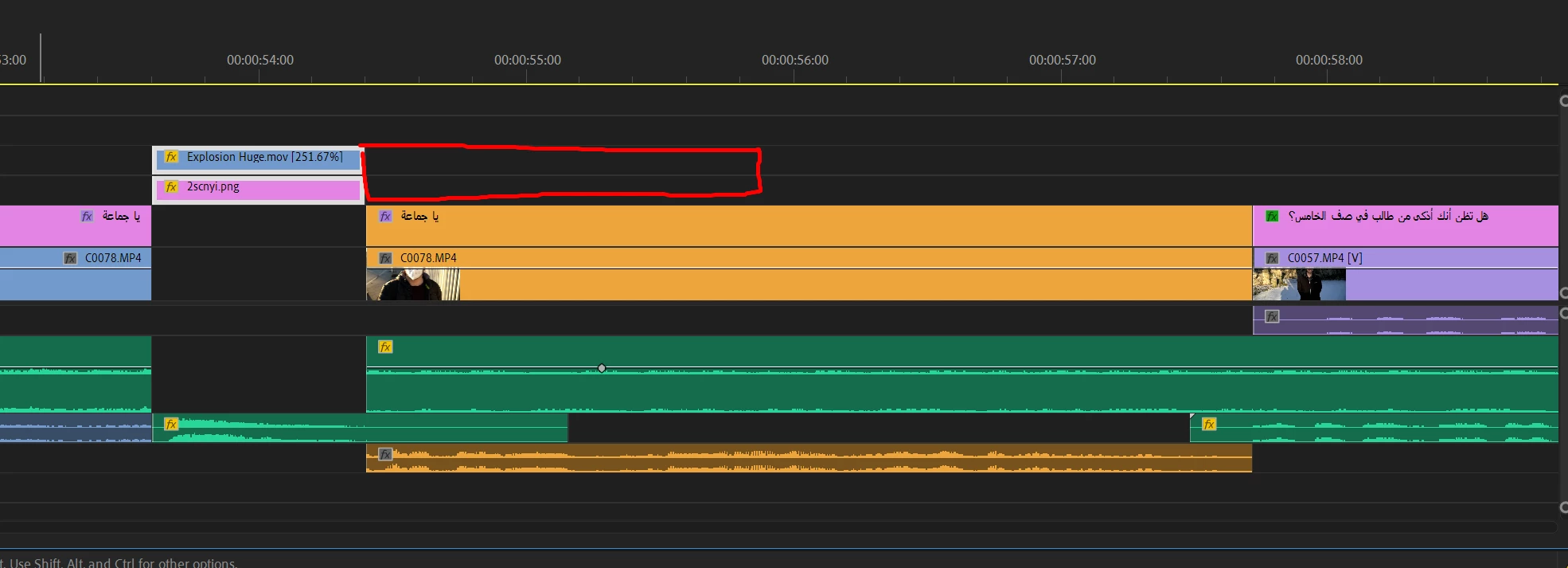
I would like to make these two layers a couple of seconds longer so that just like now everything underneath them is empty but everything else to the right stays the same... I tried to select everything and shift to the right to make space but the timeline is complicated that I am always doing something wrong this way. Is there any way I can make space for the layers automatically?

Thank you!


This topic has been closed for replies.

2 replies

Inspiring
February 18, 2021

Try the B key for ripple edit mode.

Peru Bob
Community Expert
Community Expert
February 16, 2021

You will have to do that manually.  There is no automatic way.

You can lasso clips to select them and deselect clips if you lasso too many.

This video may help:

https://helpx.adobe.com/premiere-pro/how-to/lift-extract-ripple-delete-premiere.html