
Making a video a smaller file
I need some help, and I'm not sure if I'm overlooking something obvious, but I'm having an issue.
I recorded a screen capture for a video game. The video that I recorded is an .mp4 file that's 1,906,399 KB. I imported this file into Premiere, but because of it's size, I'm having issues editing, playing it. My PC is struggling with it, and when I go to play it back, it's dropping frames and lagging like crazy. Here are the details for the video file:
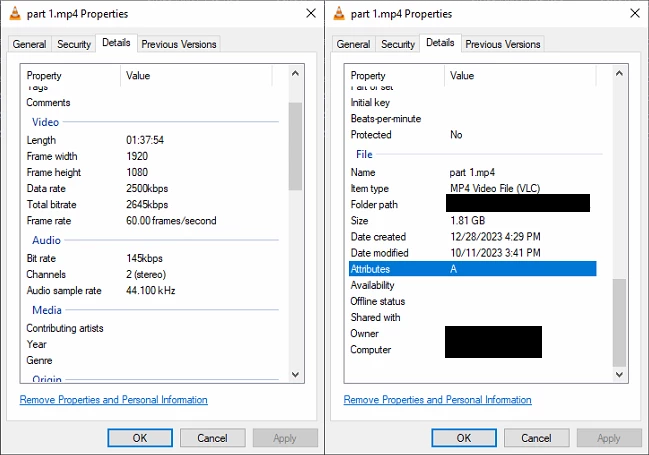
I decided that, for editing purposes, I would take the game footage, and shrink it somehow, (like the resolution, the bitrate, etc.) to make the file a smaller and easier to work with. I would use this version, do all my editing with it, and then, once all my edits were in place, replace the smaller video with the original, massive one. Then I could just render out the final video, which would take a while, but that'll be it.
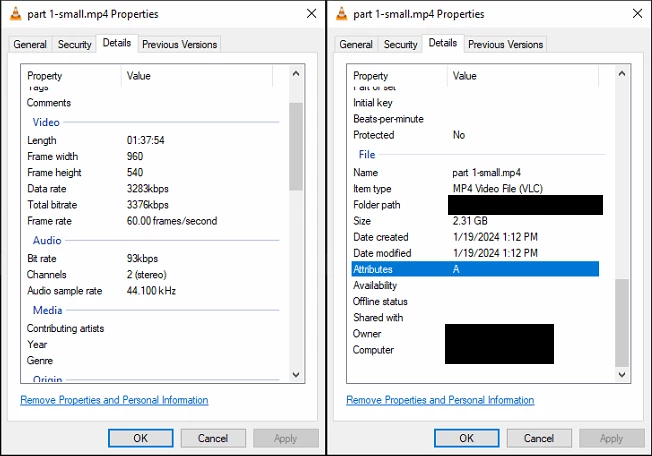
The problem is, I can't shrink this file. I put the original video in a new timeline, with no edits, no effects, no other clips, and went to export it. I researched and found that the smallest format for video is .mp4 using the H.264 codex, so that's what I'm using for my export settings. I lowered the resolution, changed the bitrate to as low as it could go, but when I exported it, somehow the file was bigger than the original:
I decided to try again. This time, I tried matching the output as close as possible to the original. I didn't change the bitrate, I left the resolution where it was, everything was as close as possible to the orignial video. And this new file was still waaay bigger than the original:
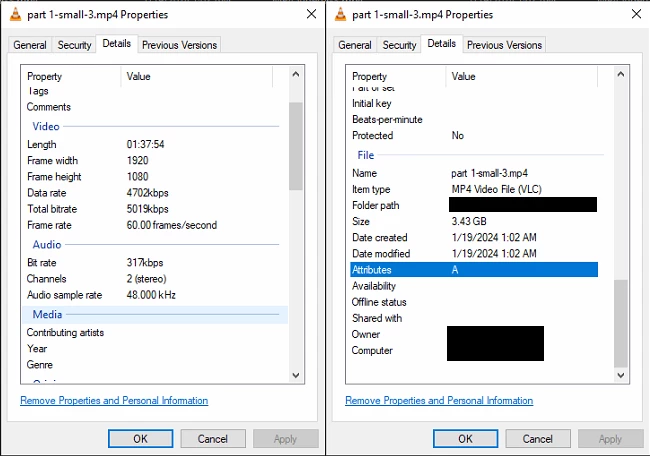
Why is this happening? It's the same format, with the same settings. Shouldn't it be roughly the same size? What can I do to make this file smaller? I just want to edit this video. Any help you can offer would be appreciated. Thanks!
 AdChoices