June 10, 2010
Answered

Making audio sound old

  • June 10, 2010
  • 1 reply
  • 44050 views

Anyone know how to use the Premiere Pro audio effects to make new audio sound old?

I'm putting a voiceover on an old Thomas Edison clip and want it to match as best as possible.

I've out a vinyl record crackle over the clip which helps a little but I know there's got to be a way

to tweak the audio in Premiere to make it sound a little more realistic.

This is my first time messing with the audio effects.

Thanks!

    This topic has been closed for replies.
    Correct answer Huntrex

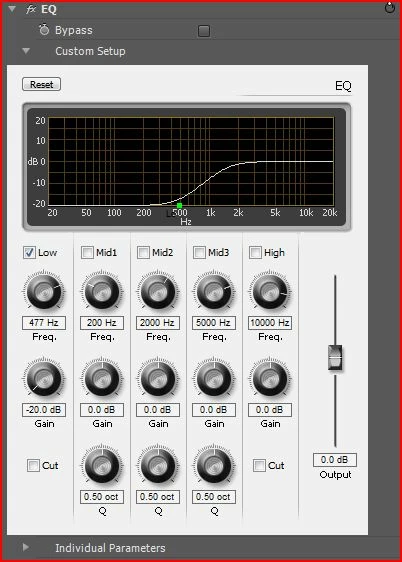
    Here's one way to make a clip sound old and low quality. Grab the eq (equalizer) effect in the effects panel and apply the settings that appear in the image below.

    1 reply

    Huntrex
    HuntrexCorrect answer
    Participating Frequently
    June 11, 2010

    Here's one way to make a clip sound old and low quality. Grab the eq (equalizer) effect in the effects panel and apply the settings that appear in the image below.

    June 11, 2010

    Hey! That worked out pretty good! Thanks!

    the_wine_snob
    Inspiring
    June 11, 2010

    There are also some 3rd party VST's (most seem to work fine in PrPro, and all of mine work great in Audition), that have various EQ and Filtering Presets. One can go from "old gramaphone" to "esoteric tube amps."

    Good luck,

    Hunt