


Managing hundreds of similar, multi-camera projects
I'm considering using Premiere Pro for something out of the ordinary and would appreciate help.
In short: I need to make 500 copies of a project, replacing its two video files (clips) with video files that are unique to each copy. Can I automate that?
In detail:
I'm conducting a study that will record a pair of simultaneous videos (two camera angles) of about 500 study sessions. Each session's videos must be reviewed by our three experts, each of whom will annotate the videos to mark each time a certain event occurs. For the purposes of discussion, let's say it's each time a person in the video blinks their eyes. We will then compare the three experts' annotations and check for substantive disagreements, such as if one expert didn't mark a blink within a second of when the other experts did, and resolve those disagreements to establish a "gold-standard" reference of when blinks occurred.
I've heard of specialized tools for video annotation like CVAT that could be employed, but it seems they're all focused on computer vision and machine learning, which we aren't doing. We only need to mark times. So, Premiere, as a tool that I already know well, came to mind, and I think it would work well.
My idea is that each expert, working in their own multi-camera sequence, will use Premiere's sequence markers to annotate the events. We will export their markers to CSV files for our project's broader analyses. By putting three such sequences (one per expert) into a single super-sequence, all within one project, we'll be able to visually compare the experts' markers, as shown below, and if needed edit the markers and re-export them to CSV. This all seems great.
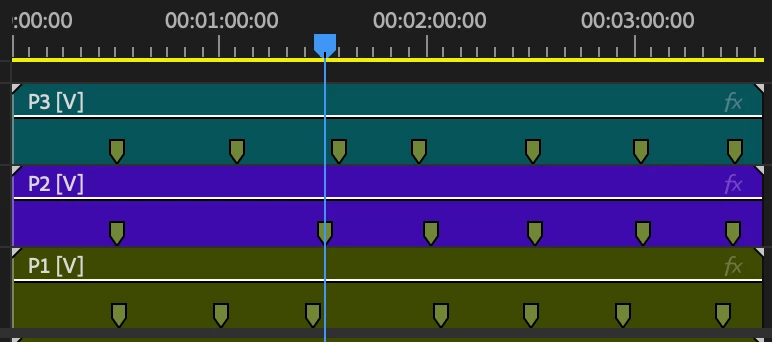
What I don't know is how to manage this process for 500 sessions without a lot of manual, error-prone drudgery.
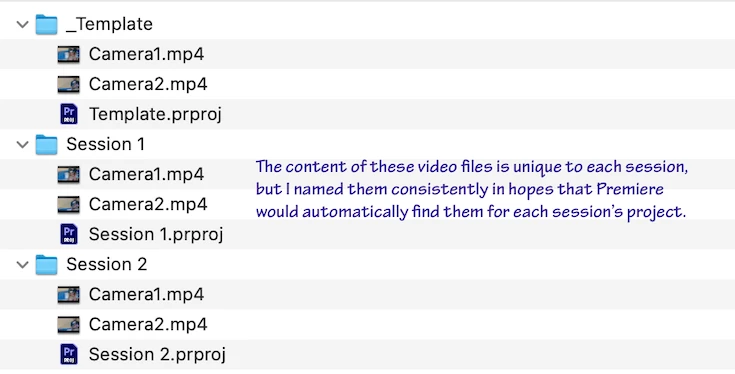
I tried and failed at one approach. I created a template project using generically named video files (Camera1.mp4, Camera2.mp4), all in one folder. Using scripts at the OS level, I would duplicate this folder to create a standalone folder per session, replacing each's video files with that session's videos, renamed to the generic names of Camera1.mp4 and Camera2.mp4. See my screenshot below. I hoped that Premiere, when opening the new project, would use relative paths to pull in the same-named videos that I had secretly swapped in, but no, Premiere goes looking for the videos in their template folder. I could move that template folder to hide it from Premiere, so that Premiere would prompt me to find replacement videos, though that would still get tedious and be prone to error (too easy to pick the wrong folder's videos). Is there a way to get Premiere to use a relative path or otherwise prioritize files that sit in the same folder as the project?
Or how else could I automate the creation of 500 projects that are identical except for their input video files? Is this something ExtendScript, the C++ SDK, Team Projects, or Productions could help with? I haven't used those, and I'm curious anyway about those two collaboration services given the multi-user effort.
Thanks very much,
Wallace

 AdChoices