

Mark in - mark out
Good evening.
I'm almost new to Premiere Pro.
I'm trying to build a time line using different footages, to understand better my question give a look to the following image:
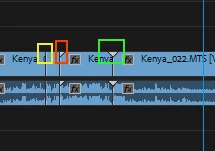
Working on a footage i set MARK IN and MARK OUT points, then I insert this first part in the timeline, I go on, on the same footage i set a new couple of MARK IN/OUT points and insert this sequence in the timeline, in the contact point (yellow rectangle) the are no triangle, i.e. there no enough footage for transitions.
Now, if I insert a new full footage after the last MARK OUT point then I can see a right triangle (red rectangle)
If I add a last footage doing nothing, except add, i see a couple of triangle, i.e. full footage for transition (green rectangle).
This is strange for me, in the first case I have two MARK IN/OUT sequence with a lot of extra footage why I have no triangles ?
Setting two different footage in sequenze with NO OVERLAY i have a full coverage (two triangles) for transitions.
Can someone explain this ? And also how can I o obtain 2 triangles using MARKIN/OUT ?
Thank a lot
Alberto
 AdChoices