
Participant
July 23, 2020
Answered

Markers are not visible on my clips on timeline

  • July 23, 2020
  • 1 reply
  • 2409 views

Hi there.

The markers are not visible on my clips on my timeline, I know they are there because I can see them on the source monitor and when I hit M twice, the marker comment box open. Markers on the sequence are visible as normal but on the clips not. I really need to solve this issue. Any clue?

I've got the latest version of Premiere Pro, 14.3.1,
Correct answer Meg The Dog

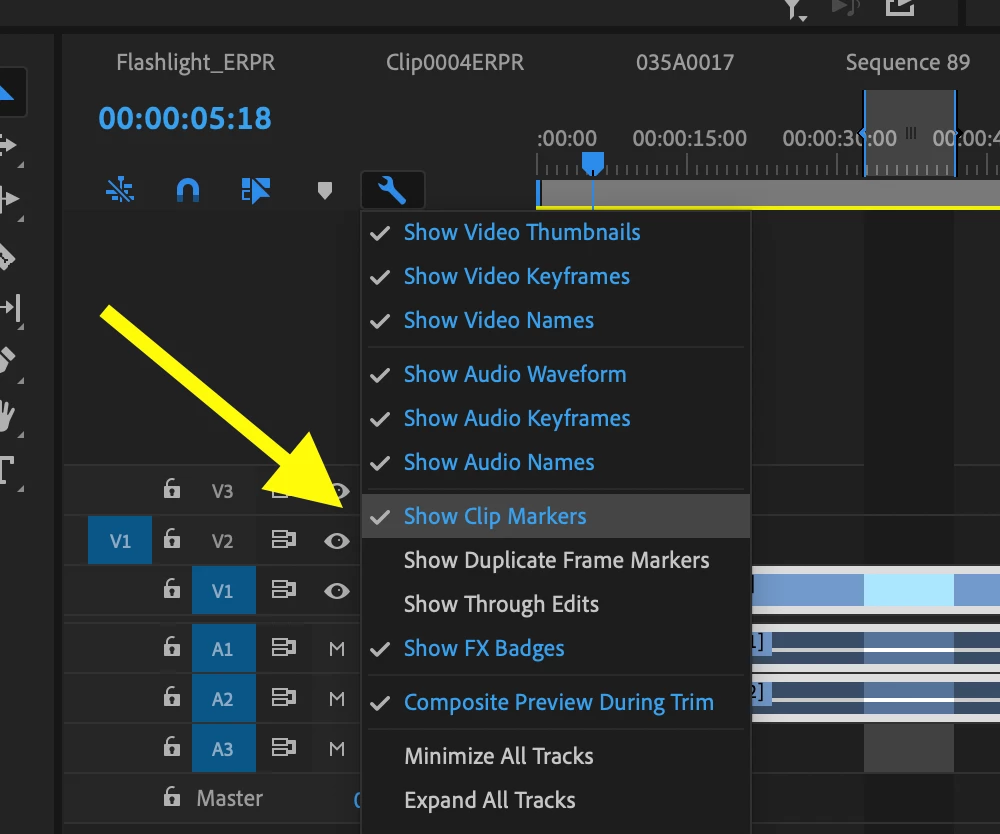
Click the wrench icon in the upper left corner of the timeline and in the drop down menu, make sure Show Clip Markers is toggled on (is checked):

MtD

1 reply

Meg The DogCorrect answer
Inspiring
July 23, 2020

Click the wrench icon in the upper left corner of the timeline and in the drop down menu, make sure Show Clip Markers is toggled on (is checked):

MtD

Participant
July 23, 2020

It was easy and fast than I thought. Thank you so much.